
Inspiring
February 11, 2019
Answered

How can I get an image from Bridge to open in CC rather than CS6?

  • February 11, 2019
  • 2 replies
  • 407 views

I have just moved up from CS6 to CC. If I double click on a .psd file in Bridge CC 2019, it opens in Photoshop CS6. If I ctrl-click it tells me that CS6 is the default even though I have set CC as the default in the system. I can't find anything in Bridge Preferences: have I overlooked it?

    This topic has been closed for replies.
    Correct answer Sahil.Chawla

    Hi Nevewg,

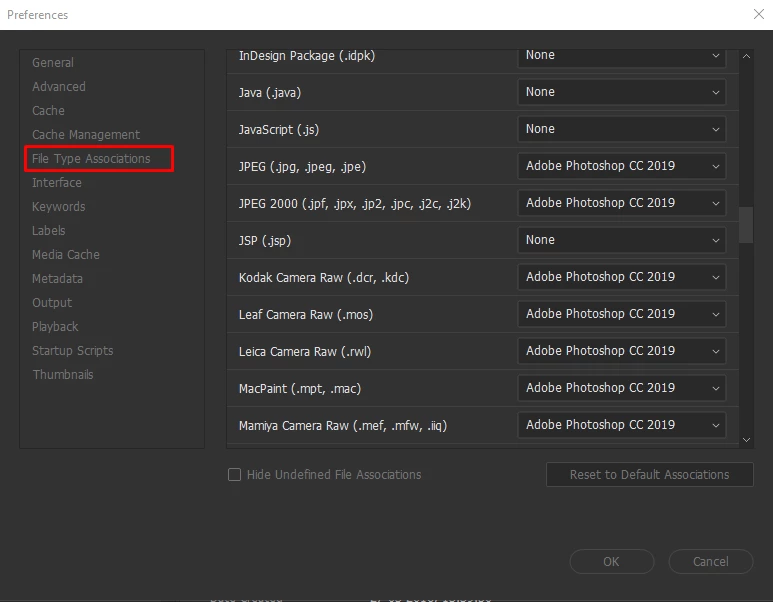
    As you're looking to open the image in Photoshop CC and not Photoshop CS6, please go to Bridge's Preferences > File Type Associations and change the format of raw file sna jpegs to Adobe Photoshop CC (Version) then Click OK and let us know how it goes.

    Regards,
    Sahil

    2 replies

    nevwgAuthor
    Inspiring
    February 11, 2019

    Many thanks for that: all sorted. That was a dialogue I don't recall ever using. I guess it was CS6 by default in my original version, and the prefs were carried across to CC without my knowing they were ever there: thanks.

    Sahil.Chawla
    Adobe Employee
    Sahil.ChawlaCorrect answer
    Adobe Employee
    February 11, 2019

    Hi Nevewg,

    As you're looking to open the image in Photoshop CC and not Photoshop CS6, please go to Bridge's Preferences > File Type Associations and change the format of raw file sna jpegs to Adobe Photoshop CC (Version) then Click OK and let us know how it goes.

    Regards,
    Sahil