

EC3010
Participant
November 23, 2017
Answered

How can i stop bridge converting thumbnails and saved images (jepg/tiff) to Black & white?

  • November 23, 2017
  • 1 reply
  • 784 views

I am trying to save edited colour images (.jepg / .tiff) using Bridge but Bridge is saving them as black & white. When I open the folder where they are saved I can see the thumbnails convert from colour to black & white before my eyes and when you open the image what was colour is now black & white also. Any advice as to how to prevent this? Is it a Bridge settings issue or is it camera related? Thanks

This topic is closed to new replies. Start a new post to keep the conversation going.
Correct answer Abambo

When you say

EC3010  wrote

I am trying to save edited colour images (.jepg / .tiff) using Bridge but Bridge is saving them as black & white.

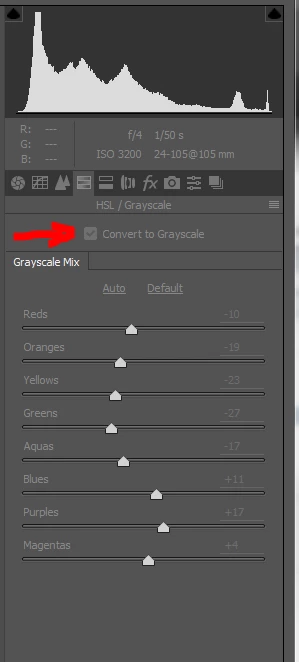
you probably mean Camera Raw, as that is the only "editing" tool found in Bridge. If that is the case, then you are "converting" the image explicitly to BW.

See the screenshot:

This, however, can be undone by opening the picture again and unticking the "convert to greyscale".

1 reply

Abambo
Community Expert
AbamboCommunity ExpertCorrect answer
Community Expert
November 27, 2017

When you say

EC3010  wrote

I am trying to save edited colour images (.jepg / .tiff) using Bridge but Bridge is saving them as black & white.

you probably mean Camera Raw, as that is the only "editing" tool found in Bridge. If that is the case, then you are "converting" the image explicitly to BW.

See the screenshot:

This, however, can be undone by opening the picture again and unticking the "convert to greyscale".

ABAMBO | Hard- and Software Engineer | Photographer