TIMELAPSE People
Participant
March 13, 2017
Answered

How do I select my pics by TIME taken ?

  • March 13, 2017
  • 1 reply
  • 254 views

hi

I have done a long term time lapse, over a year and now would like to only use the pics taken at midday.

The sun is in the right place and I am trying to get rid of flicker, so using the midday pics gives me a nice start for the edit.

How can I filter out all the other pics (over2000) using Bridge and just end up with the midday ones ?

Any ideas ?

thanks Joe

    This topic has been closed for replies.
    Correct answer Stephen Marsh

    Select an appropriate image in Bridge, then use File > File Info and go to the Raw Data tab.

    Look for the file creation metadata, such as:

    <xmp:CreateDate>2016-06-19T18:32:35.89+10:00</xmp:CreateDate>

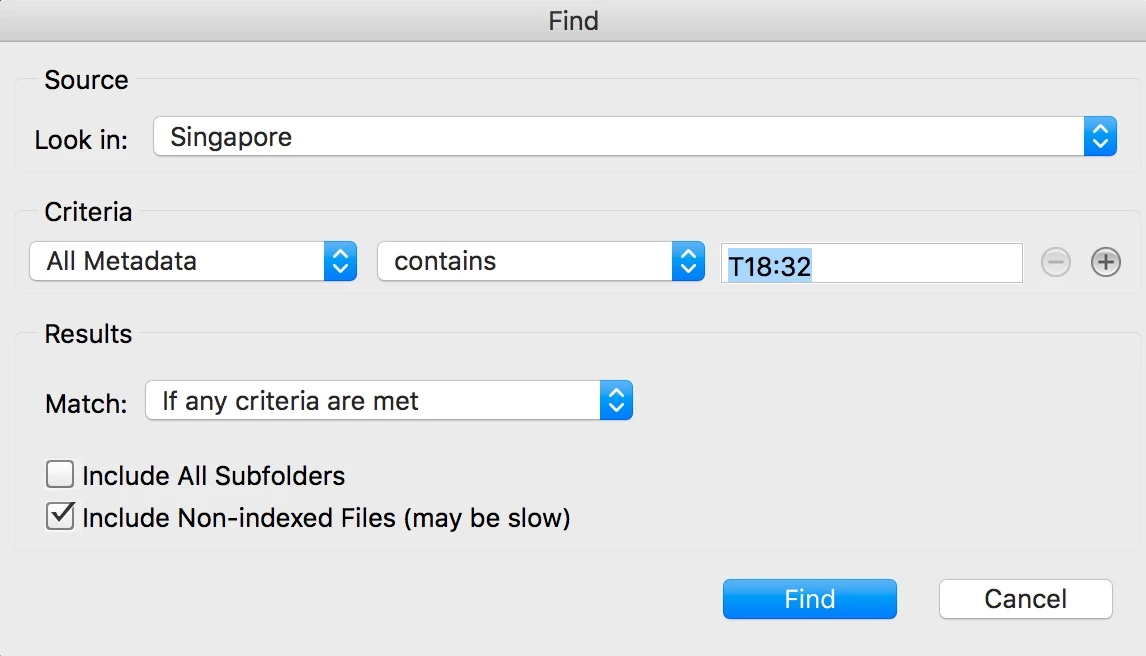
    If the target HH:MM value was 6.32pm, then you could use T18:32 in the Find command:

    1 reply

    Stephen Marsh
    Community Expert
    Stephen MarshCommunity ExpertCorrect answer
    Community Expert
    March 13, 2017

    Select an appropriate image in Bridge, then use File > File Info and go to the Raw Data tab.

    Look for the file creation metadata, such as:

    <xmp:CreateDate>2016-06-19T18:32:35.89+10:00</xmp:CreateDate>

    If the target HH:MM value was 6.32pm, then you could use T18:32 in the Find command: