
Participant
May 20, 2020
Answered

How do you add additional editors the Command 'Open with'

  • May 20, 2020
  • 1 reply
  • 709 views


I downloaded Adobe bridge yesterday but when I right click an image in the main window of Adobe Bridge, the windows pop up menu appears. The only options that I’m offered when I Click ‘Open with’ are Adobe PS CS6 and Elements but no more. I want to access additional photo editors such as Affinity Photo and Qimage Ultimate. Can anybody tell me how to do this?

All contributions welcome.

Cheers

William
This topic has been closed for replies.
Correct answer gary_sc

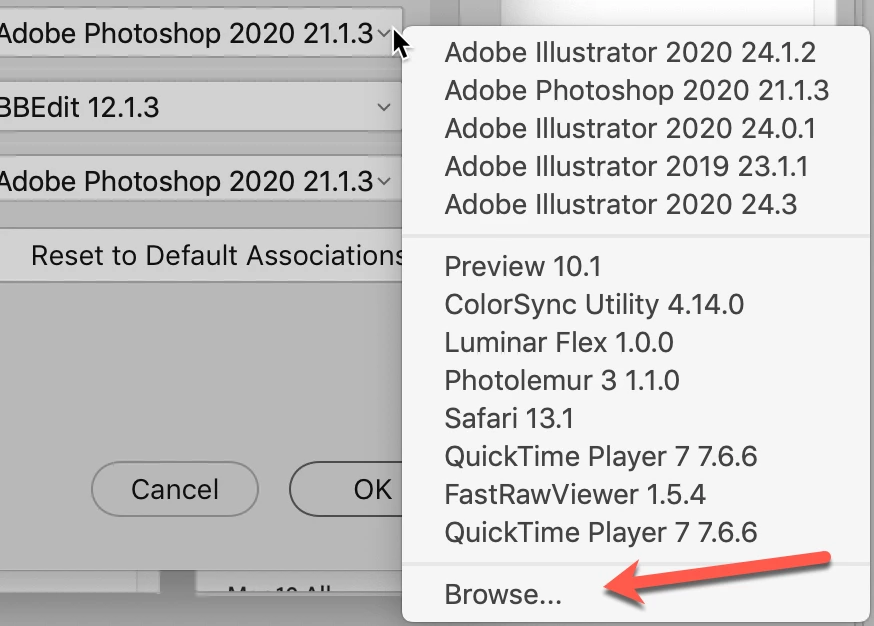
If you go to the File Type Associatios in the Preferences. On the right side is a drop down window. On the very bottom is an opportunity to Browse to what you're looking for.


Enjoy!

1 reply

gary_sc
Community Expert
gary_scCommunity ExpertCorrect answer
Community Expert
May 20, 2020

If you go to the File Type Associatios in the Preferences. On the right side is a drop down window. On the very bottom is an opportunity to Browse to what you're looking for.


Enjoy!

Participant
May 21, 2020

Thanks Gary. I successfully assigned Affinity Photo to various File extensions in Adobe Bridge, so I'm up and runnng now.

cheers

William

gary_sc
Community Expert
Community Expert
May 21, 2020

Great. Glad I could help.


Now, could you please tap the "Correct Answer" above? I'd appreciate that if you can.