



How to get Metadata underneath thumbnails
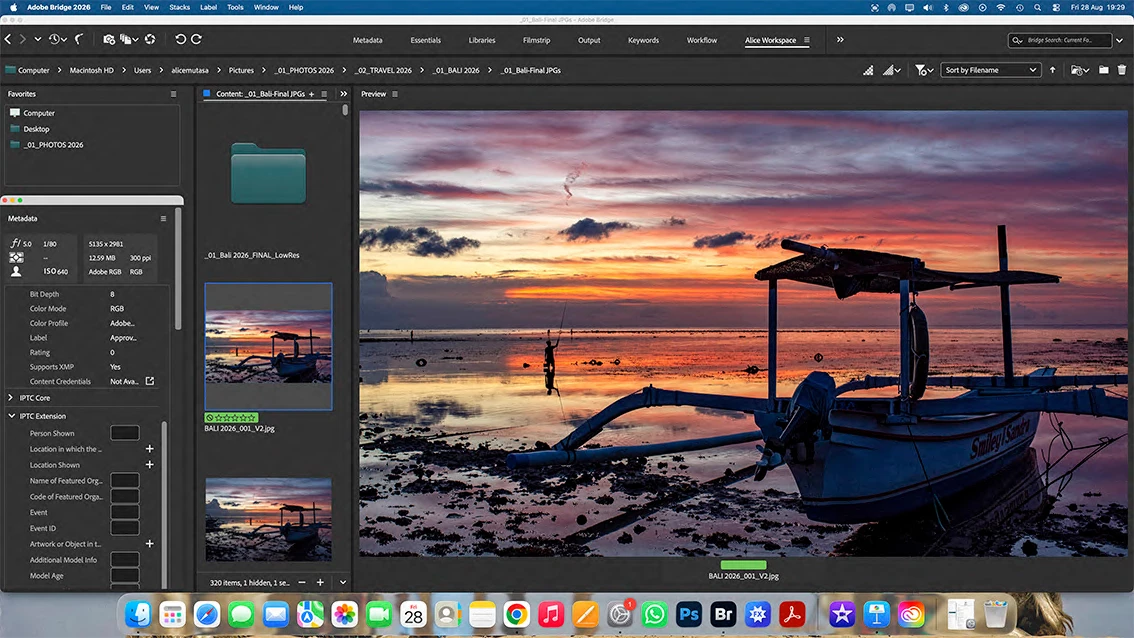
I clicked something by mistake & my entire workspace got messed up. I spent ages getting it almost back how it was, but I cannot see how to get the image info - file size, pixel dimensions, keywords etc - to show underneath each thumbnail, so that when I click on an image I can see its size etc. It used to be there automatically, but I’m finding the latest version of Bridge a complete nightmare to manage; nothing is where it should be! Some of this info is in a ‘metadata’ box in the left column, but I can’t move it & I can’t see if this is the info I want visible anyway. The left-hand column next to the thumbnails has gone all wrong anyway & the info that was there before has vanished. Why is it now showing me a whole list of file properties? I also can no longer see the ‘filter’ option which allows me to apply labels & ratings to files. Please can someone tell me how to get this back into the left-hand column?
Please see screenshot - can anyone advise please?

 AdChoices