
Participating Frequently
June 4, 2020
Question

how to hide sidecars in image grid

  • June 4, 2020
  • 1 reply
  • 1189 views

if i click on "show hidden files" it shows the "XMP" files so those as asigned as associated files.

But i can 't find a way to manual associate a filetype like developers files as filename.RAW.dop

now the sidecar is 50% of the grid.
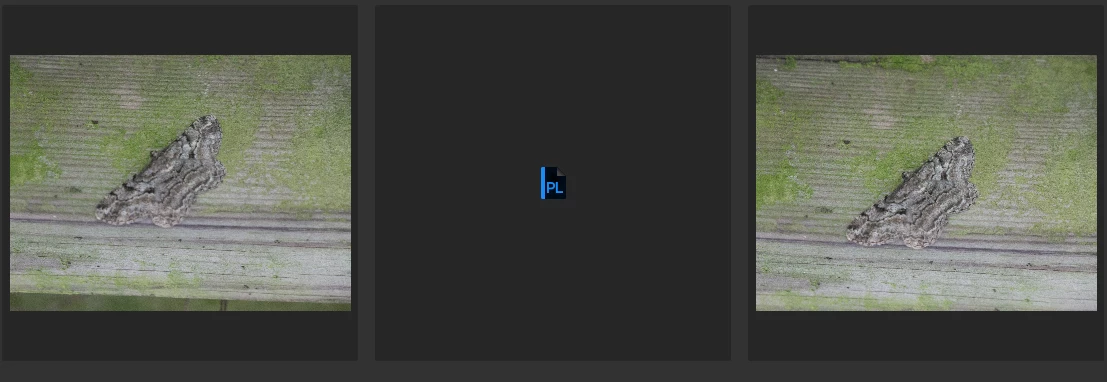
any way to avoid this?

This topic has been closed for replies.

1 reply

gary_sc
Community Expert
Community Expert
June 4, 2020

I can think of two ways:


1) turn off invisible items in your system


2) convert your images to DNG images which are containers and will contain your sidecar files. Everything will work as before. Your raw image will be just as before, but all of your side car files will be contained within the DNG file, and they will occupy less space than your raw files did.


FWIW, I've been using the DNG format for my raw images for some 14 years and never have I looked back.


Adobe provides a DNG converter here:


https://helpx.adobe.com/photoshop/using/adobe-dng-converter.html


Good luck

Spike29Author
Participating Frequently
June 5, 2020

1 invisible items: there are "off" it arn't invisible items. the are development sidecars for the rawfiles and such.

2 i don't think DNG will be the solution because the sidecars are made with development of an image. thus also with DNG.

Only way i can think of is a section where i can asign files as "xxxx.dop" is associated to xxxx.rw2 or xxxx.jpg or xxxx.tiff same as the XMP does now.


gary_sc
Community Expert
Community Expert
June 5, 2020

Hi Spike,


As I stated, I always use DNG. But to check something on this I loaded up some CR2 (canon raw files), did some editing in ACR and looked back again in Bridge: the XMP files are not to be seen. They are understood to be sidecar files and do not show up.


At least that's what's showing up on my system.


However, I also just looked up what a .dop file is and learned that it is the xmp file for the DxO Photolab. 


I have a question: are you using DxO PhotoLab with Bridge or are you trying to move on from DxO and trying out the Adobe products? It seems that since Bridge doesn't recognize the .dop file as a sidecar file, Bridge doesn't know it is not supposed to  "not show" the file. 


Do you open these images up in Photoshop or DxO? If you open them in Photoshop, do they show the DxO corrections? If you converted one of the images (with the .dop file in the same folder) into a DNG, does the resultant DNG image show the corrections?


But to answer your original question: nope, there really isn't a way for Bridge to not show the .dop files.


Sorry, I hope I did give you some leads.