
Dad25
Participating Frequently
January 9, 2019
Answered

How to move "other keywords" to people

  • January 9, 2019
  • 1 reply
  • 668 views

I use face recognition in PSE Organizer to identify people, then I save the keywords to the metadata. Then, when I look at the photographs in Bridge, those people names show up as "Other Keywords." How can I get those names to show up in Bridge under the People keyword?

    This topic has been closed for replies.
    Correct answer Stephen Marsh

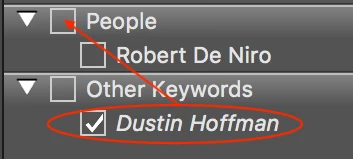
    Using the Keywords panel, drag each non-persistent “other keyword” into the persistent People keyword to set them as sub-keywords.

    If you have many of these and it is painful to do this one at a time using the Bridge GUI, then you would need to edit the underlying XML data that defines your keyword list:

    Prepression: Bridge – Restoring a Lost Keyword XML File

    1 reply

    Stephen Marsh
    Community Expert
    Stephen MarshCommunity ExpertCorrect answer
    Community Expert
    January 10, 2019

    Using the Keywords panel, drag each non-persistent “other keyword” into the persistent People keyword to set them as sub-keywords.

    If you have many of these and it is painful to do this one at a time using the Bridge GUI, then you would need to edit the underlying XML data that defines your keyword list:

    Prepression: Bridge – Restoring a Lost Keyword XML File

    Dad25
    Dad25Author
    Participating Frequently
    January 11, 2019

    Thank you Stephen. That was so simple, I almost feel embarrassed. Fortunately, I will only have a few dozen to move. But, I also appreciate the link to your blog, I have learned several things by reading several of your posts.