
Inspiring
December 11, 2019
Answered

How to split a panel in Bridge, to fit two panels

  • December 11, 2019
  • 1 reply
  • 1775 views

I would like to split all three columns in Bridge. The maximum number of open panels seems to be 5. Is there a way to display 6 open panels? I would like to use something like the "Filmstrip" workspace, but I would like to split the panel space on the right, the way the space is split in the middle and on the left. None of the default workspace options have all three columns of panels split.


[Moving from generic Start/Help forum to the specific Program forum... Mod]
[To find a forum for your program please start at https://community.adobe.com/]
This topic has been closed for replies.
Correct answer gary_sc

Hi Acawoo,


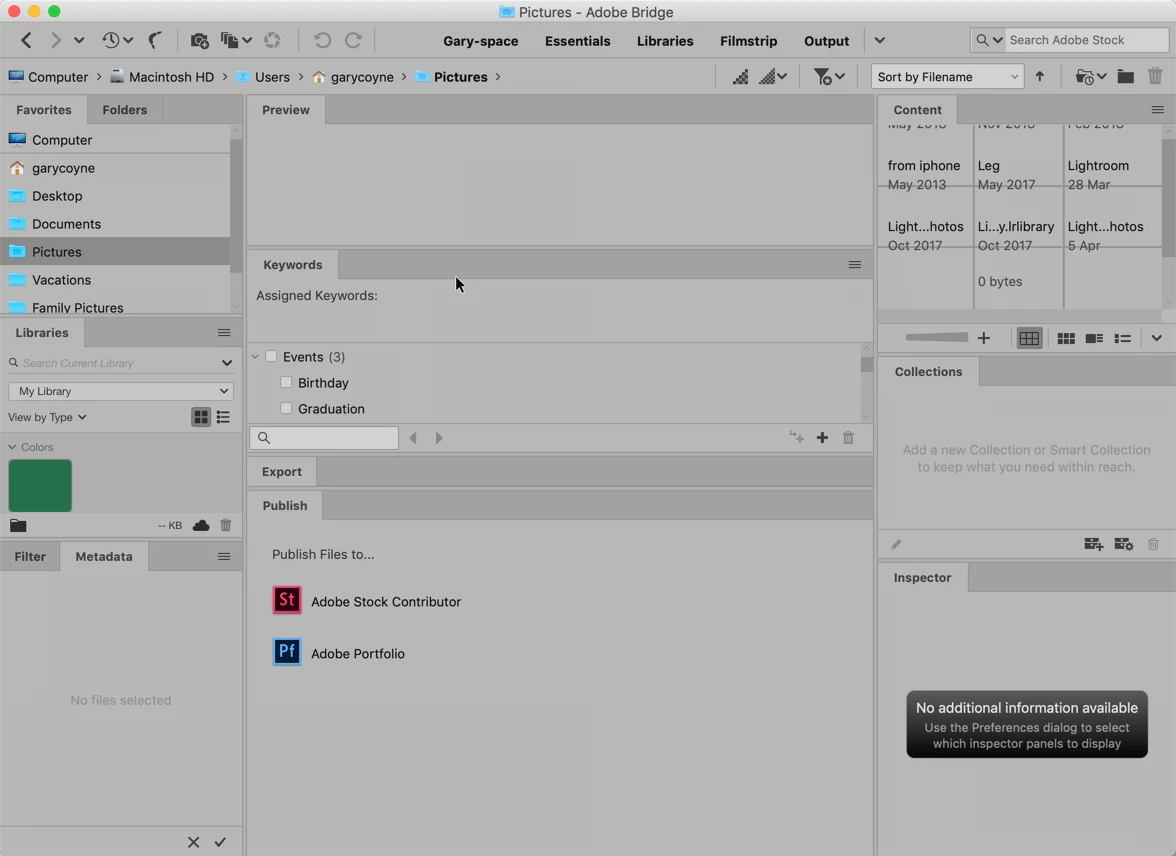
While I would NOT recommend this, I just put EVERY Panel there is up in the same window. The trick is to drag the folder tag and move toward the bottom section of any of the Columns. 


The big limitation is that there can ONLY be three columns and no Panel can float.


1 reply

gary_sc
Community Expert
gary_scCommunity ExpertCorrect answer
Community Expert
December 11, 2019

Hi Acawoo,


While I would NOT recommend this, I just put EVERY Panel there is up in the same window. The trick is to drag the folder tag and move toward the bottom section of any of the Columns. 


The big limitation is that there can ONLY be three columns and no Panel can float.


acowooAuthor
Inspiring
December 12, 2019

Thanks! You need to drag a panel over the very bottom of the destination panel until you get a single blue bar at the bottom before dropping the panel in. That will split the pane. And as your screen capture shows, you can split panes even more than twice! Now what would be cool is if you could put a single pane across the whole bottom--a filmstrip for the content panel, and then have three columns above!

gary_sc
Community Expert
Community Expert
December 12, 2019

Yes, that is something that cannot be done. Even Adobe's Filmstrip only covers the single Preview and eliminates the right hand column. 


I did forget to mention that while you cannot have more than three columns, you can have two or even one.


You can always ask for this capability over at


Adobe Bridge Feedbackhttps://adobebridge.uservoice.com