compupix
Known Participant
June 25, 2022
Question

How to Use Bridge CC Image Processor with Photoshop CS5

  • June 25, 2022
  • 1 reply
  • 362 views

Is it possible to tell Bridge CC > Tools > Photoshop to use Photoshop CS5?

I'd like to select the images in Bridge CC but use the Image Processor in CS5.
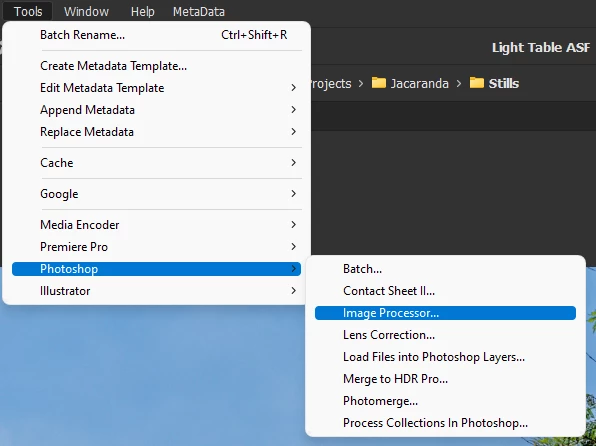
Thanks.

This topic has been closed for replies.

1 reply

gary_sc
Community Expert
Community Expert
June 25, 2022

Hi Compupix,


If you see that, it might work, but you'll have to test it. Normally, Bridge and Photoshop have to be from the same release to work, and I'm surprised to even see Image Processor in your screenshot. 


Since I've not seen CS5 in many years, and it will not work on my computer, I cannot test this for you. However, I'd be very interested to hear if it works for you.


One last comment: if your images are PNGs, my gut says these are screenshots. If so, be aware that OCR reliability decreases as resolution decreases. Therefore the quality of the OCR may not be stellar. 


Good luck!

compupix
compupixAuthor
Known Participant
June 26, 2022

The answer appears to be, you can’t associate Image Processor from Bridge CC with Photoshop CS5.

Best work around: Use Bridge CS5.

Consideration: Bridge CS5 won’t preview my Canon 6D RAW files. So, I grade/rank my RAW files in Bridge CC. I do all other Bridge work using Bridge CS5.

gary_sc
Community Expert
Community Expert
June 26, 2022

Hi Compupix,


You might consider converting your images into DNG so CS5 can access them (google DNG converter). 


What I find interesting is that you just bought a fantastic camera but are not updating your software to take full advantage of what your camera can do.


It reminds me of the time I went into a camera store many years ago to buy a tripod for my great Canon SLR. He asked me why I wanted to buy a $45 tripod for an $1800 camera; what kind of support was I hoping for/expecting?


Good luck with whatever you choose.