Hi Mario,
The quick answer is yes but the longer answer is it depends on how you selected them. In Bridge you can rate them via the "stars" or colors you assign your images.
To make sure you can use what I'm about to talk about, you need to make sure your "path bar" is showing. To do this, go to the Windows menu, and be sure that is checked (near the bottom of the menu). Besides showing the "birds trail" of where the folder you are viewing is on your hard drive. It also shows your filtering and ordering of images.

From there you can select images via their label or rating:
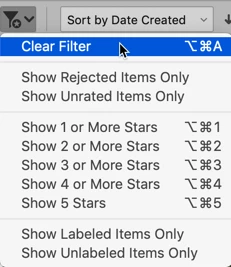
Colors are all or nothing filters. If you want to labeled images, select that from the filter menu and all colored images will be displayed. You cannot select red images and not show yellow images.
Ratings are somewhat variable. One more advantage of ratings is that you can rate all desired images with (say) 5 stars. Now select Show 5 Stars from the Filter menu. Then upon examing them further you wish to remove an image, change the rating from 5 to 4 and that images will "disappear" from view. It still exists but it is no longer selecte because it doesn't satisfy the Filter request.
I hope this answers your needs, let me know.




 AdChoices