Inspiring
February 23, 2017
Answered

I used periods in the text batch rename-Adobe Bridge

  • February 23, 2017
  • 2 replies
  • 900 views

Help!  I used periods in the text batch rename and now I can't open the files. 

    This topic has been closed for replies.
    Correct answer Stephen Marsh

    conniej9193, the issue is probably not just that periods were used, the filename extension is also missing (which is a requirement in Windows and optional on the Mac).

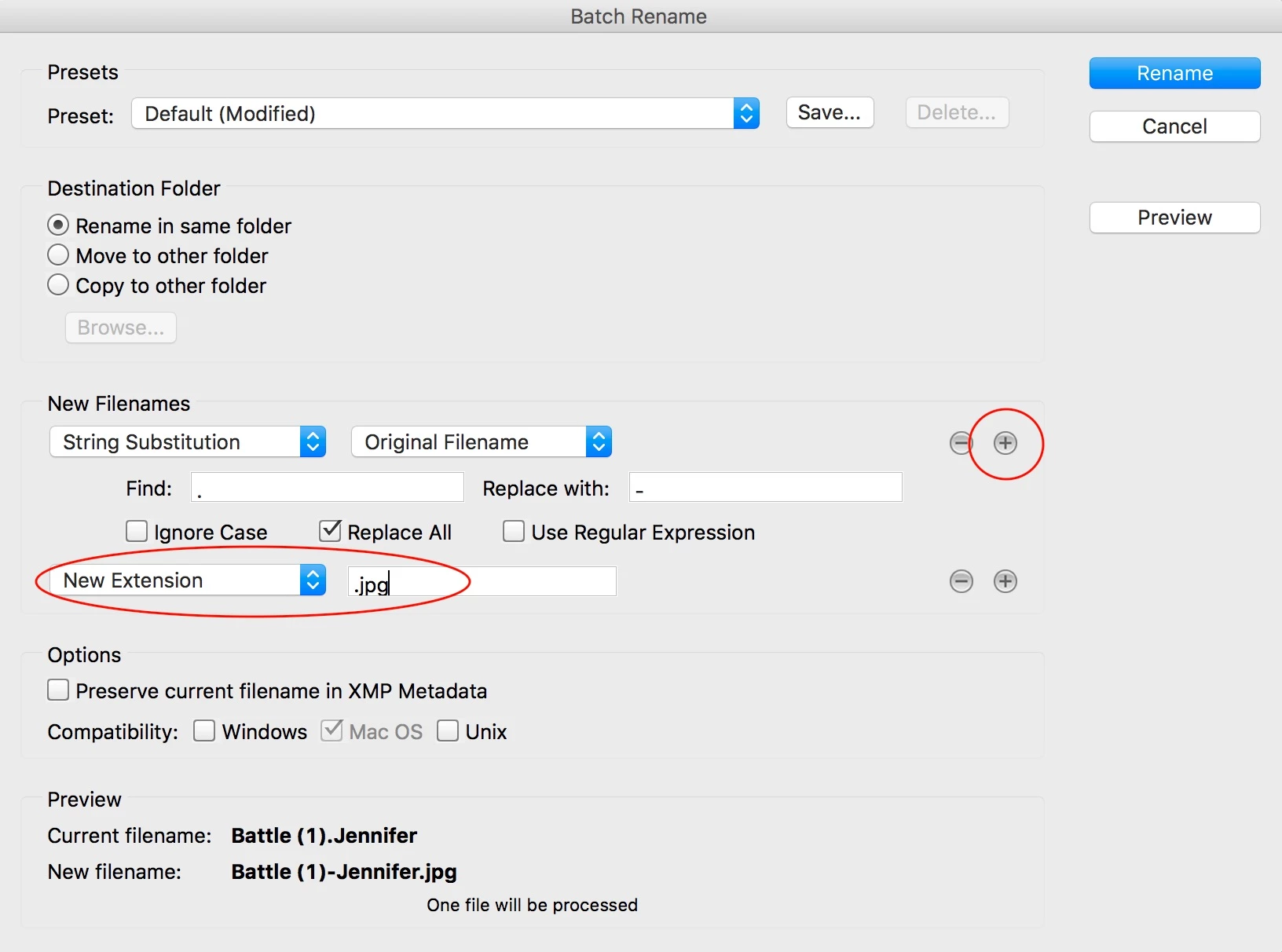
    The following screencapture presumes that the original was a JPG, you will need to use the correct filename extension. If you are unsure of what type of image it was, then you can usually force the image to be opened with a text program such as notepad and then the file format may be recognisable by some of the text in the header.

    2 replies

    Inspiring
    March 1, 2017

    Hi Stephen - This is what I get when I try: Notice the new file name.

    Stephen Marsh
    Community Expert
    Stephen MarshCommunity ExpertCorrect answer
    Community Expert
    March 1, 2017

    conniej9193, the issue is probably not just that periods were used, the filename extension is also missing (which is a requirement in Windows and optional on the Mac).

    The following screencapture presumes that the original was a JPG, you will need to use the correct filename extension. If you are unsure of what type of image it was, then you can usually force the image to be opened with a text program such as notepad and then the file format may be recognisable by some of the text in the header.

    Inspiring
    March 15, 2017

    Holy smokes!  This worked!  Thank you so much!!!

    Stephen Marsh
    Community Expert
    Community Expert
    February 24, 2017

    It should be simple enough to rename the periods to a hyphen, underscore or word space:

    Even better, if you did preserve the original filename, then it is super easy to recover: