Participant
June 28, 2017
Answered

Iphone 6s pictures with gps export to bridge cc

  • June 28, 2017
  • 1 reply
  • 408 views

Hello,

I am new on this forum. I have the following problem. I have an iphone 6s and take pictures with gps. When I export my photo's to Adobe bridge cc there is no gps information available in bridge. No place for example where I made the picture.

Is it possible to export this info from my iphone 6s to bridge cc?

Thank you for your information.

    This topic has been closed for replies.
    Correct answer Stephen Marsh

    Do you have the

    Are you using Bridge’s File > Get Photos from Camera…

    Or a different method to download photos from the camera to your computer?

    How are you confirming that there is actually GPS info in the file that Bridge does not display?

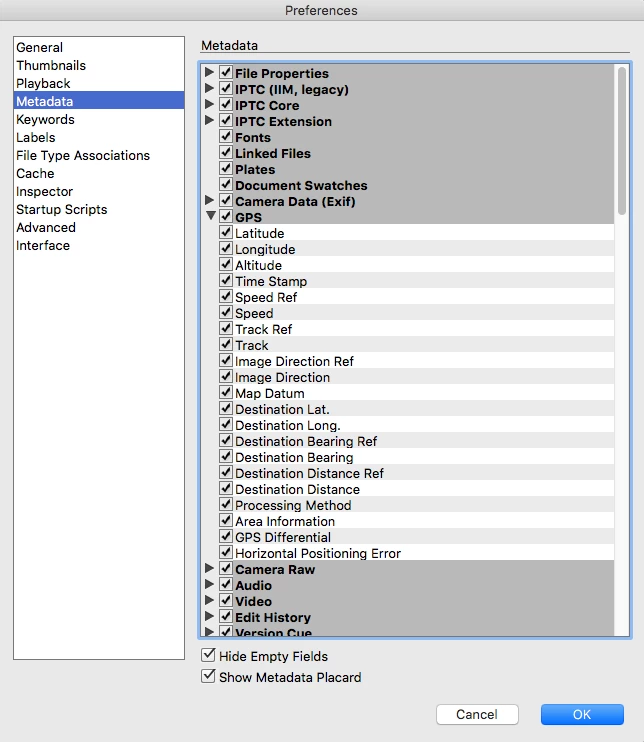
    Do you have the metadata panel prefs set to show GPS info?

    1 reply

    Stephen Marsh
    Community Expert
    Stephen MarshCommunity ExpertCorrect answer
    Community Expert
    June 28, 2017

    Do you have the

    Are you using Bridge’s File > Get Photos from Camera…

    Or a different method to download photos from the camera to your computer?

    How are you confirming that there is actually GPS info in the file that Bridge does not display?

    Do you have the metadata panel prefs set to show GPS info?

    Participant
    June 29, 2017

    Thank you for the information.

    The GPS metadata panel prefs was not on.

    No it works !!