Participant
June 7, 2021
Answered

Is it possible to export/sync Bridge collections across two computers?

  • June 7, 2021
  • 2 replies
  • 6946 views

I'm wondering if it's possible to export the Bridge workspace I have setup on my laptop. I've used collections to group my files in Bridge on my laptop, but when I open Bridge on my imac it's not synced. It's the same account for both computers - does anyone know if this is possible? 


This topic has been closed for replies.
Correct answer Stephen Marsh

@Stephen Marsh  and it is a collection not a smart collection.


Just to be clear, I am talking of changing the path to image assets, not the collection or smart collection files. I think that Bridge will always be looking at C: drive for the collection or smart collection "library' files.


So if your actual image assets have changed from C to D...


AFAIK, you have two choices for a collection:


1) Delete and start again

2) Edit the .filelist file in a text editor


On Windows, as previously mentioned, the path to the file would be similar to (changing the username to your current computer user account name without spaces):


C:\Users\username\AppData\Roaming\Adobe\Bridge 2021\Collections


Note that the AppData directory is probably hidden and you will need to make hidden items visible. You can search the web for info on how to do this if you don't know how.


Once you find the collection that ends in a filename extension of .filelist (again, extensions may be invisible and you may need to change system settings to show known filename extensions).


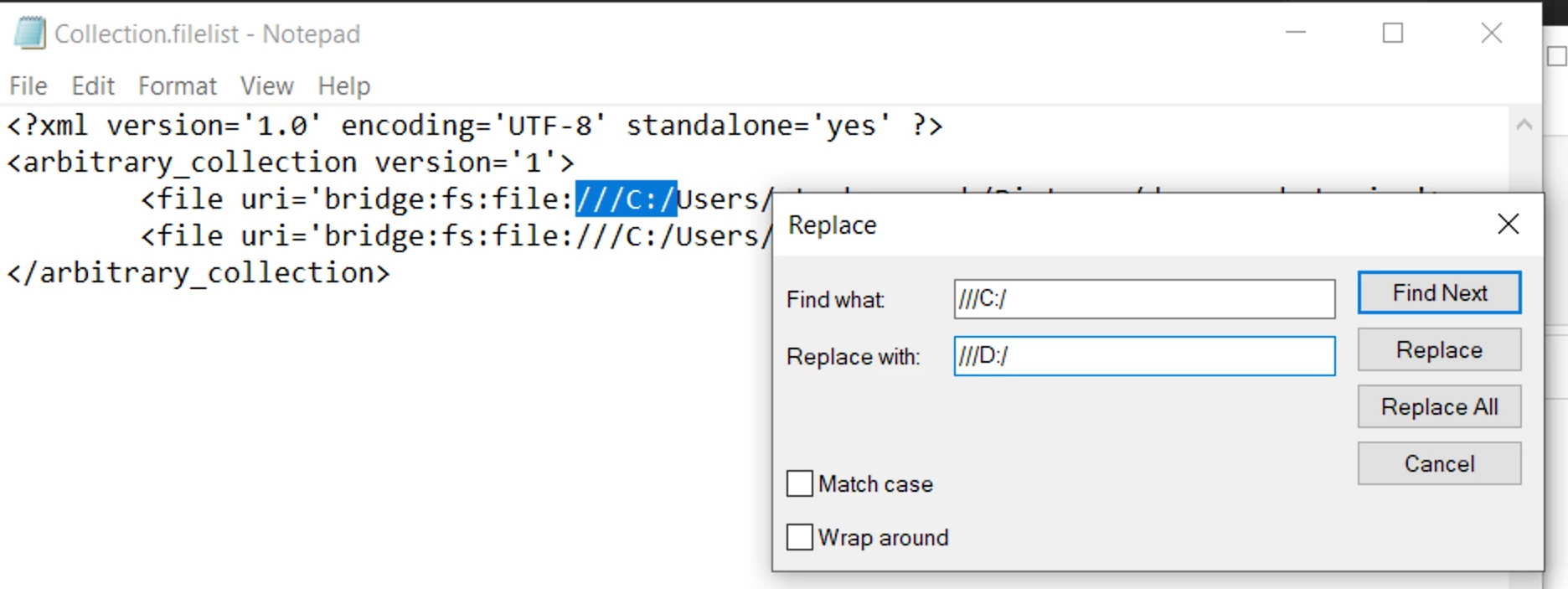
In this screenshot, I am using notepad to change all occurrences of C: to 😧 drive:
 

2 replies

Legend
June 7, 2021

The workspace you can move to a new computer, but collections are machine-specific and can't be moved.

Stephen Marsh
Community Expert
Community Expert
June 7, 2021

The .filelist can be moved. And updated. Adobe offer a GUI to help update the links by browsing to the same asset/s at a new location.


Even without the GUI, it is possible to edit the XML data and update the paths.


Same for smart collections, the .collection XML file can have each URI updated.


I have done this from Mac to Windows and vice versa.


A simple find and replace to batch update the assets paths to the same file on the new system. It is better than rebuilding the collection or smart collection (unless that is the easier answer). There is of course no sync, it has to be performed manually each time there is a change.

Stephen Marsh
Community Expert
Community Expert
June 7, 2021

Assuming you wish to move the .filelist or .collection files from Mac to Windows in the same version of Bridge (or vice versa):


Windows (the AppData directory may be hidden):

C:\Users\<username>\AppData\Roaming\Adobe\Bridge 2021\Collections\


Mac:

/Users/<username>/Library/Application Support/Adobe/Bridge 2021/Collections/


Once you have moved the filelist .collection files, you would need to edit the collection using the GUI in Bridge to relink missing assets, or manually update the file paths in a text editor with find/replace.


For .collection smart collection files, there is no GUI to relink so you have to use the text editor approach to update the URI info.


Stephen Marsh
Community Expert
Community Expert
June 7, 2021


Yes it is possible*, however, I believe that it is going to be a manual process for the workspace, collections and other assets.


Is your laptop a Mac or Windows OS? What version of Bridge of the laptop?


What version of Bridge on the iMac?


Apart from the workspace and collections, what else? Smart collections? Keywords? Batch rename tool presets etc? 


* Some of these files will be need to be updated as computer specific locations are referenced
