

AndrewSouthard
Inspiring
February 5, 2025
Question

Is there a maximum number of keywords in a saved keywords list?

  • February 5, 2025
  • 2 replies
  • 443 views

My Bridge (current 15.0.2.432) has started doing something weird. I use keywords to catalogue a vast collection of technical drawings; my list has 12,424 hierarchical keywords (and counting).


This afternoon, when I add a new sub-keyword in one of my sections, it accepts it momentarily, then moves it to [Other keywords] and adds several lists of temporary (italicized) keywords, many of which are ticked but don't show up as being applied in the keywords filter pane.


I have tried resetting Bridge preferences, "Clear and import..." a fresh uncorrupted list (which doesn't have the temporary keywords in [Other Keywords]). However, the madness happens again when I select any keyworded file in the particular folder. It's so bizarre that it's very hard to explain; I'll add a screenshot to try to clarify.


I can only imagine that I've maxed out the keyword cache (?), causing a malfunction.
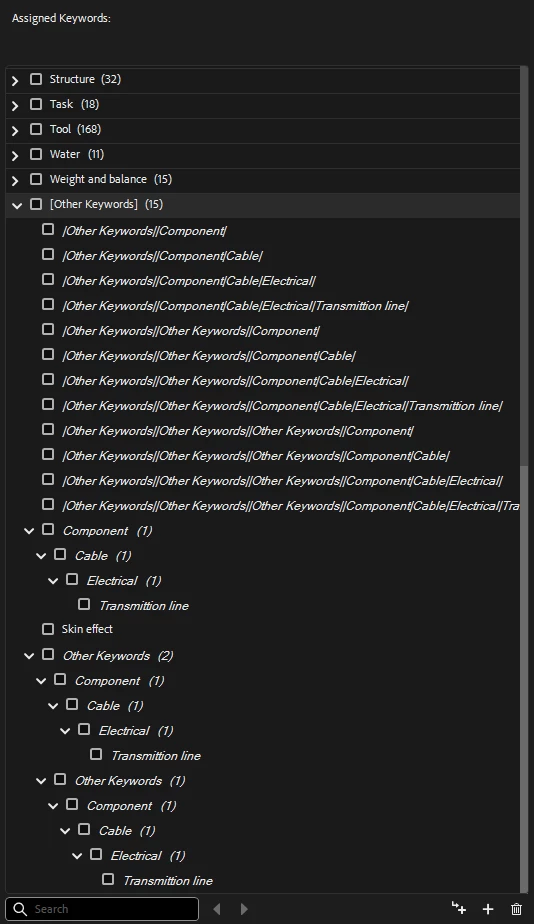
 

2 replies

Stephen Marsh
Community Expert
Community Expert
February 6, 2025

It should be noted that 'Other Keywords' in italics are not actually stored in the keywords 'library' file, they are just showing non-persistent keywords that are currently contained in the files being browsed. They must be right-clicked and "made persistent" to be stored in the library (Adobe Bridge Keywords.xml).


If right-clicking many files is to onerous, then there is a way to export and update the keywords from the files, which some may consider just as painful.

AndrewSouthard
Inspiring
February 6, 2025

Thanks for your input Stephen, but it doesn't add to this weird anomaly. You are talking about how keywords are supposed to work, this is an instance when they didn't.

Stephen Marsh
Community Expert
Community Expert
February 6, 2025

Apologies if I wasn't clear on the intention. Yes, I prefaced my reply with "It should be noted," as this was a general comment for anybody reading the topic who might not know the difference between persistent and "other" keywords or why non-persistent other keywords may appear or disappear from the list. I wasn't commenting directly on your issue that you had solved.


https://helpx.adobe.com/au/bridge/using/keywords-adobe-bridge.html#manage_keywords


AndrewSouthard
Inspiring
February 5, 2025

Don't waste any headspace on this, it turns out it was 30 corrupt Illustrator files. When I remade the folder and made new Illustrator files, cut and paste from the corrupt files, the problem dissappears. Thank goodness it was a small folder, less than an hour to fix it.