Participant
January 19, 2023
Answered

Keyword count in Bridge 2023

  • January 19, 2023
  • 2 replies
  • 424 views

Is there a way to get the 2023 version of Bridge to display the number of keywords in the metadata of an indivdual file?
I used to use an extenion called "inspector" but it appears that extension no longer works with the new version of bridge.

This topic has been closed for replies.
Correct answer Stephen Marsh

@courtney pk24816854 – I don't usually script in Bridge, however, I was able to hack the following script together... If you have multiple thumbs selected, then there will be a separate alert for each image. Look for "Keyword Count Alert" in the Tools menu.
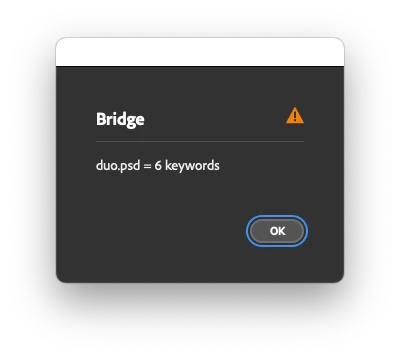


// v1.0, 20th January 2023, Stephen Marsh
// Script hacked from:
// How to limit the number of keywords in Bridge
// https://community.adobe.com/t5/bridge/how-to-limit-the-number-of-keywords-in-bridge/m-p/10945147

#target bridge

if (BridgeTalk.appName == "bridge") {
   keyCount = MenuElement.create("command", "Keyword Count Alert", "at the end of tools");
}
keyCount.onSelect = function () {
   try {
      if (ExternalObject.AdobeXMPScript == undefined) ExternalObject.AdobeXMPScript = new ExternalObject("lib:AdobeXMPScript");
      var sels = app.document.selections;
      for (var a = 0; a < sels.length; a++) {
         var thumb = new Thumbnail(sels[a]);
         var md = thumb.synchronousMetadata;
         var xmp = new XMPMeta(md.serialize());
         if (!xmp.doesPropertyExist(XMPConst.NS_DC, "subject")) continue;
         var keys = [];
         keys = getArrayItems(XMPConst.NS_DC, "subject");
         //////////
         alert(thumb.name + " = " + keys.length + " keywords");
         //////////
         function getArrayItems(ns, prop) {
            var arrItem = [];
            var items = xmp.countArrayItems(ns, prop);
            for (var i = 1; i <= items; i++) {
               arrItem.push(xmp.getArrayItem(ns, prop, i));
            }
            return arrItem;
         };
      }
   } catch (e) {
      alert(e + "\n" + e.line);
   }
};


Tested in versions 2022 and 2023 on the Mac.

2 replies

Stephen Marsh
Community Expert
Stephen MarshCommunity ExpertCorrect answer
Community Expert
January 20, 2023

@courtney pk24816854 – I don't usually script in Bridge, however, I was able to hack the following script together... If you have multiple thumbs selected, then there will be a separate alert for each image. Look for "Keyword Count Alert" in the Tools menu.


// v1.0, 20th January 2023, Stephen Marsh
// Script hacked from:
// How to limit the number of keywords in Bridge
// https://community.adobe.com/t5/bridge/how-to-limit-the-number-of-keywords-in-bridge/m-p/10945147

#target bridge

if (BridgeTalk.appName == "bridge") {
   keyCount = MenuElement.create("command", "Keyword Count Alert", "at the end of tools");
}
keyCount.onSelect = function () {
   try {
      if (ExternalObject.AdobeXMPScript == undefined) ExternalObject.AdobeXMPScript = new ExternalObject("lib:AdobeXMPScript");
      var sels = app.document.selections;
      for (var a = 0; a < sels.length; a++) {
         var thumb = new Thumbnail(sels[a]);
         var md = thumb.synchronousMetadata;
         var xmp = new XMPMeta(md.serialize());
         if (!xmp.doesPropertyExist(XMPConst.NS_DC, "subject")) continue;
         var keys = [];
         keys = getArrayItems(XMPConst.NS_DC, "subject");
         //////////
         alert(thumb.name + " = " + keys.length + " keywords");
         //////////
         function getArrayItems(ns, prop) {
            var arrItem = [];
            var items = xmp.countArrayItems(ns, prop);
            for (var i = 1; i <= items; i++) {
               arrItem.push(xmp.getArrayItem(ns, prop, i));
            }
            return arrItem;
         };
      }
   } catch (e) {
      alert(e + "\n" + e.line);
   }
};


Tested in versions 2022 and 2023 on the Mac.

Participant
January 20, 2023

That last script works perfectly!!
Thank you so much Stephen. I owe you a beer (or 3)!!

Stephen Marsh
Community Expert
Community Expert
January 19, 2023

I have the following script in my collection, however, I haven't tested it with Bridge 2023 which appears to have broken many older scripts:


KeyWordCount = function(event){  
   if ((event.type == 'hover') && (event.object instanceof Thumbnail)) {
           var Thumb  = new Thumbnail(event.object.spec);
            var md = Thumb.synchronousMetadata;
                md.namespace = "http://ns.adobe.com/photoshop/1.0/"; 
                if(md.Keywords.length >0){
            Thumb.core.itemContent.tooltip = "Keyword Count = " +md.Keywords.length;   
            }
      return { handled:false};
  }
}
app.eventHandlers.push( { handler: KeyWordCount } );
var prefs = app.preferences;
try{
if(!prefs.ShowTooltips) prefs.ShowTooltips=true;
}catch(e){}


EDIT: And another one:


// https://forums.adobe.com/thread/2034141
// https://forums.adobe.com/message/10525794#10525794
KeyWordCount = function(event){    
   if ((event.type == 'hover') && (event.object instanceof Thumbnail)) {  
       if(event.object.spec instanceof Folder) return;  
           var Thumb  = new Thumbnail(event.object.spec);  
           switch(Thumb.mimeType){  
               case  "image/jpeg" :break;  
               case  "image/tiff" :break;  
               case  "image/png" :break;  
               case  "image/gif" :break;  
               case  "image/cameraraw" :break;  
               case  "application/x-wmf" :break;  
               case  "application/x-emf" :break;  
               default : return;  
               }  
            var md = Thumb.synchronousMetadata;  
                md.namespace = "http://ns.adobe.com/photoshop/1.0/";   
                if(md.Keywords.length >0){  
            Thumb.core.itemContent.tooltip = "Keyword Count = " +md.Keywords.length;     
            }  
      return { handled:false};  
  }  
}  
app.eventHandlers.push( { handler: KeyWordCount } );  
var prefs = app.preferences;  
try{  
if(!prefs.ShowTooltips) prefs.ShowTooltips=true;  
}catch(e){}


https://prepression.blogspot.com/2017/11/downloading-and-installing-adobe-scripts.html

Participant
January 20, 2023

Hi Stephen,
Thanks for posting that code.
I have installed it and it is apperaing in the startup scripts list.
Not sure how the functionality works though, as I cant seem to find anywhere that displays the number of keywords.

Not sure whether I'm missing something or if the script is not working.
Could you please describe where the keyword count should be displayed?

Thanks again

Stephen Marsh
Community Expert
Community Expert
January 20, 2023

I wouldn't waste anymore time on it, I tried in 2021, 2022 and 2023 so this must have been broken for a while (or the scripts never worked in the first place, which I doubt). I tried with prefs set to show metadata on hover which is off by default, however, the keyword count didn't display. I couldn't find tooltips in prefs.


It is meant to work when the mouse hovers over the image, it likely only works in grid or thumbnail view modes, not lists.


Perhaps one of the Bridge forum regulars who scripts Bridge can update the code...

