Bas_Leroy
Inspiring
March 11, 2025
Answered

Magnifying glass zooms to much

  • March 11, 2025
  • 2 replies
  • 923 views

Hi,


I am using the magnifying glass to view if my photos are sharp or not. But it zooms in way to much, like in Lightroom I always use 50%. In Bridge it is 100%. Is there a way to make it 50% zoom? The only thing I can find to change is that I can zoom in even more... Just to look at pixels.


Thanks

Correct answer gary_sc

Hi, @Bas_Leroy, OK, I understand better now. (Although I've never fully understood why people cull in Bridge and then transfer to LRC. I always do my culling in LRC by simply tapping the "X" key, and at the end, at the bottom of the Photo Menu, delete all rejected photos.)


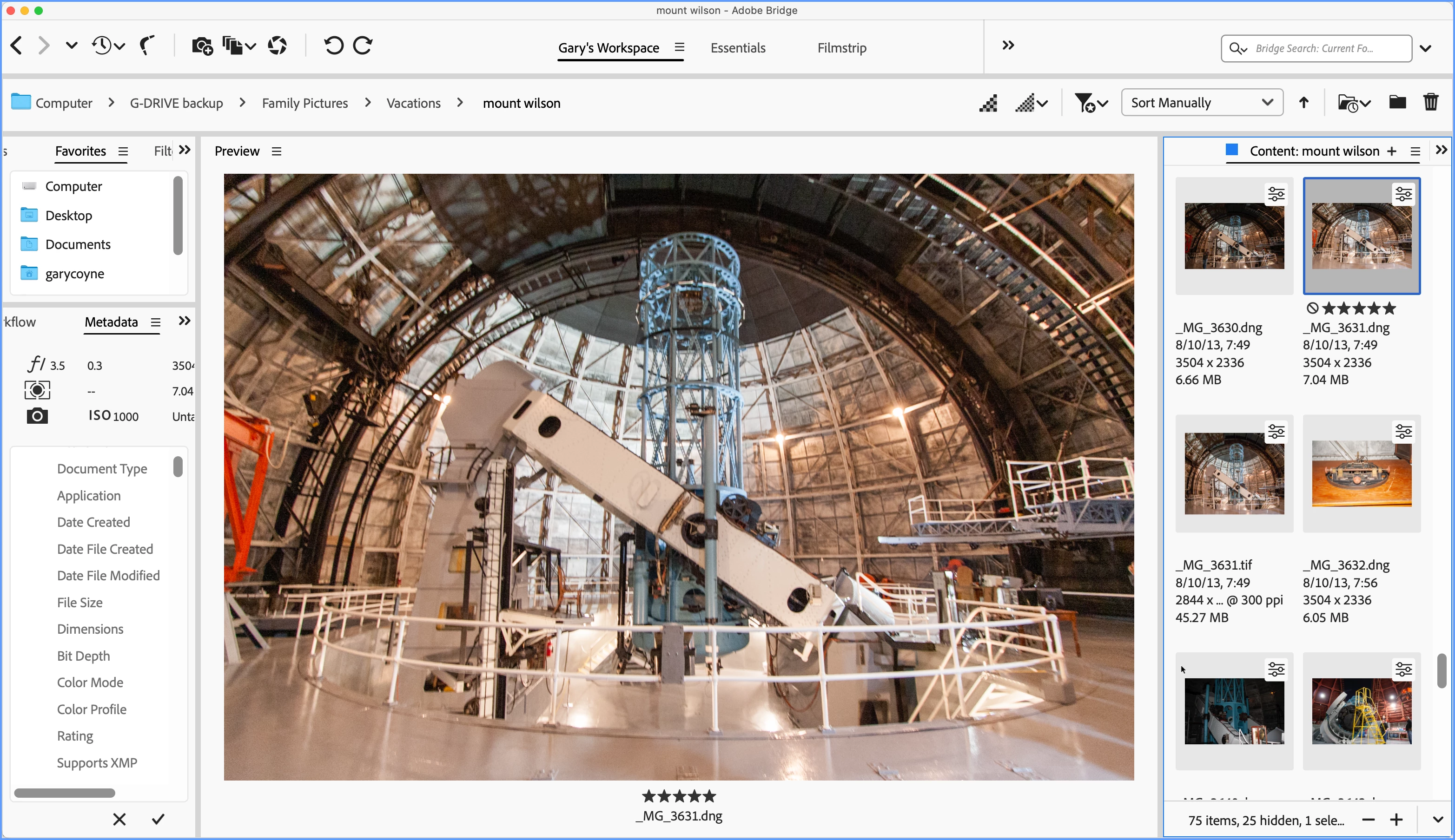
However, all that notwithstanding, I think I may have an alternate solution for you: create a different workspace. I've never been happy or satisfied with the Essentials workspace. I could never understand why the Preview window was only slightly larger than the thumbnails. Below is my Workspace. Certainly variations are available. But the basic concept is two columns of control, while the center region is the Preview Panel. The right panel is for the Content Panel only. Could that help? I know I can see the obviously out of focus images very clearly in that region even though it's not going to be 100%.

2 replies

Participant
July 23, 2025

Use the - or + to decrease or increase magnification.

gary_sc
Community Expert
Community Expert
March 11, 2025

Hi, @Bas_Leroy. I'm not sure what to tell you, but the default magnification for viewing image sharpness quality is 100%. That gives you one pixel of image per one pixel of screen. When you have a percentage (±100%) of viewing, that means that the computer is either hiding or inventing pixels, neither of which accurately represents your images.


It is also more likely that images at 50% will appear sharper than they really are.

Bas_Leroy
Bas_LeroyAuthor
Inspiring
March 11, 2025

Hi @gary_sc Thanks for your reply


I am using Bridge for culling my photos before importing into Lightroom classic. Because sometimes I have over a 1000 photos to go trough. So I just want to remove the out of focus/blurry shots.


In Lightroom classic when using 100% zoom I need to check certain parts of the image if they are in focus or not. With 50% I can see a bigger part of the image to see if it is sharp or not way faster when going trough a lot of images.  I just like 50% zoom more, but I just don't understand why this option isn't available in Bridge.

gary_sc
Community Expert
gary_scCommunity ExpertCorrect answer
Community Expert
March 11, 2025

Hi, @Bas_Leroy, OK, I understand better now. (Although I've never fully understood why people cull in Bridge and then transfer to LRC. I always do my culling in LRC by simply tapping the "X" key, and at the end, at the bottom of the Photo Menu, delete all rejected photos.)


However, all that notwithstanding, I think I may have an alternate solution for you: create a different workspace. I've never been happy or satisfied with the Essentials workspace. I could never understand why the Preview window was only slightly larger than the thumbnails. Below is my Workspace. Certainly variations are available. But the basic concept is two columns of control, while the center region is the Preview Panel. The right panel is for the Content Panel only. Could that help? I know I can see the obviously out of focus images very clearly in that region even though it's not going to be 100%.

