Participant
April 17, 2017
Answered

Mince cadre autour photo à l'ouverture de Bridge ?

  • April 17, 2017
  • 2 replies
  • 488 views

Bonjour,

Je ne peux retrouver dans Aide comment ouvrir une photo dans Bridge sans qu'il y ait un mince cadre qui disparaît par la suite .  Cette situation ralentit l'ouverture de mes photos.

Merci à l'avance

Suzanne

    This topic has been closed for replies.
    Correct answer Deepak_Gupta1

    Hi fredan,

    I think you are talking about Black thin border around the photos in Bridge, and this Black border disappears later. This is a feature of Adobe Bridge.

    When a photo is open is Bridge's content panel, Bridge first generates the thumbnail for that photo, and then generates the various size of previews for that photo.

    Bridge shows the thumbnail in Content panel. However, the previews are shown in Preview panel.

    The black thin border around photo suggests that previews are not generated yet, and the black border disappears as soon as previews are available.

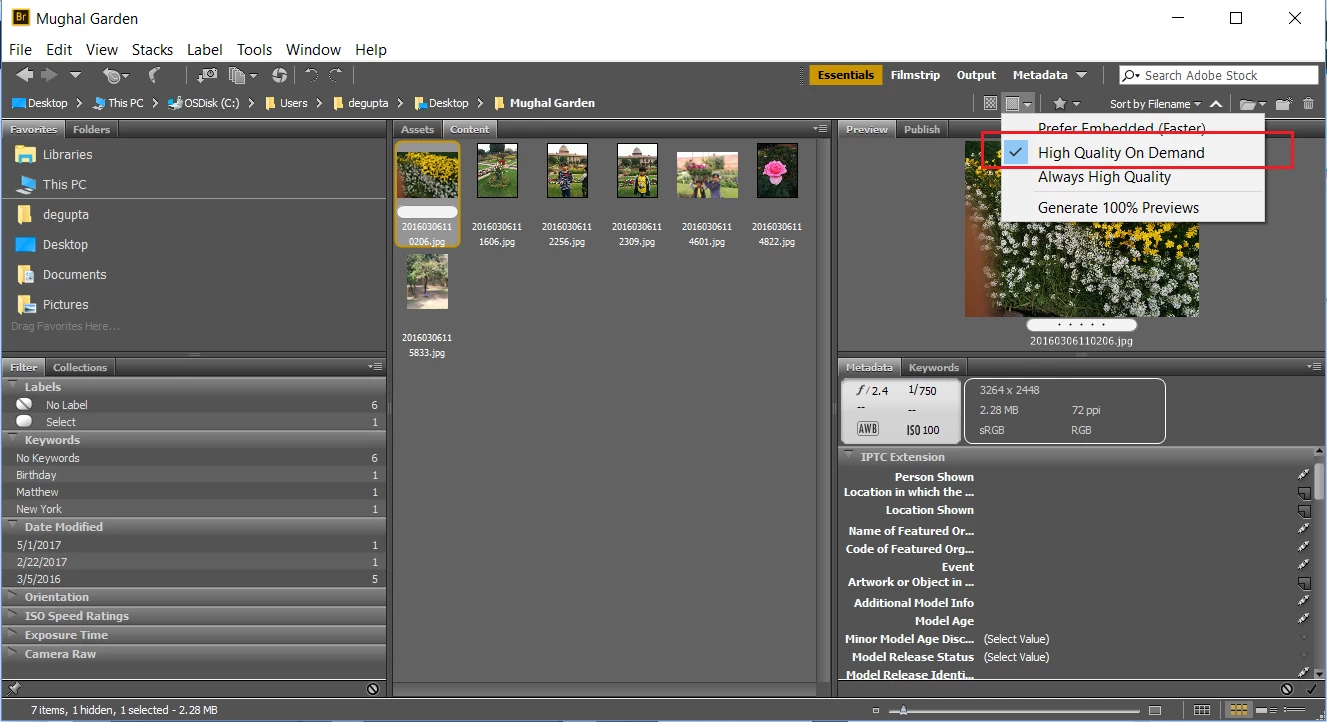
    You can try the option highlighted in screenshot below to improve the time taken in opening a folder containing many photos.
    Thanks,

    Deepak Gupta

    2 replies

    Deepak_Gupta1
    Deepak_Gupta1Correct answer
    Participating Frequently
    May 10, 2017

    Hi fredan,

    I think you are talking about Black thin border around the photos in Bridge, and this Black border disappears later. This is a feature of Adobe Bridge.

    When a photo is open is Bridge's content panel, Bridge first generates the thumbnail for that photo, and then generates the various size of previews for that photo.

    Bridge shows the thumbnail in Content panel. However, the previews are shown in Preview panel.

    The black thin border around photo suggests that previews are not generated yet, and the black border disappears as soon as previews are available.

    You can try the option highlighted in screenshot below to improve the time taken in opening a folder containing many photos.

    Thanks,

    Deepak Gupta

    fredanAuthor
    Participant
    May 12, 2017

    Hi Deepak,

    I think you got me right and you understood what I meant by "thin black frame" but i have read somewhere that there is a way to avoid waiting for that thin black border to disappear...but I am probably mistaking.

    Thanking you,

    Suzanne

    Sahil.Chawla
    Adobe Employee
    Adobe Employee
    May 2, 2017

    Hi Suzanne,

    Could you please post a screenshot of this issue so that we can suggest some steps to resolve it?

    Regards,

    Sahil