
Parksite Karl
Inspiring
October 19, 2018
Answered

Modify default Place > contextual menu command

  • October 19, 2018
  • 1 reply
  • 516 views

Hoping someone can help.  I have searched high and low to no avail.

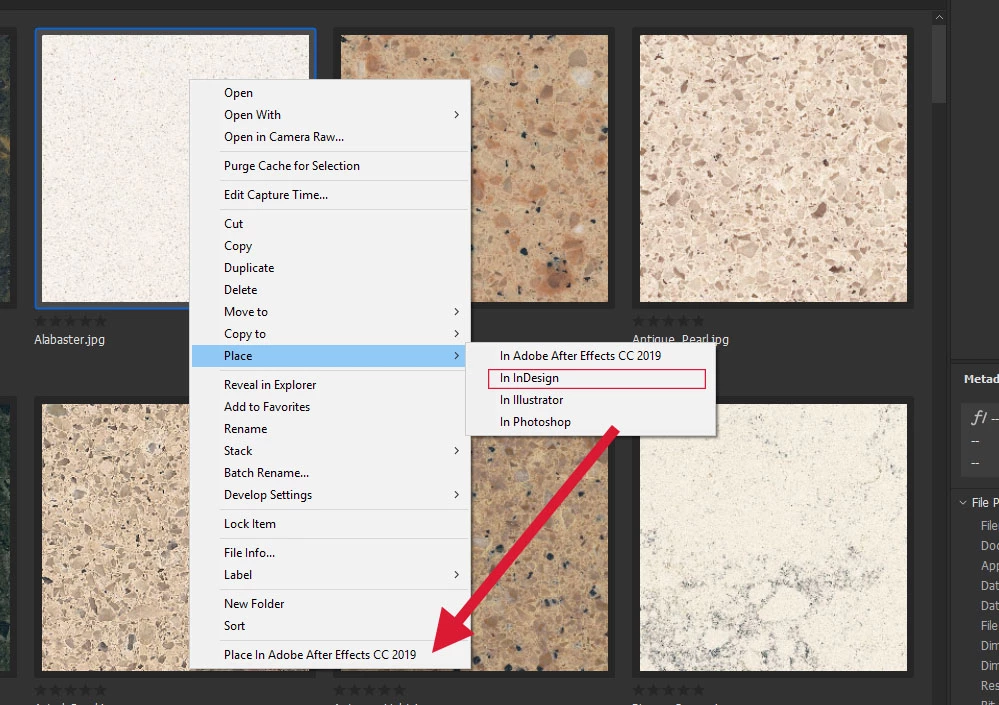
I am wondering how to change the default PLACE IN command on the contextual menu in Bridge.

At some point I did place something into After Effects and that somehow became the default selection. 

However I rarely use this to place into After Effects.  Much more often I am placing hundreds of items into indesign or into Photoshop depending on the task at hand and it would save a considerable amount of time if I could set the default program at the bottom of the "left click" contextual menu to Indesign.

Anyone got an idea on this?

All updated versions (CC2019)

Please and thanks!
    This topic has been closed for replies.
    Correct answer Abhishek.Seth

    Hi Parksite Karl,

    This is standard setting and cannot be changed.

    To place assets in Photoshop\Illustrator\InDesign , you will have to choose from the submenu under "Place".

    Regards,

    Abhishek Seth

    1 reply

    Abhishek.SethCorrect answer
    Adobe Employee
    October 26, 2018

    Hi Parksite Karl,

    This is standard setting and cannot be changed.

    To place assets in Photoshop\Illustrator\InDesign , you will have to choose from the submenu under "Place".

    Regards,

    Abhishek Seth

    Parksite Karl
    Inspiring
    October 26, 2018

    Thanks for the answer.

    So everyone's Bridge contextual menu says Place in Adobe After Effects as the default?

    That seems unlikely to me.