Participant
December 13, 2023
Answered

(Multiple) Ratings and Labels

  • December 13, 2023
  • 1 reply
  • 214 views

Please, make LABELS and RATINGS work again, as before!
1. The colour labels of labeled photographs/images should be visible in the overview row again.
2. Ratings ***** should be visible in the pull-down-/drop-down menu if right mouse click is used
If there is a possibility to change this in the settings, please let me know.
Mac Studio 2022 M1 Max, Ventura 13.0.1.
Adobe Bridge German language, 14.0.1.137

Great, if this could be done before X-Mas (2023). Thanks! 😉

This topic has been closed for replies.
Correct answer gary_sc

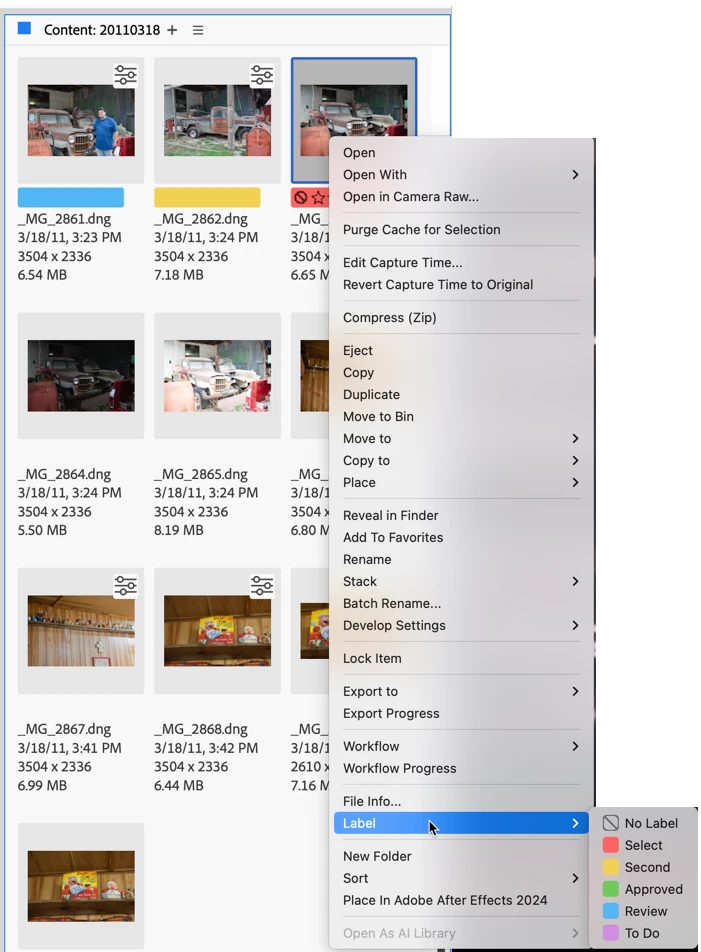
Hi @Roy34233557yy1r, I think you may have inadvertently tapped one setting that limits what you can see in the Layout view. Meanwhile, you are correct; there is no way (currently) to set Ratings with a right-click. I had missed that since I never use it, but you CAN set labels that way as shown below
 

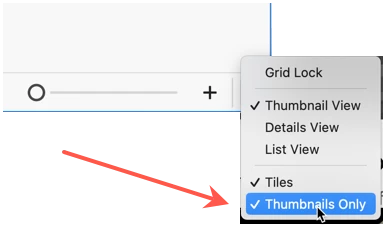
If you are not seeing the labels (or ratings) or any other items in the Content Panel, please go to the bottom right corner of the Contents Panel and press on the downward pointing arrow. If you see "Thumbnails only" check, and uncheck it (by selecting it with your cursor) and that should fix the problem.
 

Meanwhile, I doubt very much that it will be possible to return Ratings back to the right-click menu before X-mas. Unfortunately, software development doesn't work quite that fast. But hopefully "soon." In the meantime, you can set ratings and labels from the keyboard. You can use the combination of Command-#, or if you change it in the Keyboard shortcut settings as I did, you can just tap the keyboard # keys and you're good to go.


Good luck!

1 reply

gary_sc
Community Expert
gary_scCommunity ExpertCorrect answer
Community Expert
December 14, 2023

Hi @Roy34233557yy1r, I think you may have inadvertently tapped one setting that limits what you can see in the Layout view. Meanwhile, you are correct; there is no way (currently) to set Ratings with a right-click. I had missed that since I never use it, but you CAN set labels that way as shown below


If you are not seeing the labels (or ratings) or any other items in the Content Panel, please go to the bottom right corner of the Contents Panel and press on the downward pointing arrow. If you see "Thumbnails only" check, and uncheck it (by selecting it with your cursor) and that should fix the problem.


Meanwhile, I doubt very much that it will be possible to return Ratings back to the right-click menu before X-mas. Unfortunately, software development doesn't work quite that fast. But hopefully "soon." In the meantime, you can set ratings and labels from the keyboard. You can use the combination of Command-#, or if you change it in the Keyboard shortcut settings as I did, you can just tap the keyboard # keys and you're good to go.


Good luck!

Participant
December 19, 2023

Hi @gary_sc, many thanks! The "Thumbnails Only" check was the reason that the colorlabels were not visible.

I hope too, that AI will make software development easier and faster 😉
Have a wonderfull X-Mas and a great new light-year!

Roy