
John Nez Illustration
Inspiring
December 31, 2018
Answered

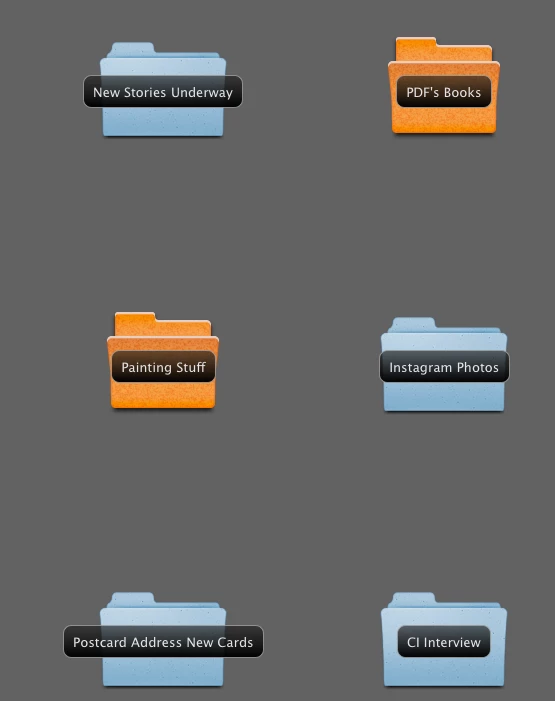
My Bridge folder names suddenly have a dark background - how to fix?

  • December 31, 2018
  • 1 reply
  • 542 views

All of a sudden, all my folders in Bridge have a dark background around the title names. And the regular names have vanished... what's up with that?

I've been working in CS6 for years and never have seen this before.

I tried clicking on all the preference settings... but can't change the view back to normal - where the type is not surrounded by a black background.

Any ideas how to fix this?

Here's a picture of how it looks.
Thanks so much

This topic has been closed for replies.
Correct answer John Nez Illustration

It's Photoshop CS6 - but I think I just fixed it.

I noticed that the weird behavior was only acting up in one of the three different Bridge preset settings I had. So I just tried clicking on RESET and the black boxes went away!

Whew... it was really freaking me out for a moment since I was right in the middle of uploading a project when it happened.

But thanks!

1 reply

Legend
December 31, 2018

What operating system is this? And is this Bridge CS6?

John Nez Illustration
John Nez IllustrationAuthorCorrect answer
Inspiring
December 31, 2018

It's Photoshop CS6 - but I think I just fixed it.

I noticed that the weird behavior was only acting up in one of the three different Bridge preset settings I had. So I just tried clicking on RESET and the black boxes went away!

Whew... it was really freaking me out for a moment since I was right in the middle of uploading a project when it happened.

But thanks!

Participant
December 13, 2021

I was also puzzled by this. Now I figured it out. On the upper left hand, there are a few categories: Essentials, Filmstrip, Output, Metadata, etc... I must have selected "Essentials" and it appeared this way. When I click on "Filmstrip", everything looks fine again. 🙂