katyb97373696
Participant
May 31, 2018
Answered

New to Bridge and having some issues

  • May 31, 2018
  • 3 replies
  • 449 views

So i'm trying to use Bridge to keep a modest photo collection organized and having some very frustrating issues.

1) When i right click on an image it says i have the option to copy and paste from the program, but when i try to do so into say an email or a word doc it doesnt work.

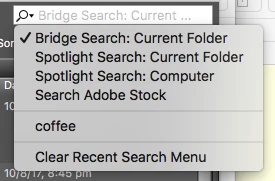
2) the Search bar doesnt work. I have selected "search in folder" and not "search stock image" i figured that one out, but it doesnt seem to be able to find images unless i have found them manually already. Kinda defeats the purpose.

These are two issues that i am finding to be deal breakers on my ability to use this program. I dont think im trying to push a square peg in a round hole here.

This topic has been closed for replies.
Correct answer Stephen Marsh

Copy/Paste is for use within Bridge, not with other programs.

Bridge search may rely on Bridge previously indexing/caching files – or there are operating system specific search features.

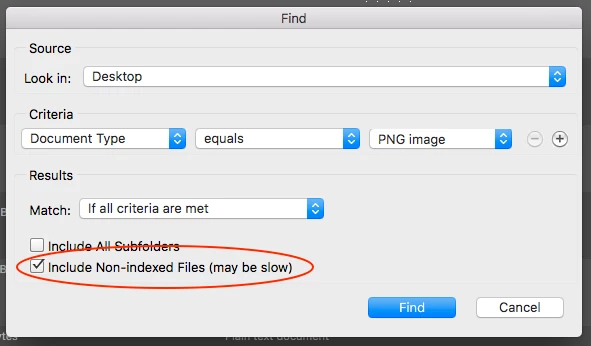
There is also the Edit > Find command which has on option:

3 replies

Legend
June 1, 2018

You may want to open your image in an editor first to resize it before blindly sending it or inserting it. ANd most programs that handle images have an internal import or attach or place command.

Searching in Bridge can be problematic. Try using the non-indexed files option shown above for better results.

Bojan Živković11378569
Community Expert
Community Expert
June 1, 2018

You should be able to drag the image from Adobe Bridge. Make Bridge window smaller or display it side by side then drag the photo onto application/page where you want to insert image. I am trying with Gmail open in Chrome and everything works just fine.

Stephen Marsh
Community Expert
Stephen MarshCommunity ExpertCorrect answer
Community Expert
June 1, 2018

Copy/Paste is for use within Bridge, not with other programs.

Bridge search may rely on Bridge previously indexing/caching files – or there are operating system specific search features.

There is also the Edit > Find command which has on option: