
No smoothing on thumbnails?
I'm having a major problem with the thumbnails in Bridge that's making it almost unusable for me.
My thumbnails have no smoothing at all. They look jagged and skippy in the small details of the image. I don't remember them ever looking this way in the past, because I would have been unable to use Bridge if they had. I've tried checking and unchecking any setting I can think of related to previews and thumbnails and clearing my cache each time. I've noticed that sometimes after clearing the cache that the thumbnails will be smoothed for a second then go back to the jagged preview with no smoothing. I use Bridge whilst looking at a lot of ink and pencil drawings, so this is a problem because it basically turns the thumbnails into unreadable, garbled pixels. Here's an example of a thumbnail screenshot below:
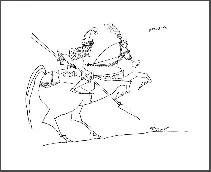
I would expect something a little more akin to:
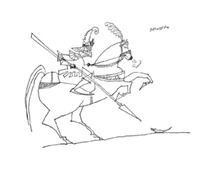
I can't verify, but this seems to be something that happened with one of the last few major updates? Is there any way to fix this besides making the thumbnails huge or rolling back my version of Bridge?


 AdChoices