
Participant
December 30, 2020
Answered

Not Happy with New HDR merge

  • December 30, 2020
  • 1 reply
  • 425 views

I had a merge to HDR Pro option under my tools setting before some update. Now I just have to select the files while they are open in camera raw and click a merge to HDR. The results are terrible and give me no control of gamma or detail, etc.... Am i missing something or is this the new way. If not what is a better way to go about being able to edit my HDR like previously. TIA
This topic has been closed for replies.
Correct answer gary_sc

Hi Douglas


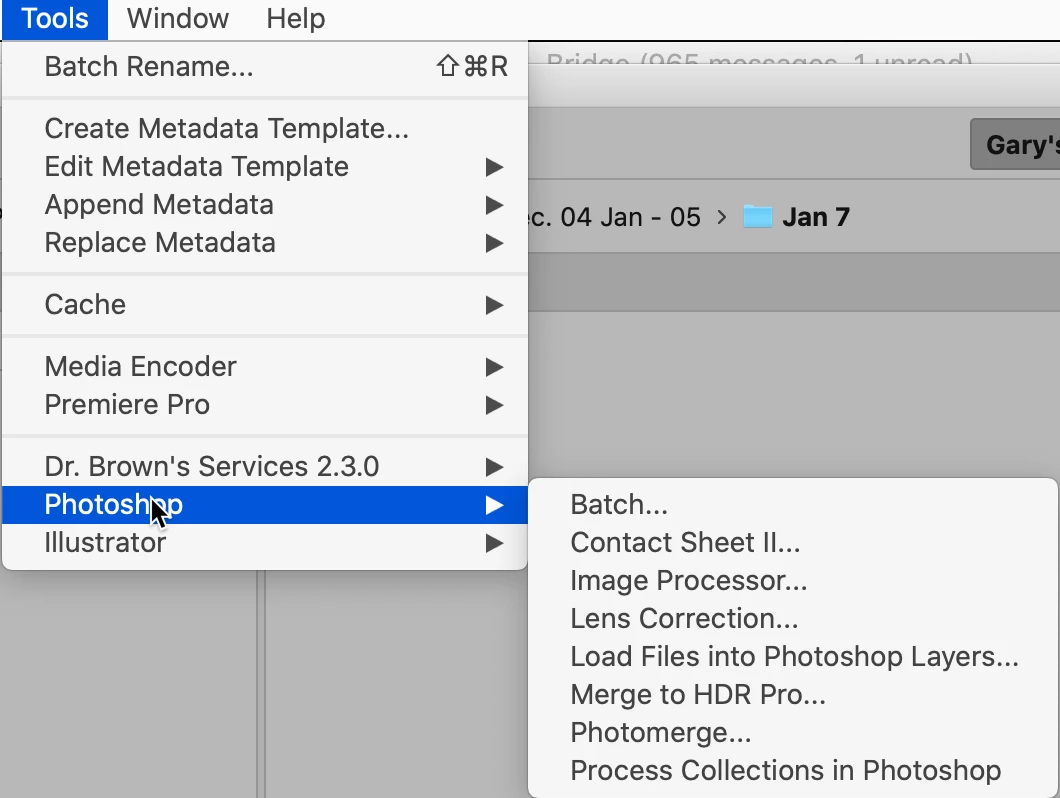
Do you have any of Photoshop's tools showing from the Tools menu? Here's what mine is showing?

 If you're not seeing that full list (or even a partial list) these are installed BY PS. To get them into Bridge you do need to uninstall both Bridge and PS. If you're on Windows, after uninstalling it's best to reboot and then reinstall (On the Mac you do not need to reboot (but it doesn't hurt either.) but you MUST first install Bridge and then install PS. That way PS can see that Bridge is there and that the menu items should be installed in Bridge.


Let us know how this works.

1 reply

jbm007
Community Expert
Community Expert
December 31, 2020

Do you have Photoshop installed?

If you do and the merge Merge to HDR pro under Tools/Photyoshop drop down menu.

If its not there reinstall PS

Participant
December 31, 2020
yes i have had photoshop installed this whole time. the merge to hdr pro
option was always there in bridge as an easy and good way to create hdr
images for me. now it is gone and i cant find out how to get to the merge
to hdr pro step anymore.


Doug Parker
Owner/Photographer


*Parker Photography & Imaging*
FB@ParkerPhotographyTX
www.ParkerPhotographyTX.com
*(832) 557-5633*

*3027 Marina Bay Dr. #201*
*League City, TX 77573*
gary_sc
Community Expert
gary_scCommunity ExpertCorrect answer
Community Expert
December 31, 2020

Hi Douglas


Do you have any of Photoshop's tools showing from the Tools menu? Here's what mine is showing?

 If you're not seeing that full list (or even a partial list) these are installed BY PS. To get them into Bridge you do need to uninstall both Bridge and PS. If you're on Windows, after uninstalling it's best to reboot and then reinstall (On the Mac you do not need to reboot (but it doesn't hurt either.) but you MUST first install Bridge and then install PS. That way PS can see that Bridge is there and that the menu items should be installed in Bridge.


Let us know how this works.