Inspiring
Oct 5, 2021 6:11 AM UTC
Answered

Number of files displayed next to folders.

Hello,


How can set Bridge to display the number of files contained in each folder I am browsing?


Thank you.

This topic is closed to new replies. Start a new post to keep the conversation going.
LumigraphicsCorrect answer
Legend
Oct 5, 2021 1:01 PM UTC

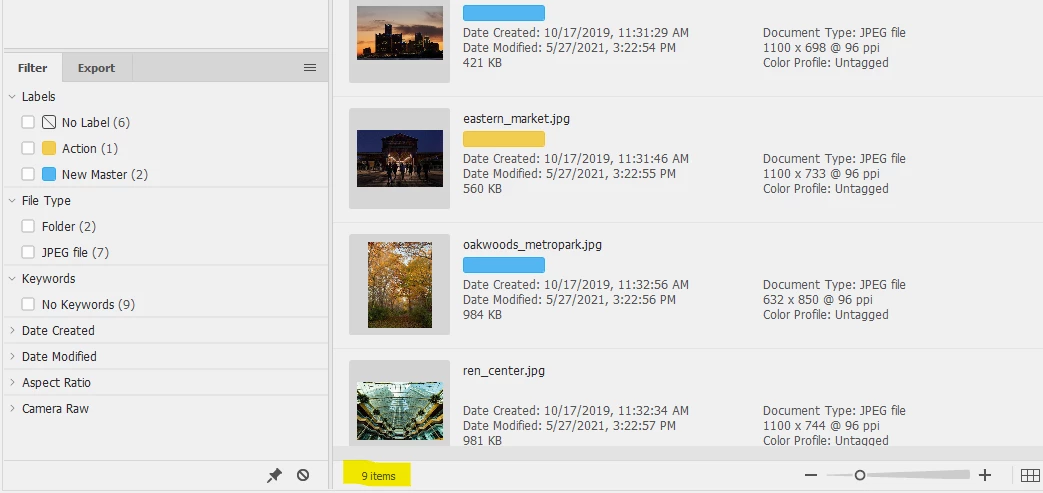
At the bottom of the window, I highlighted the display in yellow here.

8 replies

gary_sc
Community Expert
Community Expert
Oct 5, 2021 4:09 PM UTC

Lumigraphic has the correct answer but be aware that if you decrease the width of the Content Panel, the number of files is cut off. In fact, if you keep on decreasing the width, more bit of information is cut off.


Good luck!

Translate
LumigraphicsCorrect answer
Legend
Oct 5, 2021 1:01 PM UTC

At the bottom of the window, I highlighted the display in yellow here.

Translate
Inspiring
Oct 6, 2021 6:59 AM UTC

Hi Lumigraphics,


Thank you for your help and the answer you provided.

As I asked the question I had something different in mind. It was my intention to find a way to have the number of files displayed next and to the right of each folder. Can this be done in Bridge? I am under the impression I had an older version of Bridge displaying this information but don't remember exactly how it did it.

Thank you again.

Translate
Legend
Oct 6, 2021 1:00 PM UTC

Please post a screenshot showing what you want, I'm not sure about your question.

Translate