
TVMediaworks
Participant
November 17, 2018
Question

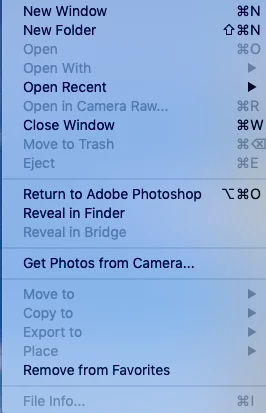
"Open" and "Open in Camera Raw" in Bridge CS6 are both greyed out

  • November 17, 2018
  • 1 reply
  • 367 views

iMac running Mojave 10.14.1.This just happened; the File dialog box now shows both "Open" and "Open in Camera Raw" are both greyed out. I can only do "Open Recent". Is there a fix for this? I used to be able to go to my Photos library, look at my Raw files, select them, and edit them. This just stopped.
    This topic has been closed for replies.

    1 reply

    Legend
    November 19, 2018

    Can you open RAW files directly in Photoshop?

    TVMediaworks
    Participant
    November 21, 2018

    Yes I can, but I now have to save thm in a separate folder, whereas before, I could just open them from photos

    Legend
    November 26, 2018

    Sounds like a permissions problem. I'd look into that first. See if you have read/write permission on that folder.