Inspiring
April 22, 2020
Answered

Open in affinity through Adobe Bridge

  • April 22, 2020
  • 1 reply
  • 2612 views

i have added bridge and had a quick look my question to you when i right click and look at open with all i see is rundll32 how do i get affinity and my other editors to appear


{Thread renamed by moderator}

Correct answer gary_sc

HI Terry,


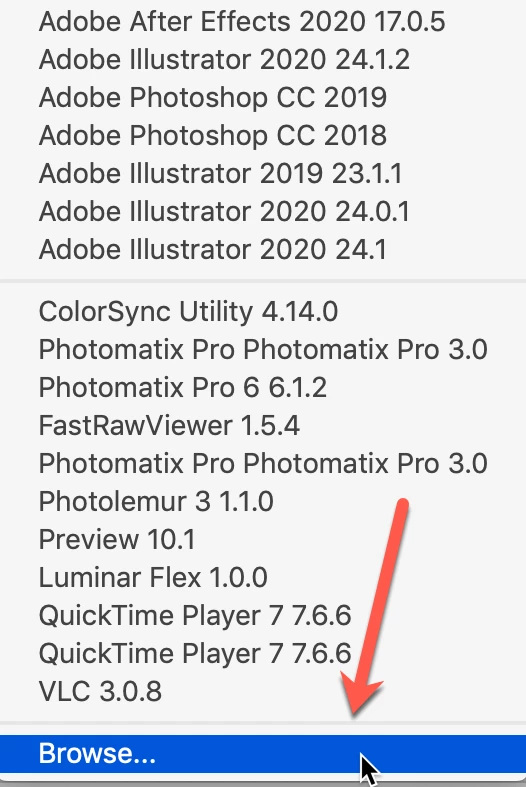
If you look at the bottom of your dropdown menu in File Type Associations you can see "Browse..." This will open up a search window for Explorer or Finder and you can then select the application you want to have priority for opening your files and that should take care of it. Let us know if this helps or not.

1 reply

Sahil.Chawla
Adobe Employee
Adobe Employee
April 23, 2020

Hi Terry,

Could you please let us know the version of Bridge you're using?
Also, as you do not see Affinity in the Open with list, could you please go to Bridge's Preferences > File Type Association and let us know if you're able to see Affinity for any image format?

Regards,
Sahil

Inspiring
April 23, 2020

the version is 10.0.3.138


in file type association affinity and luminar 4 do not show up


regards


Terry

gary_sc
Community Expert
gary_scCommunity ExpertCorrect answer
Community Expert
April 23, 2020

HI Terry,


If you look at the bottom of your dropdown menu in File Type Associations you can see "Browse..." This will open up a search window for Explorer or Finder and you can then select the application you want to have priority for opening your files and that should take care of it. Let us know if this helps or not.