

Dynamic_beauty15A8
Participating Frequently
July 17, 2013
Answered

Output Module (Bridge CC) not working on Mac

  • July 17, 2013
  • 17 replies
  • 58299 views

As suggested here

http://helpx.adobe.com/bridge/kb/install-output-module-bridge-cc.html

I downloaded and tried to install the Bridge CC Output Module. I could not find the "Bridge CC Extensions" folder only "Bridge CC"
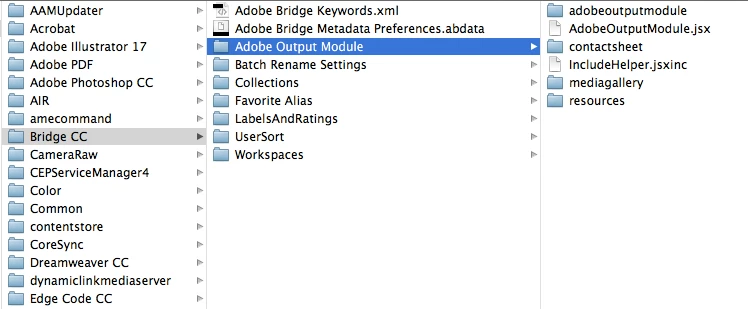
I can see the output name inside Bridge when I try to install it but nothing happens when I try to click it, it's just greyed out
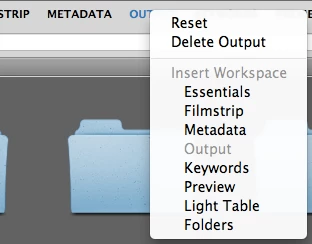
I using Bridge 6.0.0.151

On OS X 10.8.4

This topic has been closed for replies.
Correct answer AnnShelbourne

The only major difference I can think of is that I have CS6 & CS5 installed at work and only CC at home


You may have found the vital Link.

The replacement AOM for Bridge CC installed without any problems and works perfectly here on OSX 10.8.4 -- but I also have CS6 installed on the same machine.

Try re-installing CS6 and see if the Bridge CC Output Panel then works.

My guess is that a vital component in Bridge CC is missing and suggest that  Adobe need to post a completely new Update on the Cloud for Bridge CC (with a properly integrated AOM incorporated into the Build).

The current idea of  offering the AOM as an add-on has proved to be far too difficult and burdensome for the average User to handle.

17 replies

Deepak_Gupta1
Community Manager
Community Manager
October 18, 2017

Hi All,

We have released a new version of Adobe Bridge (CC 2018) on 18 Oct 2017. The new version build number is 8.0.0.262. This version is available to install via Adobe Creative Cloud application.

This Bridge update contains Native PDF Output in application. Please check the Output workspace after installing new version of Bridge CC.

You may need to update the Creative Cloud application and restart your computer to see the updated installer.

Thanks,

Deepak Gupta

Participating Frequently
October 20, 2017

Hallelujah!
And it works better than the original one, been waiting a long time for this, good result.

Known Participant
February 3, 2017

I found that the particular problem of the blank Output Module Panel in OS X (10.11) for me was that when unzipping the file, there are two layers entitled "AOM_Mac" the latter of which contains "Adobe Output Module".  Use only the "Adobe Output Module" in the Bridge CC 2017 Extensions folder.

Use:

/Library/Application Support/Adobe/Bridge CC 2017 Extensions/Adobe Output Module

Not:

/Library/Application Support/Adobe/Bridge CC 2017 Extensions/AOM_Mac/Adobe Output Module

Known Participant
February 4, 2017

& Also not:

System/Library/

erichenao
Participating Frequently
January 13, 2017

Okay, have updated to the latest version of Bridge 2017 7.0.0.9. Also am currently running Mac OS 10.10.5 (Yosemite) Running Adobe Creative Cloud CC 2017 for all other apps.

Downloaded latest version of the Output module: How to install Adobe Output Module in Bridge CC 2017

Tried to follow the directions, only there is no Application Support folder in the System Library folder. But there is one in the User Library folder. I placed the file and the folder into the correct locations and made sure that there were no alias' used.

The Output option is now showing in the program, but after selecting some images and then clicking on the Output tab, nothing happens.

I also reset my Adobe Window Workspace.

I click the Output and nothing happens. I also to the keyboard command and nothing. I also do the Window -> Workspace -> Output and nothing.

Thanks.

Participant
March 7, 2016

You have to split the folder.  Put the Adobe workspace folder and all its contents into the Bridge CC Extension folder.  Take the workspace icon and put that in the workspace folder located in the Bridge CC Extension folder.

Participant
February 25, 2016

Hello.  My output library is showing up but ever since the latest update- i am now getting I/O error after i press save and it starts outputting?????

Participant
February 25, 2016

Go back to the original download page, Adobe published an update for the newest version of bridge. You just have to replace the files in your library folder, same as when you installed it initially. They even lists your issue in "possible issues and solutions"

https://helpx.adobe.com/bridge/kb/install-output-module-bridge-cc.html

Grayson

Participant
February 25, 2016

I actually did that... my output module appears- like it did before.  Its after i press save that the issue occurs... if you look at the files in the "new" file- they are from 2013.

Participant
September 18, 2015
Min E
Known Participant
July 5, 2015

Aaargh, Adobe. Would it kill you to leave this in, I mean, come ON!!! This download plugin crap is such a pain in the ass. Just put it back in and leave it in. Geeze. This is why I always update your software on my least favorite, least used computer, so I'll know whether or not its worth it on my favorite, most used computer. So no, won't be updating it anytime soon, assuming the Adobe Overlords won't force it on me.

I think I'll reload a really old version of Bridge, easier than dealing with installing the plugin or whatever stupid hoops Adobe wants me to jump through to prove my love for Output.

Participating Frequently
June 21, 2015

OK, I did it, grudgingly, looking forward to seeing a good feature from this update.

Participant
July 4, 2015

I have still and ongoing the same problem. Even after the o so handy update towards Bride CC 2015. The module persist in NOT working, Adobe persist in NOT embed the output module in Bridge as it was in the good old days. For me it's a big FAIL from Adobe. They should be very very ashamed.

Downloading a plugin? Common! And it even doesn't work as with many others before me as stated the whole discussion above, leaving a lot of professionals with a blanc module screen.

A big BAH towards Adobe.

Participant
July 8, 2015

Possible issues

Issue: If the newly installed Output module displays as blank, try one or more of these solutions:

Solution 1

In Bridge, choose Window > Workspace > Reset Workspace.

Solution 2

Windows:

  1. Close Bridge.
  2. In Windows Explorer, navigate to the \Users\[user name]\AppData\Roaming\Adobe\Bridge CC\Workspaces folder.
  3. Delete the !!-$$$AdobeOutputModule.workspace file.

Mac OS:

  1. Close Bridge.
  2. In Finder, navigate to the Users/[user name]/Library/Application Support/Adobe/Bridge CC/Workspaces folder
  3. Delete the !!-$$$AdobeOutputModule.workspace file.

This set everything to work correctly for me ...

Participating Frequently
June 21, 2015

Why do you have to download files now, what's the creative cloud app for, is this old info? I don't get it. Why do hard just to make PDF proof sheet? Wasn't this functionality around forever before?

Participant
August 31, 2015

>Why do you have to download files now, what's the creative cloud app for, is this old info? I don't get it. Why do hard just to make PDF proof sheet? Wasn't this functionality around forever before?

yes, yes it was. who knows why they do these things.

Christine Dransard
Participant
April 15, 2015

https://helpx.adobe.com/bridge/kb/install-output-module-bridge-cc.html

If any trouble after clean install (without old version....)

In Bridge, choose Window > Workspace > Reset Workspace.

  1. Close Bridge.
  2. In Finder, navigate to the Users/[user name]/Library/Application Support/Adobe/Bridge CC/Workspaces folder
  3. Delete the !!-$$$AdobeOutputModule.workspace file.
Participant
April 15, 2015

Still doesn't work.  If I follow the instructions precisely, I get this error upon launch:

"Could not create work area (/Users/rreed/Library/Application Support/Adobe/Bridge CC/Adobe Output Module/MediaGallery)".

Then if I manually create those folders in my home path, I get this error:

"TypeError: underfined in not an object:

onResize()

buildUIStack(true,"Cabinet")

buildUIStack([TabbedPalette:[object...." < this error goes on and on.

This software doesn't seem ready for release.

Participant
May 29, 2015

You may have installed in the wrong library. Ignore the User library completely, you need to install in the System library.