This topic is closed to new replies. Start a new post to keep the conversation going.
GautamBahl
GautamBahlCorrect answer
Inspiring
November 7, 2016

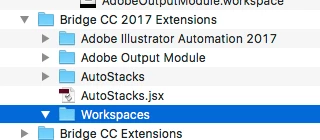
There is nothing in the Workspaces folder.


Hi Dale,

When you downloaded the Adobe Output module package and extracted the zip file you would have seen an "Adobe Output Module Folder" as well as "AdobeOutputModule.workspace file".

You need to copy the "AdobeOutputModule.workspace" file in the workspaces folder.

Regards,

Gautam

15 replies

Deepak_Gupta1
Participating Frequently
October 18, 2017

Hi All,

We have released a new version of Adobe Bridge (CC 2018) on 18 Oct 2017. The new version build number is 8.0.0.262. This version is available to install via Adobe Creative Cloud application.

This Bridge update contains Native PDF Output in application. Please check the Output workspace after installing new version of Bridge CC.

You may need to update the Creative Cloud application and restart your computer to see the updated installer.

Thanks,

Deepak Gupta

Translate
Known Participant
November 6, 2016

I downloaded the AOM file.

Instructions told me to place the Adobe Output Module folder in my “/Library/Application Support/Adobe/Bridge CC 2017 Extensions (here, Library refers to the System Library, not the User Library on Mac OS X)”.

There is no Bridge CC 2017 Extensions folder in my Adobe Application Support folder.

There is no Bridge CC 2015 application for me to fall back on either - it has been deleted from my Applications folder!

Translate
GautamBahl
Inspiring
November 6, 2016

Hi Erica and Dale,

It seems like you both are in the hidden library folder rather than the system library folder.

"Bridge CC 2017 extensions" folder is created in system library and "Bridge CC 2017" folder is created in hidden library.

Please see the below screenshot which might help you in copying the folders in the right location.

Regards,

Gautam

Translate
Known Participant
November 6, 2016

OK, thanks!

I transferred the AOM to the Bridge CC 2017 Extensions folder and relaunched Bridge. It asked me if I wanted to add the Output Module, so I accepted, but I can't find "Output" in the module listing.

Translate
bjerneri
Participating Frequently
November 4, 2016

I'm having the same issue. I click on the "Output" tab in top right corner of window, and nothing happens.

Translate
GautamBahl
Inspiring
November 4, 2016

Hi Sunisa,

Can you please share a screenshot of your Bridge CC 2017 extensions located in Mac HD/Library/ApplicationSupport/Adobe.

Regards,

Gautam

Translate