mzbrock
Participant
April 23, 2019
Answered

Parent keyword in brackets

  • April 23, 2019
  • 2 replies
  • 2261 views

I'm trying to organize keywords in a simple hierarchy, with a "title" keyword that's not "active," and then a list of subkeywords under that. For example:

Color

-Red

-White

-Green

In this scenario, I don't want the word "Color" to be assigned to an image.

According to the manual, "If you want a parent keyword to be used for structural purposes only, place the keyword in brackets, such as [Names]. Keyords in brackets cannot be added to files."

This isn't working for me. At all.

Anybody?
This topic has been closed for replies.
Correct answer Stephen Marsh

OK, I have looked into this a little deeper… I must confess that I have never used the [bracket] option!

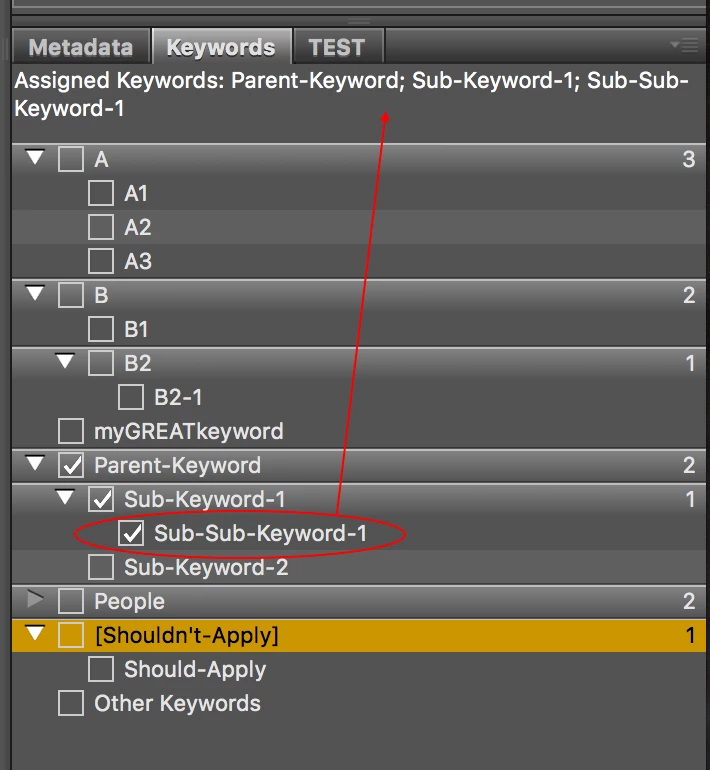
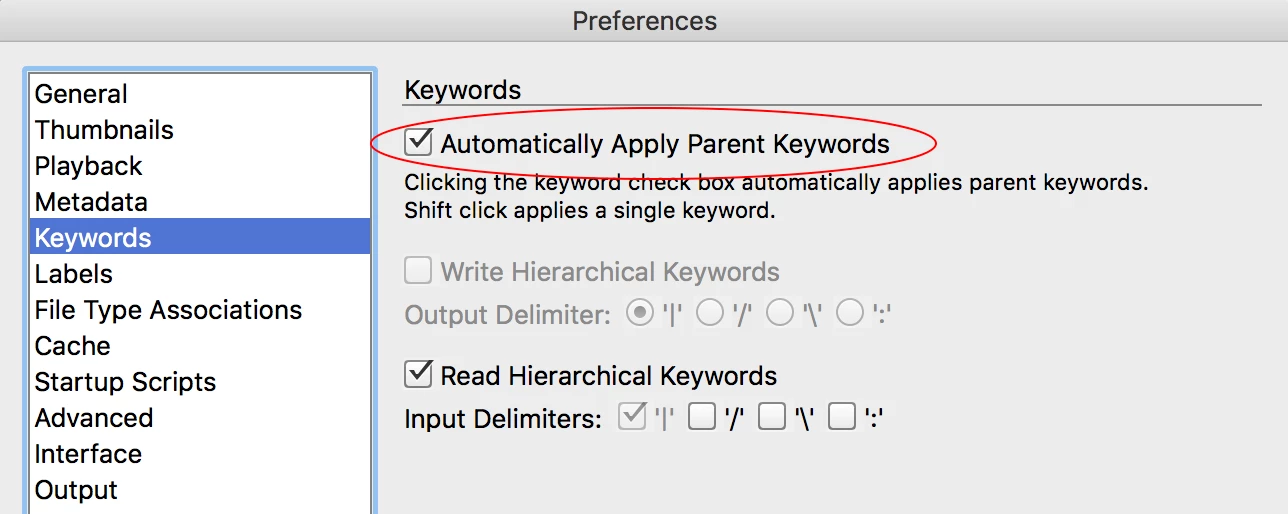
1. So with the Keyword Preferences set to “Automatically apply parent keywords”:

2. Next I checked the following sub-keyword, that did not have a parent keyword in [brackets]:

As expected, the lower child/sub-keyword also includes the two nested parent keywords. All good so far!

3. Finally I setup a parent keyword using [brackets] and ticked the lower child/sub-keyword:

And only the child/sub-keyword is applied, the parent keyword is not applied!

Keep in mind that Bridge is still “silently” writing Lightroom Hierarchical Keywords that will include both keywords (output from ExifTool):

[XMP-lr]   HierarchicalSubject:   Shouldn't-Apply|Should-Apply

This was tested with Bridge CC2018 on the Mac.

2 replies

Legend
August 1, 2019

I did some testing with bracketed keywords and had to manually edit the keywords XML file to fix the mess that resulted. ALL my nested keywords got blown out, and the dc namespace didn't match the lr namespace. Buggy, buggy, buggy. Just be aware if you have existing keywords.

Stephen Marsh
Community Expert
Community Expert
April 23, 2019

Try setting your keyword prefs as follows for “write”, for “read” you may also wish to untick as well, not sure that is your call:

Stephen Marsh
Community Expert
Stephen MarshCommunity ExpertCorrect answer
Community Expert
April 24, 2019

OK, I have looked into this a little deeper… I must confess that I have never used the [bracket] option!

1. So with the Keyword Preferences set to “Automatically apply parent keywords”:

2. Next I checked the following sub-keyword, that did not have a parent keyword in [brackets]:

As expected, the lower child/sub-keyword also includes the two nested parent keywords. All good so far!

3. Finally I setup a parent keyword using [brackets] and ticked the lower child/sub-keyword:

And only the child/sub-keyword is applied, the parent keyword is not applied!

Keep in mind that Bridge is still “silently” writing Lightroom Hierarchical Keywords that will include both keywords (output from ExifTool):

[XMP-lr]   HierarchicalSubject:   Shouldn't-Apply|Should-Apply

This was tested with Bridge CC2018 on the Mac.

Legend
April 24, 2019

Be aware of a bug, keywords entered in the kw panel write to LR namespace but using File Info in Bridge and Photoshop, they do not.