


olege49379222
Participant
November 1, 2020
Question

Photo Downloader in Bridge doesn't work properly

  • November 1, 2020
  • 2 replies
  • 352 views

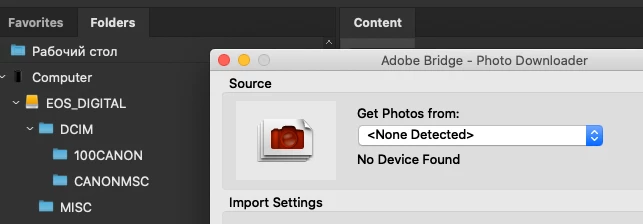
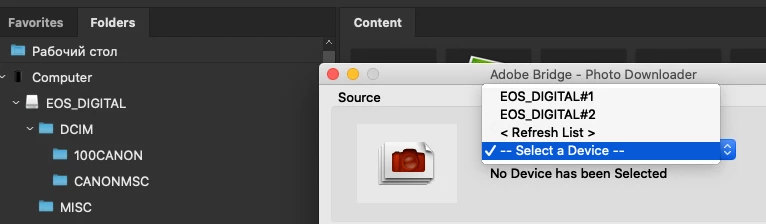
One month ago I bought a Canon R5, now new memory cards and new .cr3 files. Both cards are visible in Finder and Bridge, but the Photo Downloader in Bridge does not work properly. CFexpress card is not visible at all, but the SDXC card is visible even twice (EOS_Digital#1 and EOS_Digital#2 - both work). Enabling Adobe Bridge in the Full Disk Access section and new updates 2021 did not help.
This topic has been closed for replies.

2 replies

Legend
January 3, 2023

The Photo Downloader does not work with some types of cards. Use the Finder instead.

Inspiring
January 3, 2023

The Photo Downloader has been buggy and in various states of disrepar forsome time.

I use Finder on my Mac to download and then fill in the detailsas necessary to make things work. e.g. add copyright, rename etc.

Bridge CC Output Module
Participating Frequently
December 30, 2022

I find it dishearterning that this question was posed in November 2020, not answered and still persists! I have an R5, and have the same issue more than two years later. I have, of course, found a work around in manually dragging and dropping files from my CFExpress card into a folder on my drive and then renaming the resulting files, but this is really labor intensive, tedious, time consuming, and not at in keeping with my workflow. 


Not holding my breath here, but would appreciate a reply.

Bridge CC Output Module
Participating Frequently
December 30, 2022

currently running Mac OS 13.0.1