
Known Participant
June 6, 2019
Answered

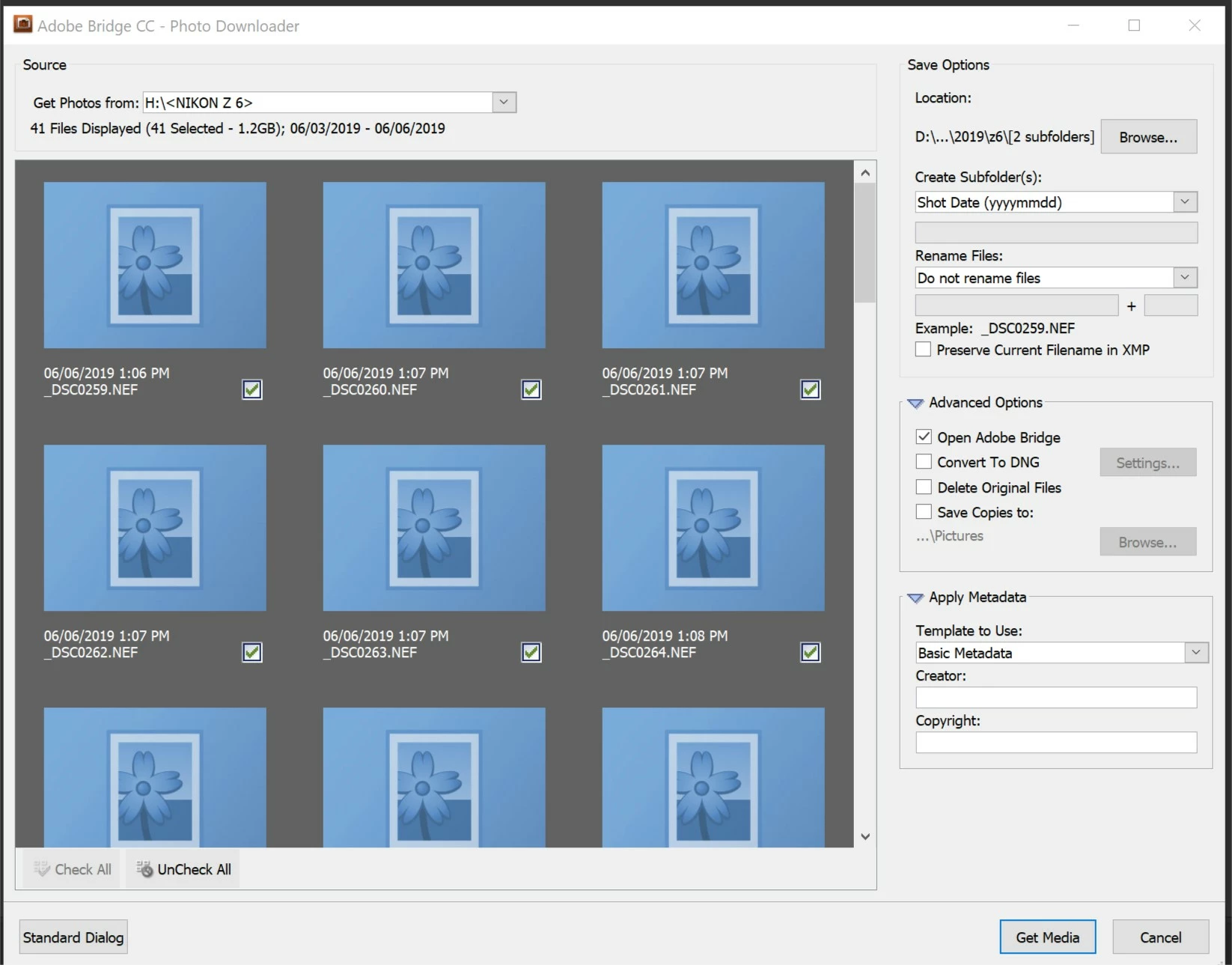
Photo Downloader only shows Z6 icons
  • June 6, 2019
  • 2 replies
  • 2655 views

Windows 10 (1903), latest versions of Bridge and ACR. Downloader will not display images from Z6 but Bridge and converter recognize, display and process Z6 NEF files. No issues with NEF from other Nikons or Canon/Olympus raw images. Reset preferences in Bridge, did nothing. When I first got the Z6 I had no problems. I am not sure if this happened after installing the new RAW image extension for Win 10 (which I believe only works in 1903?)--file explorer now displays raw image previews.

    This topic has been closed for replies.
    Correct answer Nikon D500 Series

    I've been following this thread to try to figure out why my Nikon P1000, Z6, and Z50 cameras don't show the photos associated with raw files uploaded to Adobe Bridge through the Photo Downloader - the only thing I see is the file name and the flower icon. However, once the files are down loaded the raw photos are available in Bridge and no issues are presented. For what it's worth, I talked to Adobe tech support this morning and was told that Adobe is aware of this problem and that Adobe engineers are working to correct a software bug. I was told that the problem should be corrected within the next few updates. At least I now know that there is no preference setting or other Windows 10 setting that I've overlooked.

    2 replies

    Nikon D500 SeriesCorrect answer
    Participant
    January 26, 2021

    I've been following this thread to try to figure out why my Nikon P1000, Z6, and Z50 cameras don't show the photos associated with raw files uploaded to Adobe Bridge through the Photo Downloader - the only thing I see is the file name and the flower icon. However, once the files are down loaded the raw photos are available in Bridge and no issues are presented. For what it's worth, I talked to Adobe tech support this morning and was told that Adobe is aware of this problem and that Adobe engineers are working to correct a software bug. I was told that the problem should be corrected within the next few updates. At least I now know that there is no preference setting or other Windows 10 setting that I've overlooked.

    Participant
    January 26, 2021

    Thanks for the update - what great news!

    Hopefully they'll speed up the process...


    Thx.

    /Palle 

    Akash Sharma
    Legend
    June 7, 2019

    Hi bmoag,

    That isn't a great user experience as the Photo Downloader in Bridge is not showing the preview of the Nikon Z6 NEF images , we're sorry to hear about this. Let us help make it right.

    Please take a look at the troubleshooting steps mentioned in this article Troubleshoot Adobe Bridge for freezes and performance issues  and let us know if that helps?

    The solutions mentioned here can also help resolving the issue: Generic icons | Camera raw files | Adobe Bridge

    Let us know if that helps.

    Thanks,

    Akash

    bmoagAuthor
    Known Participant
    July 16, 2019

    I did not realize I got a reply. I did all of that as well as installing the NEF codec for Win 10 and reinstalling the latest version of the Adobe Raw Plug in. The Bridge downloader still will not show thumbnails of Nikon Z6 NEF files in Win 10 ( works in OSX). Windows File Explorer shows thumbnails as does Bridge itself. The Bridge downloader remains brain dead.

    Akash Sharma
    Legend
    July 17, 2019

    Which exact version of Bridge are you using? Help>>About Bridge

    ~Akash