
Question
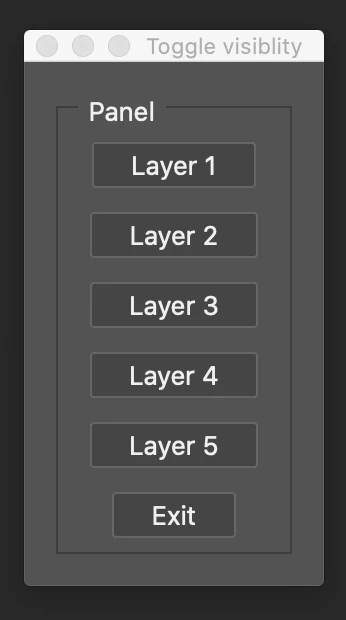
Photoshop UI Pallet Button Toggle
The Photoshop UI palette uses BridgeTalk to allow interaction with the palette buttons. The. idea was to use functions and a switch statement to add functionality to the UI buttons. It turns out, BridgeTalk uses a different type of function and does not work with a switch statement. A workaround was suggested which includes wrapping the functions in the bt.body and copying the bt.body to an external file where they can be treated with regular photoshop functions. Every time the script runs the by.body is copied to an external file overwriting the previous version.
Can somebody check the script and suggest how to proceed. I have been stuck for a few days and unable to find a similar UI pallet script to reference.
#target photoshop
var bt = new BridgeTalk(),
ph = BridgeTalk.getSpecifier('photoshop'),
buildWindow = function () {
var z = Window.find('palette', 'Toggle visiblity');
if (z) {
z.show();
return;
}
var dialog = new Window("palette");
dialog.text = "Toggle visiblity";
dialog.orientation = "column";
dialog.alignChildren = ["center", "center"];
dialog.spacing = 10;
dialog.margins = 16;
var panel = dialog.add('panel', undefined, 'Panel');
var toggleButton1 = panel.add('button', undefined, undefined, { name: 'toggleButton1' });
toggleButton1.text = "Layer 1";
toggleButton1.onClick = function () {
var theLayer = toggleButton1.text;
lyrToggle(theLayer);
test(theLayer);
};
var toggleButton2 = panel.add('button', undefined, undefined, { name: 'toggleButton2' });
toggleButton2.text = "Layer 2";
toggleButton2.onClick = function () {
var theLayer = toggleButton2.text;
lyrToggle(theLayer);
};
var toggleButton3 = panel.add('button', undefined, undefined, { name: 'toggleButton3' });
toggleButton3.text = "Layer 3";
toggleButton3.onClick = function () {
var theLayer = toggleButton3.text;
lyrToggle(theLayer);
};
var toggleButton4 = panel.add('button', undefined, undefined, { name: 'toggleButton4' });
toggleButton4.text = "Layer 4";
toggleButton4.onClick = function () {
var theLayer = toggleButton4.text;
lyrToggle(theLayer);
};
var toggleButton5 = panel.add('button', undefined, undefined, { name: 'toggleButton5' });
toggleButton5.text = "Layer 5";
toggleButton5.onClick = function () {
var theLayer = toggleButton5.text;
lyrToggle(theLayer);
};
var exitButton = panel.add('button', undefined, 'Exit', {name: 'Exit'});
exitButton.onClick = function () {
dialog.hide();
}
dialog.onShow = function (){
this.active = true;
}
dialog.show();
}
bt.target = ph;
bt.body = "var f=" + buildWindow.toSource() + ";f();";
f = File(Folder.desktop + "/independentlyExecutableFunction.jsx");
f.open('w');
f.encoding = 'text';
f.write(bt.body);
f.close();
bt.send();
///////////////////////////////////////////////////////////////////////
And this is what gets outputted tot he external file
independentlyExecutableFunction.jsx
var f=(function () {
var z = Window.find('palette', 'Toggle visiblity');
if (z) {
z.show(); return;
}
var dialog = new Window("palette");
dialog.text = "Toggle visiblity";
dialog.orientation = "column";
dialog.alignChildren = ["center", "center"];
dialog.spacing = 10; dialog.margins = 16;
var panel = dialog.add('panel', undefined, 'Panel');
var toggleButton1 = panel.add('button', undefined, undefined, { name: 'toggleButton1' });
toggleButton1.text = "Layer 1";
toggleButton1.onClick = function () {
var toggleLayer = toggleButton1.text;
main(toggleLayer);
};
var toggleButton2 = panel.add('button', undefined, undefined, { name: 'toggleButton2' });
toggleButton2.text = "Layer 2";
toggleButton2.onClick = function () {
var toggleLayer = toggleButton2.text;
main(toggleLayer);
};
var toggleButton3 = panel.add('button', undefined, undefined, { name: 'toggleButton3' });
toggleButton3.text = "Layer 3";
toggleButton3.onClick = function () {
var toggleLayer = toggleButton3.text; main(toggleLayer);
};
var toggleButton4 = panel.add('button', undefined, undefined, { name: 'toggleButton4' });
toggleButton4.text = "Layer 4";
toggleButton4.onClick = function () {
var toggleLayer = toggleButton4.text;
main(toggleLayer);
};
var toggleButton5 = panel.add('button', undefined, undefined, { name: 'toggleButton5' });
toggleButton5.text = "Layer 5";
toggleButton5.onClick = function () {
var toggleLayer = toggleButton5.text;
main(toggleLayer);
};
var exitButton = panel.add('button', undefined, 'Exit', {name: 'Exit'});
exitButton.onClick = function () {
dialog.hide();
}
dialog.onShow = function (){
this.active = true;
}
dialog.show();
});f();


 AdChoices