
cannondale63
Participant
April 24, 2022
Question

Platzieren in Indesign aus Bridge bringt Fehlermeldung

  • April 24, 2022
  • 2 replies
  • 397 views

Hallo Community


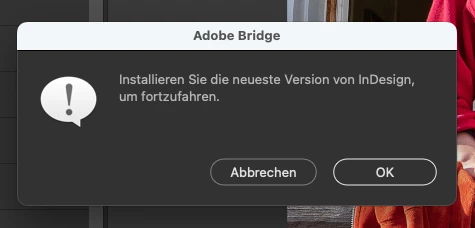
Wenn ich ein Bild aus Bridge direkt in Indesign platzieren will, erhalte ich die Fehlermeldung «Installieren Sie die neuste Version von Indesign, um fortzufahren». Ich habe jedoch die neuste Version installiert. Woran kann das liegen?

Hinweis: Ich arbeite mit Mac ios, neuste Version.


Danke für eure Hilfe, Dominik
This topic has been closed for replies.

2 replies

Rahul Saraogi
Community Manager
Community Manager
May 6, 2022

Hello Canondale63,


Thank you for reaching out to us.


To better investigate the issue, could you please share the following:

1. Bridge and InDesign version installed

2. Script for InDesign is enabled? You can check from Bridge->Preferences->Startup Scripts. Entry will be something as shown in the screenshot


3. If you have relaunched Bridge after installing InDesign? If not, please relaunch Bridge after installing InDesign

After relaunching Bridge you will get a message to enable InDesign script

4. Machine configuration like OS, processor, etc.


Thanks,

Bridge Team


cannondale63
Participant
May 6, 2022

Hello Bridge Team

Thanks for your answer. I have installed the following versions (see attached screenshots):

  • Bridge: 12.0.1.246
  • Indesign: 17.2.1

I just have installed Bridge again --> same problem as before.

Indesign script is enabled, see screenhot.

I'm working with Apple iOs.

Would be great if you can help me.

Thanks a lot


Dominik


gary_sc
Community Expert
Community Expert
April 24, 2022

Hi Canondale63,


The first thing I'd try is to rebuild your Preferences:

Quit Bridge (if running). Just before clicking on Bridge in the Dock or double-clicking the application, for the Mac, press Command-Option-Shift. For PCs, press Control-Alt -Shift. Then open Bridge BUT KEEP your fingers on those keys until you see a window pop up. From the window, choose “Reset Preferences," "Entire Thumbnail Cache”, and/or "Reset Standard Workspaces.” In your case, choose "Reset Preferences."


Let's see if this works, we can go from there.


Good luck!

cannondale63
Participant
April 25, 2022

Hi gary_sc

I did this reset, but it did not help. Too bad... Do you have another idea? Should I reinstall bridge maybe?
This problem also occurs when I try to place an image from Bridge into Photoshop, for example.

Thanks for your help!

Dominik

gary_sc
Community Expert
Community Expert
April 25, 2022

Hi Dominik,


The interactions between Bridge and any other application are done via scripts installed into Bridge by the other applications. Therefore, if you installed Bridge AFTER installing the other applications, the other applications do not know there is (or will be) a Bridge to install the scripts into Bridge.


You may need to uninstall any applications that Bridge is not placing images into and then reinstall them. Be sure to have Bridge turned off (quit) during this reinstallation. 


Best,


Gary