
Participant
Jun 17, 2012 7:59 PM UTC
Question

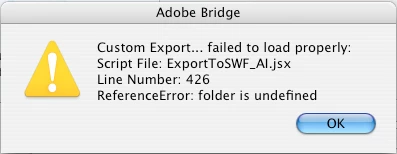
Please help me find "ExportToSWF_AI.jsx".

I'm using Adobe Bridge to select a batch of .JPEG's to convert to a .SWF file presentation. Under the menu TOOLS I select Illustrator/Export to SWF and I get an error message. I've searched Google and have been unable to find this "ExportToSWF_AI.jsx" file anywhere. Please help me resolve this error with Adobe Bridge.
This topic is closed to new replies. Start a new post to keep the conversation going.

2 replies

Inspiring
Jun 18, 2012 8:38 AM UTC

Im at work where I only have a CS5 install… What version are you using and was this script part of the standard Adobe install…?

You must have the script file in order to run its location will depend on your OS and the app version…

Translate
macphotoAuthor
Participant
Jun 18, 2012 11:39 AM UTC

My appologies, I should have included that information. 

Adobe Bridge CS3 and inDesign CS3 on Apple PPC running OSX 10.4

I'd like to collect a batch of .JPEG's to create a slideshow in a .SWF using this feature.

Translate