

VisualDigits
Inspiring
April 11, 2018
Question

Previews looking strange when coworking with lightroom cc

  • April 11, 2018
  • 1 reply
  • 300 views

Hi,

I use lightroom cc classic and bridge in parallel and have configured both products to make use of sidecar files so changes are reflected in the other product.

Recently I tried the feature "Adjust Luminance by dragging in the picture" ("HSL / Color" tab) in lightroom classic and reduced the luminance of a blue sky.

Back in bridge the preview now looks as if it was color reduced to 32 colors or so:
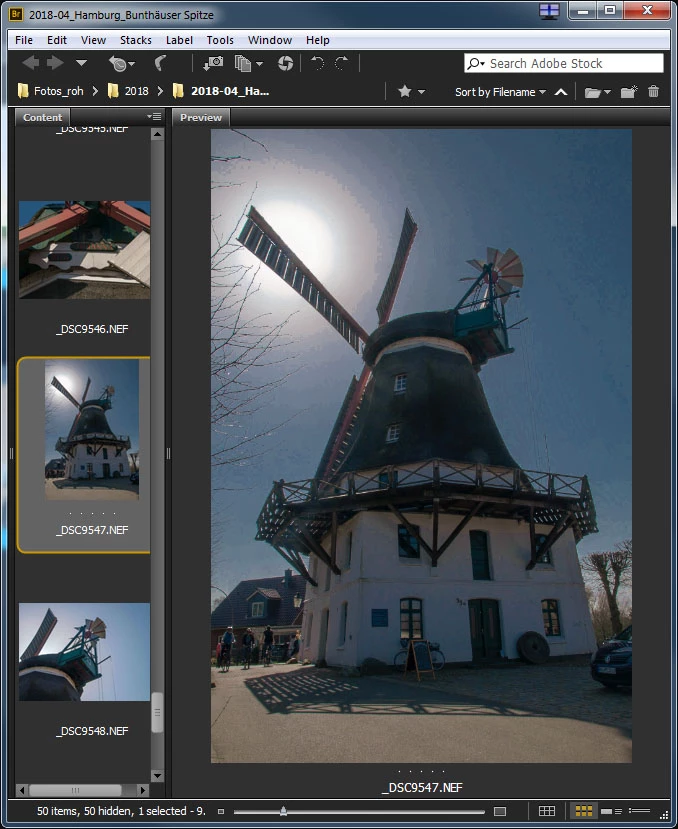
In lightroom it looks as expected.

Are previews mangled somehow in bridge and can that be configured (did not find any option for that).

REgards,

Stephan

This topic has been closed for replies.

1 reply

Theresa J
Community Expert
Community Expert
April 12, 2018

Is this a new issue, or something you have experienced before? I think it has something to do with the way Bridge is creating previews. Are both Lr and Bridge the most current versions?

VisualDigits
Inspiring
April 12, 2018

Hi Theresa,

I just have updated to the newest versions of all products I use (photo bundle).

Before I used a very old cs5 version bridge and was not using lightroom in parallel.

So I cannot say if this is a new issue.

What I already tried is to purge the cache for that picture after I have set the thumbnail generation to full screen size.

But this did not help.

I think this only occurs if I use the feature I mentioned in my original post. When just using the normal controls within the base panel I do not see this behavior. Maybe the changes are not smooth enough when modifying a specific color range as the picker tool does it.