



dragantomas
Inspiring
December 27, 2021
Question

Problem in removing Dr Brown's Services from Bridge

  • December 27, 2021
  • 6 replies
  • 411 views

Hi All,


Lateest versions of Photoshop and Bridge. MBook Pro Big Sur.


I am unable to remove Dr Brown's Services from Bridge. I have removed its files from Photoshop Scripts and Bridge presets in the Finder menus. But when I open Bridge and go Tools, in the drop down meny Dr Brown's Services is still there. 


I have uninstalled&reinstalled Bridge but thats not helping the issue. Does someoine knows what is going on here and how to have it removed from the Tools meny in the Bridge?
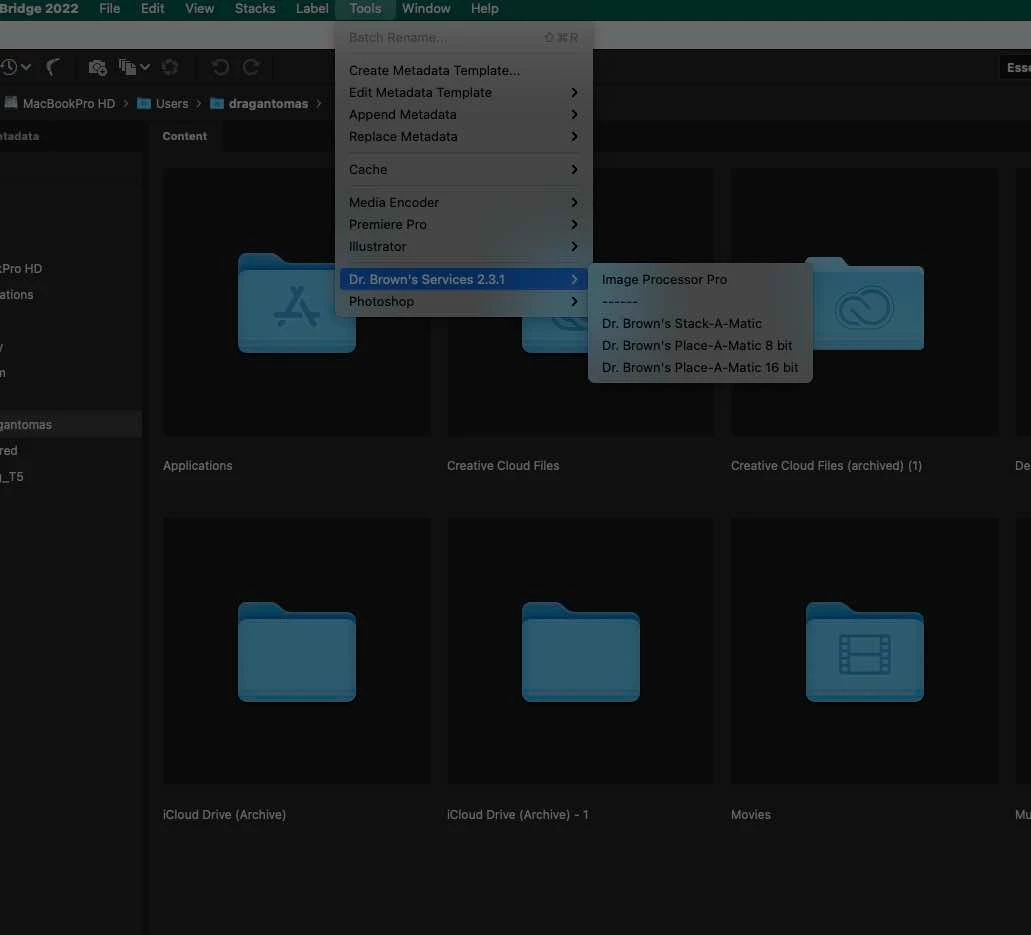
 

This topic has been closed for replies.

6 replies

gary_sc
Community Expert
Community Expert
December 27, 2021

It's in your computer's library, not the user library.


Let me know if this works or not.

dragantomas
Inspiring
December 27, 2021

I have followed up on what you said. Couldnt find it there. Here is screenshot:


gary_sc
Community Expert
Community Expert
December 27, 2021

According to your screenshot, you were not in the correct location. From Adobe -> the next folder should have been "Startup Scripts CC"


Glad you resolved your issue though.

Nancy OShea
Community Expert
Community Expert
December 27, 2021

[Moderator moved from Photoshop to Bridge.]


Nancy O'Shea— Product User & Community Expert