
Inspiring
August 7, 2022
Answered

Problem using Bridge - small arrow for subfolders not visible

  • August 7, 2022
  • 1 reply
  • 988 views

Hi,

When I use Bridge and store my photos on my ext. HDD, I for some day ago discover, I suddenly do not see the small arrows anymore, that shows there is a subfolder in the folder. It is only when I make new subfolders and only making them from Bridge. If I make the new subfolder from Finder it is okay.

I see all files and all folder.


Bridge is fully updated and I have reinstalled Bridge, but have not reinstalled an older version. I use MacOS  10.15.7 Catalina (the newest MacOS is 12.5)


On the photo:

See my yellow circle for the folder with the subfolder "Testing".

See my red circle for a folder with no error, where the small arrow is shown.
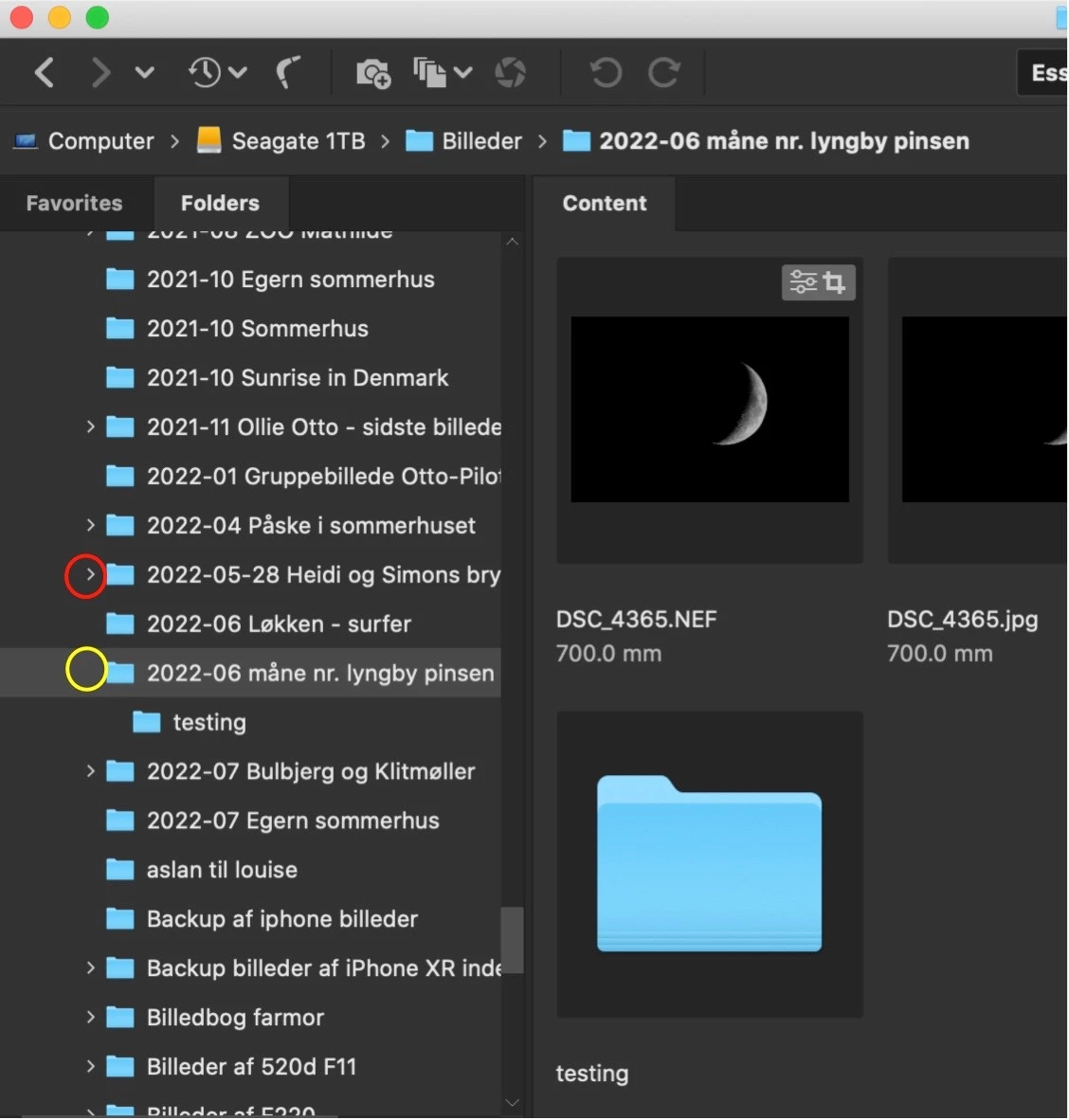
 

This topic has been closed for replies.
Correct answer ibolesen

This is very strange.


When I install Bridge 12.0 or 12.1 (uninstall 12.2 first) I can't see the little arrow either, but when I do a rebuild of preferences (SHIFT+ALT+CMD when restarting Bridge) I see all the little arrows at folders with subfolders (made in Bridge).


But when (after rebuilding the preferences) I create a new folder with a subfolder (made in Bridge), I don't see the arrow when restarting Bridge. I have to rebuild preferences again when restarting Bridge. Then I see the small arrows ...


** UPDATE **

Problem solved.

Bridge does not support ExFAT format. When i reformatted to APFS I hav no problems. The downside is, that I then can't share files from this ext. HD on Windows PC.

1 reply

gary_sc
Community Expert
Community Expert
August 7, 2022

Quick question: is there anything inside the folders without the arrow?


Alternatively, is there a folder inside the folder or just images?

ibolesenAuthor
Inspiring
August 7, 2022

Both. No diff. if there is images or not. I have tried both.

gary_sc
Community Expert
Community Expert
August 7, 2022

Hi Ibolesen,


The reason why I ask is that on my computer if there is a folder inside the folder, there is an arrow. If there is no folder inside the folder, just images, no arrow.


I've always taken this as "but wait, there's more!" That is, if you were looking for something, it was a way to let you know that there is another folder for you to dig into. I'm really sure this is not new, but I can't tell you how long it's been this way.