
Kasyan Servetsky
Legend
May 3, 2017
Question

Problem with adding TabbedPalette using the create document event

  • May 3, 2017
  • 2 replies
  • 1151 views

Dear forum,

I created a TabbedPalette and now want it to add automatically on start up. My first attempt was to add it to the ‘Startup Scripts’ folder, but this, obviously, didn’t work so I reread the documentation more carefully and found out that this should be done using the create document event.

You can add a palette to an existing browser window at any time (as long as the identifier is unique), and

you can use the create document event to add your palette to new browser windows on creation.

(Bridge CS6 scripting reference, page 87)

Here’s a snippet illustrating the problem:

onCreateDocument = function(event) {

    if (event.object instanceof Document && event.type == "create") {

        $.writeln("Document is created");

        CreateTabbedPalette();

        return {handled: true};

    }

}

app.eventHandlers.push({handler: onCreateDocument});

function CreateTabbedPalette() {

    $.writeln("Entering the 'CreateTabbedPalette' function");

    $.writeln("App documents length = " + app.documents.length);

    $.writeln("Exiting the 'CreateTabbedPalette' function");

}

It seems that the create document event is triggered before the document is actually created so app.documents.length = 0; as a result, later when I try to add a TabbedPalette to the current document -- app.documents[0] – an error occurs.
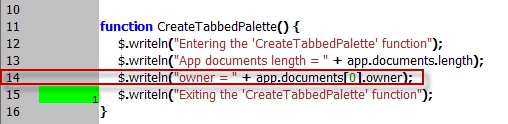
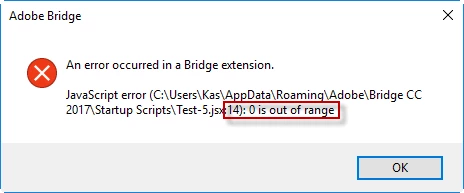
Am I doing something wrong, or adding a TabbedPalette via menu item is the only option?

Regards,
Kas

This topic has been closed for replies.

2 replies

Inspiring
August 14, 2019

I have a solution for this. It may be seen as an inelegant work-around for the issue, but it works for me.

Once you have your script file working the way you want and it is located in the Bridge Startup Scripts folder, go into the Bridge Preferences and disable that script file from running at Startup. We will call this file "MainScript.jsx".  Or you can actually save it anywhere else and skip the disabling step. Just remember where it is.

Create another script file to be saved into the Bridge Startup Scripts folder. This one we will call "Script-Launcher.jsx". In Script-Launcher.jsx put the following code (which you will have to edit for your own personal needs).

Edit the first 3 variables for your own system DelaySeconds you will have to play with to get it where you want it. Too soon might launch the Palette script while the application is still loading and cause errors. Too late and the Palette won't be available right away when Bridge starts. Error on the side of too late.

launchFileName="MainScript.jsx";  //Filename for Palette Script File

scriptDir="...\\Adobe\\Bridge CC 2018\\Startup Scripts\\"; //Folder where Bridge Startup Scripts are located

DelaySeconds=15; //Delay before running Palette Script. This may have to be adjusted.

launchFile=scriptDir+launchFileName;

delay=DelaySeconds*1000;

app.scheduleTask("LaunchFile()",delay,false);

function LaunchFile() {

    if (File(launchFile).exists) {

        $.writeln("Launching "+launchFile);

        $.evalFile(launchFile);

    }

    else $.writeln("Did not launch "+launchFile);

}

Kasyan Servetsky
Legend
August 14, 2019

Thank you!

Legend
August 20, 2019

My Text Preview script does this, and is configurable. Apache-licensed open source. Look at the event handlers, I too use the loaded event.

Dropbox - Utility Script Pack.zip - Simplify your life

Kasyan Servetsky
Legend
May 3, 2017

Now I tried to use the loaded event instead of created: I guess this may solve my problem.

Kasyan Servetsky
Legend
May 3, 2017

I tried to use the loaded event — no joy.

Though the palette is added on start up, at the line which adds the TabbedPalette, an error occurs:

So I attempted to enclose the line into a try-catch bloc:

Here's what I get in the console:

Document is created

App documents length = 1

Document: 1280

Bad argument list, line: 58

true

So the active document is valid and I can get its properties: e.g. width)

The palette has been created and is visible in Bridge. However, the error (bad argument) occurs when the script is triggered by the event (when run from ESTK, no error happens) and the variable 'c' is undefined which leads to further errors when the script references it.

SuperMerlin
Inspiring
May 3, 2017

Would something like this work for you?

try{

    var ct = new TabbedPalette( app.document, "Test tabbedPanel", "Id", "script", "left", "top");

     CreateTabbedPalette( );

     }catch(e){}

onCreateDocument = function(event) { 

    if (event.object instanceof Document && event.type == "create") { 

        $.writeln("Document is created"); 

        if(ct == undefined){

            var ct = new TabbedPalette( app.document, "Test tabbedPanel", "Id", "script", "left", "top");

        CreateTabbedPalette( ); 

        }else{

            $.sleep(500);

             var ct = new TabbedPalette( app.document, "Test tabbedPanel", "Id", "script", "left", "top");

            CreateTabbedPalette(); 

            }

        return {handled: true}; 

    } 


app.eventHandlers.push({handler: onCreateDocument}); 


function CreateTabbedPalette() { 

    $.writeln("Entering the 'CreateTabbedPalette' function"); 

    $.writeln("App documents length = " + app.documents.length); 

    $.writeln("Exiting the 'CreateTabbedPalette' function"); 

}