
Inspiring
June 5, 2018
Question

Problem with displaying folders in order while cruising

  • June 5, 2018
  • 2 replies
  • 767 views

Hi,

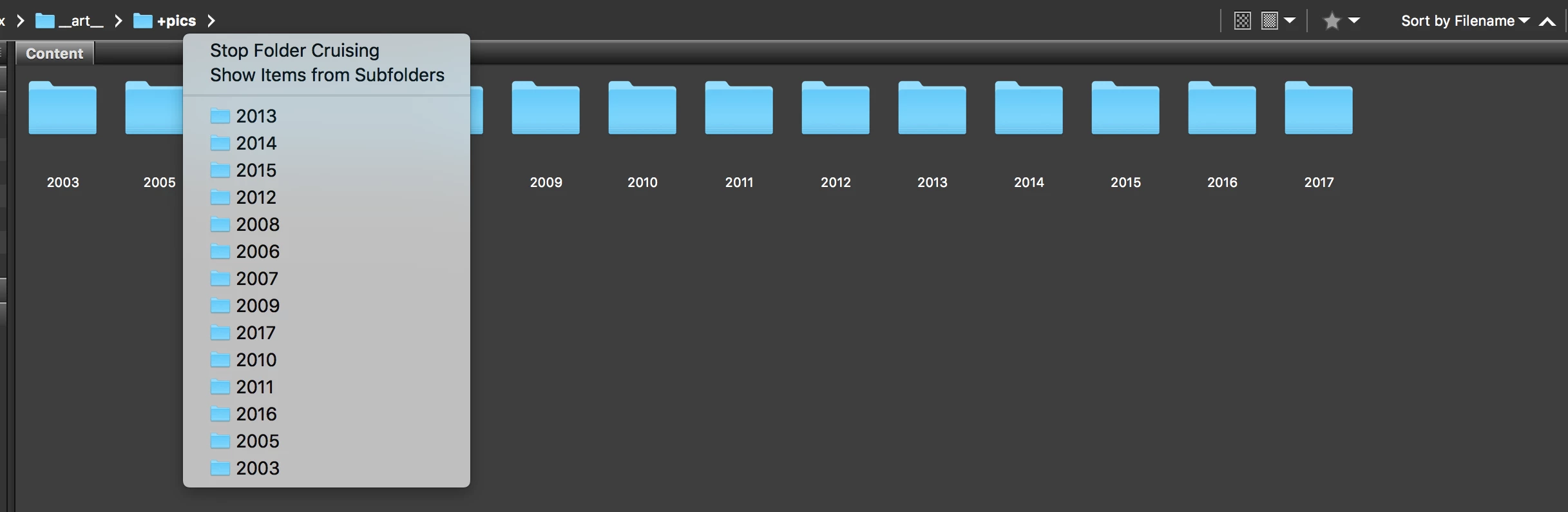
I use Bridge CC on macOS High Sierra and noticed that folders are not in order while clicking on the triangle to see sub-folders (see the screenshot).

View->Sort is set to "By Filename" (you can see that in Content is fine).

How to fix it?

I used Bridge CS6 previously and it was working fine!
This topic has been closed for replies.

2 replies

Participating Frequently
October 17, 2018

Hi xbartx,

We have released a new version of Adobe Bridge (CC 2019) on 15th October 2018. The new version build number is 9.0.0.204. This version is available to install via Adobe Creative Cloud application.

This version has fixes for displaying folder in alphabetic order, while cruising.

Please check following link to know about all new features in Adobe Bridge CC 2019 - https://helpx.adobe.com/bridge/using/whats-new.html

You may need to update the Creative Cloud application and restart your computer to see the updated installer.

Thanks,

Saurabh Verma

jbm007
Community Expert
Community Expert
June 5, 2018

Does your sort order appear the same in Finder?

xbartxAuthor
Inspiring
June 8, 2018

No, in Finder the sort order is correct. I checked for "View as Icon", "View as List" and others. Everything is fine there.

gary_sc
Community Expert
Community Expert
June 11, 2018

I just checked and it's that way in my copy of Bridge, no setting seems to affect this.

I think you found a bug! Congrats!