

Problem with TabbedPalette
Dear forum,
I am trying to make a custom TabbedPalette in Bridge CC 2017 release – 7.0.0.93 x64 -- Windows
When I was reading the scripting guide it looked for me like an easy trip since I am already familiar with ScriptUI and made many dialog boxes in InDesign. So, at first, I created a dialog box as I usually do: using automatic layout.
In ESTK it looks as I want:
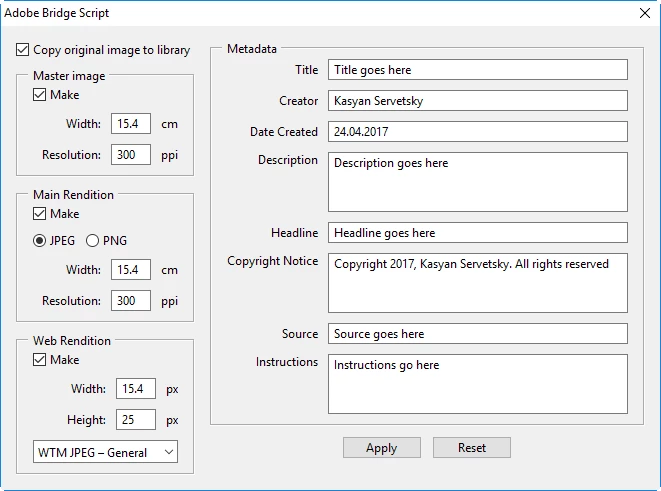
In Bridge the same code looks much worse: no outline around the text edit boxes, the drop down list has dark color, some characters in static texts are clipped at the right. But it is still acceptable.
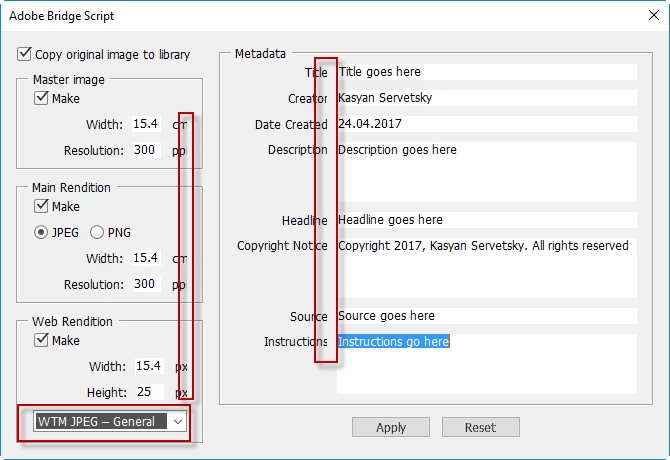
However, after I reworked it into TabbedPalette, I was totally disappointed with the result. It looks ugly: some controls are invisible – check boxes, text edit fields, radio buttons, the text in the text edit fields is hardly discernible. Though the controls are in place; when I click the area where a check box is located, the script reacts on it.
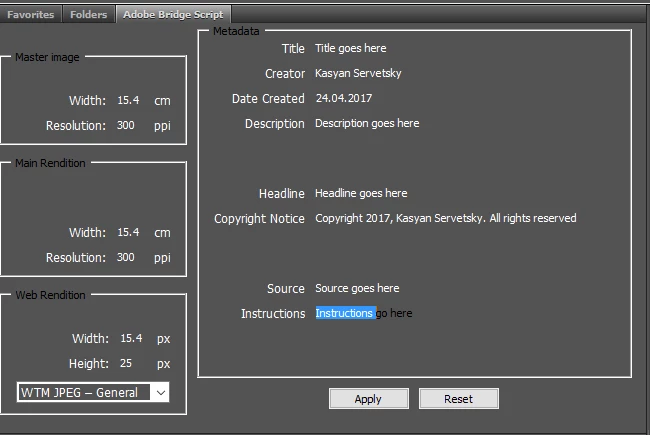
Here I read that ScriptUI in Bridge is non-functional (in CS6).
As far as I understand, the feature is totally broken – at least in the latest versions of Bridge – and it’s impossible to make TabbedPalette.
Am I right, or there’s some workaround to solve the problem?
Currently I'm on vacation so can't test it in older versions and on Mac.
Here’s my code:
var set = null;
set = {
locationOriImg: "/Desktop/Files/IMAGE_LIBRARY/-Originals-Masters/", // A & B
locationMainRend: "/Desktop/Files/IMAGE_LIBRARY/", // C
locationWebRend: "/Desktop/Files/IMAGE_LIBRARY/-website_images/", // E & F
filename: "MyFilename",
folderName: "My folder",
preset: "WTM PNG - Smll WEB"
};
set.meta = {
title: "Title goes here",
creator: "Kasyan Servetsky",
description: "Description goes here",
dateCreated: "24.04.2017",
headline: "Headline goes here",
keywords: "dog, cat, mouse",
copyrightNotice: "Copyright 2017, Kasyan Servetsky. All rights reserved",
source: "Source goes here",
instructions: "Instructions go here"
};
set.image = {
originalImage: {cb: true},
masterImage: {cb: true, width: 15.4, resolution: 300},
mainRendition: {cb: true, isJpeg: true, width: 15.4, resolution: 300},
webRendition: {cb: true, preset: "WTM JPEG – General", width: 15.4, height: 25}
};
Main();
function Main() {
var doc = app.documents[0];
var editTextNumChars = 4;
var p = new TabbedPalette(doc, "Adobe Bridge Script", "AdobeBridgeScript", "script");
p.g = p.content.add("group"); // main group
p.g.orientation = "row";
p.g.alignChildren = "top";
// Left column ==================================================
p.g.g = p.g.add("group");
p.g.g.orientation = "column";
p.g.g.cb = p.g.g.add("checkbox", undefined, "Copy original image to library");
p.g.g.cb.alignment = "left";
p.g.g.cb.value = true;
//-----------------------------------------------------------------------------------------------
p.g.g.p = p.g.g.add("panel", undefined, "Master image");
p.g.g.p.orientation = "column";
p.g.g.p.alignment = "fill";
p.g.g.p.alignChildren = "right";
p.g.g.p.cb = p.g.g.p.add("checkbox", undefined, "Make");
p.g.g.p.cb.value = set.image.masterImage.cb;
p.g.g.p.cb.alignment = "left";
p.g.g.p.cb.onClick = function() {
if (this.value) {
p.g.g.p.g.enabled = p.g.g.p.g1.enabled = true;
}
else {
p.g.g.p.g.enabled = p.g.g.p.g1.enabled = false;
}
}
p.g.g.p.g = p.g.g.p.add("group");
p.g.g.p.g.orientation = "row";
p.g.g.p.g.st = p.g.g.p.g.add("statictext", undefined, "Width:");
p.g.g.p.g.et = p.g.g.p.g.add("edittext", undefined, set.image.masterImage.width);
p.g.g.p.g.et.characters = editTextNumChars;
p.g.g.p.g.st1 = p.g.g.p.g.add("statictext", undefined, "cm");
p.g.g.p.g1 = p.g.g.p.add("group");
p.g.g.p.g1.orientation = "row";
p.g.g.p.g1.st = p.g.g.p.g1.add("statictext", undefined, "Resolution:");
p.g.g.p.g1.et = p.g.g.p.g1.add("edittext", undefined, set.image.masterImage.resolution);
p.g.g.p.g1.et.characters = editTextNumChars;
p.g.g.p.g1.st1 = p.g.g.p.g1.add("statictext", undefined, "ppi");
//-----------------------------------------------------------------------------------------------
p.g.g.p1 = p.g.g.add("panel", undefined, "Main Rendition");
p.g.g.p1.orientation = "column";
p.g.g.p1.alignment = "fill";
p.g.g.p1.alignChildren = "right";
p.g.g.p1.cb = p.g.g.p1.add("checkbox", undefined, "Make");
p.g.g.p1.cb.value = set.image.mainRendition.cb;
p.g.g.p1.cb.alignment = "left";
p.g.g.p1.cb.onClick = function() {
if (this.value) {
p.g.g.p1.g.enabled = p.g.g.p1.g1.enabled = p.g.g.p1.g2.enabled = true;
}
else {
p.g.g.p1.g.enabled = p.g.g.p1.g1.enabled = p.g.g.p1.g2.enabled = false;
}
}
p.g.g.p1.g = p.g.g.p1.add("group");
p.g.g.p1.g.orientation = "row";
p.g.g.p1.g.alignment = "left";
p.g.g.p1.g.rb = p.g.g.p1.g.add("radiobutton", undefined, "JPEG");
p.g.g.p1.g.rb.value = true;
p.g.g.p1.g.rb1 = p.g.g.p1.g.add("radiobutton", undefined, "PNG");
if (set.image.mainRendition.isJpeg) {
p.g.g.p1.g.rb.value = true;
}
else {
p.g.g.p1.g.rb1.value = true;
}
p.g.g.p1.g1 = p.g.g.p1.add("group");
p.g.g.p1.g1.orientation = "row";
p.g.g.p1.g1.st = p.g.g.p1.g1.add("statictext", undefined, "Width:");
p.g.g.p1.g1.et = p.g.g.p1.g1.add("edittext", undefined, set.image.mainRendition.width);
p.g.g.p1.g1.et.characters = editTextNumChars;
p.g.g.p1.g1.st1 = p.g.g.p1.g1.add("statictext", undefined, "cm");
p.g.g.p1.g2 = p.g.g.p1.add("group");
p.g.g.p1.g2.orientation = "row";
p.g.g.p1.g2.st = p.g.g.p1.g2.add("statictext", undefined, "Resolution:");
p.g.g.p1.g2.et = p.g.g.p1.g2.add("edittext", undefined, set.image.mainRendition.resolution);
p.g.g.p1.g2.et.characters = editTextNumChars;
p.g.g.p1.g2.st1 = p.g.g.p1.g2.add("statictext", undefined, "ppi");
//-----------------------------------------------------------------------------------------------
p.g.g.p2 = p.g.g.add("panel", undefined, "Web Rendition");
p.g.g.p2.orientation = "column";
p.g.g.p2.alignment = "fill";
p.g.g.p2.alignChildren = "right";
p.g.g.p2.cb = p.g.g.p2.add("checkbox", undefined, "Make");
p.g.g.p2.cb.value = set.image.webRendition.cb;
p.g.g.p2.cb.alignment = "left";
p.g.g.p2.cb.onClick = function() {
if (this.value) {
p.g.g.p2.g.enabled = p.g.g.p2.g1.enabled = p.g.g.p2.dll.enabled = true;
}
else {
p.g.g.p2.g.enabled = p.g.g.p2.g1.enabled = p.g.g.p2.dll.enabled = false;
}
}
p.g.g.p2.g = p.g.g.p2.add("group");
p.g.g.p2.g.orientation = "row";
p.g.g.p2.g.st = p.g.g.p2.g.add("statictext", undefined, "Width:");
p.g.g.p2.g.et = p.g.g.p2.g.add("edittext", undefined, set.image.webRendition.width);
p.g.g.p2.g.et.characters = editTextNumChars;
p.g.g.p2.g.st1 = p.g.g.p2.g.add("statictext", undefined, "px");
p.g.g.p2.g1 = p.g.g.p2.add("group");
p.g.g.p2.g1.orientation = "row";
p.g.g.p2.g1.st = p.g.g.p2.g1.add("statictext", undefined, "Height:");
p.g.g.p2.g1.et = p.g.g.p2.g1.add("edittext", undefined, set.image.webRendition.height);
p.g.g.p2.g1.et.characters = editTextNumChars;
p.g.g.p2.g1.st1 = p.g.g.p2.g1.add("statictext", undefined, "px");
p.g.g.p2.dll = p.g.g.p2.add("dropdownlist", undefined, ["WTM JPEG – General", "WTM JPEG – Smll WEB", "WTM PNG – General", "WTM PNG - Smll WEB"]);
p.g.g.p2.dll.selection = 0;
// Right column =================================================
var editTextWidth = 300;
p.g.g1 = p.g.add("group");
p.g.g1.orientation = "column"
p.g.g1.p = p.g.g1.add("panel", undefined, "Metadata");
p.g.g1.p.orientation = "column";
p.g.g1.p.alignChildren = "right";
p.g.g1.p.g = p.g.g1.p.add("group");
p.g.g1.p.g.orientation = "row";
p.g.g1.p.g.st = p.g.g1.p.g.add("statictext", undefined, "Title");
p.g.g1.p.g.et = p.g.g1.p.g.add("edittext", undefined, set.meta.title);
p.g.g1.p.g.et.preferredSize.width = editTextWidth;
p.g.g1.p.g1 = p.g.g1.p.add("group");
p.g.g1.p.g1.orientation = "row";
p.g.g1.p.g1.st = p.g.g1.p.g1.add("statictext", undefined, "Creator");
p.g.g1.p.g1.et = p.g.g1.p.g1.add("edittext", undefined, set.meta.creator);
p.g.g1.p.g1.et.preferredSize.width = editTextWidth;
p.g.g1.p.g2 = p.g.g1.p.add("group");
p.g.g1.p.g2.orientation = "row";
p.g.g1.p.g2.st = p.g.g1.p.g2.add("statictext", undefined, "Date Created");
p.g.g1.p.g2.et = p.g.g1.p.g2.add("edittext", undefined, set.meta.dateCreated);
p.g.g1.p.g2.et.preferredSize.width = editTextWidth;
p.g.g1.p.g2.et.preferredSize.width = editTextWidth;
p.g.g1.p.g3 = p.g.g1.p.add("group");
p.g.g1.p.g3.orientation = "row";
p.g.g1.p.g3.alignChildren = "top";
p.g.g1.p.g3.st = p.g.g1.p.g3.add("statictext", undefined, "Description");
p.g.g1.p.g3.et = p.g.g1.p.g3.add("edittext", undefined, set.meta.description);
p.g.g1.p.g3.et.preferredSize = [editTextWidth, 60];
p.g.g1.p.g4 = p.g.g1.p.add("group");
p.g.g1.p.g4.orientation = "row";
p.g.g1.p.g4.st = p.g.g1.p.g4.add("statictext", undefined, "Headline");
p.g.g1.p.g4.et = p.g.g1.p.g4.add("edittext", undefined, set.meta.headline);
p.g.g1.p.g4.et.preferredSize.width = editTextWidth;
p.g.g1.p.g5 = p.g.g1.p.add("group");
p.g.g1.p.g5.orientation = "row";
p.g.g1.p.g5.alignChildren = "top";
p.g.g1.p.g5.st = p.g.g1.p.g5.add("statictext", undefined, "Copyright Notice");
p.g.g1.p.g5.et = p.g.g1.p.g5.add("edittext", undefined, set.meta.copyrightNotice);
p.g.g1.p.g5.et.preferredSize = [editTextWidth, 60];
p.g.g1.p.g6 = p.g.g1.p.add("group");
p.g.g1.p.g6.orientation = "row";
p.g.g1.p.g6.st = p.g.g1.p.g6.add("statictext", undefined, "Source");
p.g.g1.p.g6.et = p.g.g1.p.g6.add("edittext", undefined, set.meta.source);
p.g.g1.p.g6.et.preferredSize.width = editTextWidth;
p.g.g1.p.g7 = p.g.g1.p.add("group");
p.g.g1.p.g7.orientation = "row";
p.g.g1.p.g7.alignChildren = "top";
p.g.g1.p.g7.st = p.g.g1.p.g7.add("statictext", undefined, "Instructions");
p.g.g1.p.g7.et = p.g.g1.p.g7.add("edittext", undefined, set.meta.instructions);
p.g.g1.p.g7.et.preferredSize = [editTextWidth, 60];
p.g.g1.g = p.g.g1.add("group");
p.g.g1.g.orientation = "row";
p.g.g1.g.alignment = "center";
p.g.g1.g.b = p.g.g1.g.add("button", undefined, "Apply");
p.g.g1.g.b1 = p.g.g1.g.add("button", undefined, "Reset");
p.content.layout.layout(true);
}
Regards,
Kasyan


 AdChoices