


Participating Frequently
November 22, 2022
Answered

Problem with Using Bridge 2023 Photodownloader on Windows 10 Home

  • November 22, 2022
  • 3 replies
  • 467 views

Hello All, I just upgraded to Bridge 2023 13.0.0.562 and when I insert the SD card in the PC card reader, instead of launching Bridge 2023, I got the " ...Application Not Found".  I think Bridge 2023 is mapped to the wrong folder for Windows 10.  I use the Home Edition.  Please see the picture.  Please help.
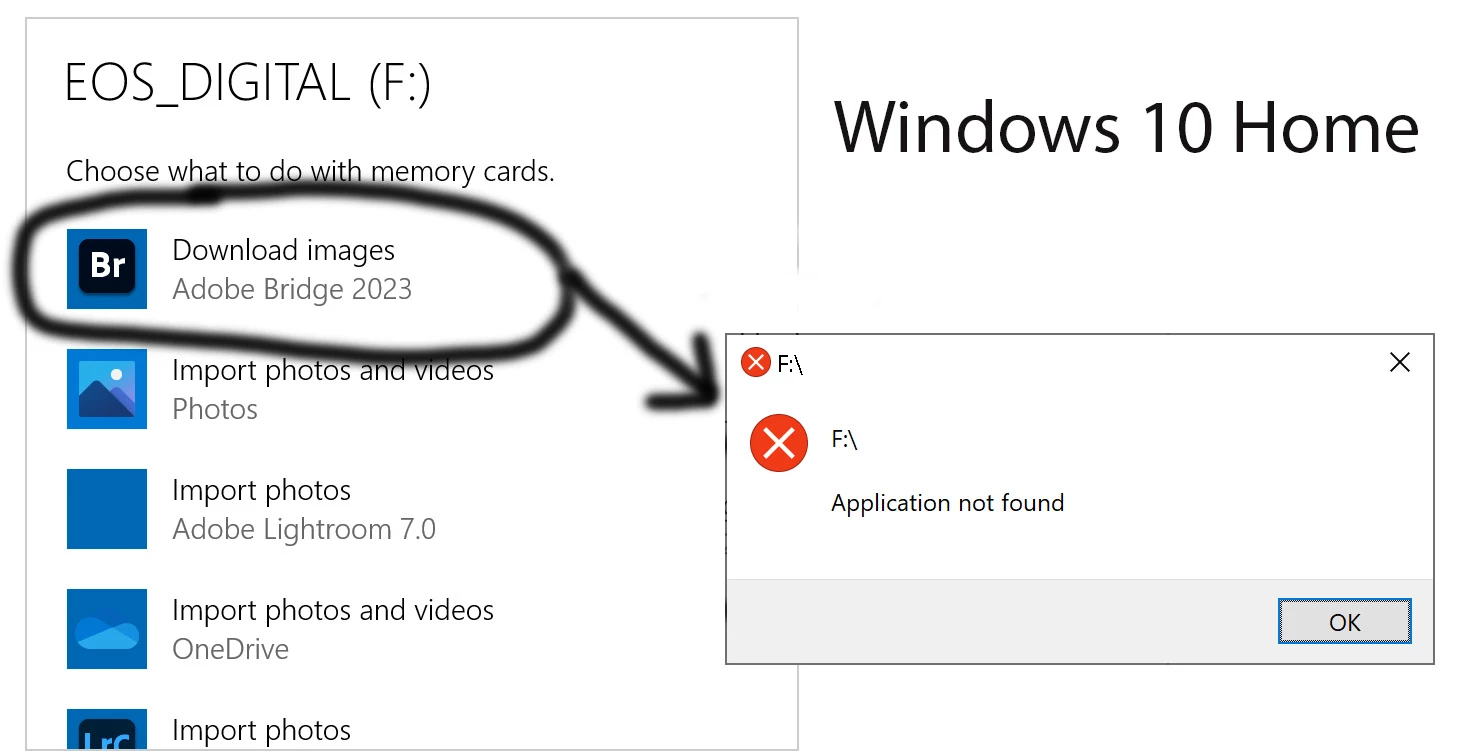

This topic has been closed for replies.
Correct answer Rahul Saraogi

Hi,


The mentioned issue is fixed in the latest patch release #13.0.1.583. Please install and confirm if that fixes the issue.
You can refer to the issues fixed in the patch at the following link https://helpx.adobe.com/bridge/kb/fixed-issues.html


Thanks,
Bridge Team

3 replies

Participating Frequently
December 6, 2022
I also loaded the "downgrade" for Bridge2023, and now have several hundred
photos locked in a program that will not open. I tried uninstalling and
reinstalling and got the same crap. I don't understand why Adobe would
take a program that was useful and reliable and turn it into a piece of
s*** that is now totally worthless. Since Adobe shows no sign of
attempting to correct the disaster the have created, I would appreciate any
suggestions for correcting this FUBAR.
Legend
December 6, 2022

Please post a new thread, unless your problem is with the Photo Downloader.

Rahul Saraogi
Rahul SaraogiCorrect answer
Participating Frequently
November 24, 2022

Hi,


The mentioned issue is fixed in the latest patch release #13.0.1.583. Please install and confirm if that fixes the issue.
You can refer to the issues fixed in the patch at the following link https://helpx.adobe.com/bridge/kb/fixed-issues.html


Thanks,
Bridge Team

Participating Frequently
November 24, 2022

Thank you so much.  I confirmed that this problem has been fixed! 

Rahul Saraogi
Participating Frequently
November 23, 2022

Hello,

Thank you for reaching out to us. The team is currently investigating the issue.


Thanks,

Bridge Team