Inspiring
March 24, 2020
Answered

Re: blurry interface bridge cs6 perpetual license

  • March 24, 2020
  • 1 reply
  • 315 views

My Bridge has a very blurry interface, and I'm on the newest posible versions of all apps.

I think I have tried all combinations in Preferences->Interface


    This topic has been closed for replies.
    Correct answer luchau

    Hello Gary

    Thanks for replying! I have Bridge 10.0.3 on a laptop running Windows 10 Pro v.1809. All my other Adobe apps are also the latest versions.

    Working from home due to Covid-19 my setup is now with 2 screens both are 1920*1080 pixels, the built-in screen is 60 Hz and the extra screen is 59 Hz.

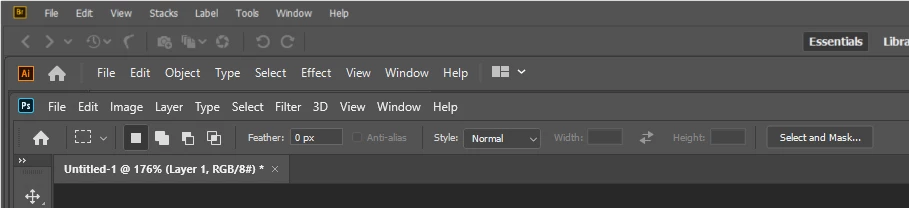
    Bridge is only blurry on the extra screen, and all other apps are clear on both screens (as shown in the image i posted earlier).

    ...

    And just as I was writing this, I tried redefining the extra screen as the primary screen, and after restarting Bridge, it stays sharp on both screens. Windows apparently has a feature to fix this issue, but only for the primary screen.

    1 reply

    gary_sc
    Community Expert
    Community Expert
    March 24, 2020

    Hi Lauger,


    Please be aware that the "correct answer" above was written 4 and a half years ago. That information was valid with the products that Adobe was selling at the time and valid to the computer OSs at the time. Unless your computer OS is also about 4 years old, that information is no longer valid.


    What is your computer OS (what release)?

    What version of PS, Bridge, and AI are you using (and what release)?


    Thanks!

    luchauAuthorCorrect answer
    Inspiring
    March 25, 2020

    Hello Gary

    Thanks for replying! I have Bridge 10.0.3 on a laptop running Windows 10 Pro v.1809. All my other Adobe apps are also the latest versions.

    Working from home due to Covid-19 my setup is now with 2 screens both are 1920*1080 pixels, the built-in screen is 60 Hz and the extra screen is 59 Hz.

    Bridge is only blurry on the extra screen, and all other apps are clear on both screens (as shown in the image i posted earlier).

    ...

    And just as I was writing this, I tried redefining the extra screen as the primary screen, and after restarting Bridge, it stays sharp on both screens. Windows apparently has a feature to fix this issue, but only for the primary screen.

    gary_sc
    Community Expert
    Community Expert
    March 25, 2020

    Hi Lauger,,


    VERY interesting. 


    Good catch and good experiment. As a Mac user with only one screen, I'd never have been able to catch this.


    Congrats!
