Known Participant
May 18, 2021
Answered

Reading keywords from MacOS photos-exported images

  • May 18, 2021
  • 1 reply
  • 301 views

Not sure why I'm having trouble with this. Working with a client folder of jpg files exported from Photos/iPhoto awhile ago, where keywords and/or descriptions had been added, and included on export. Searching with Bridge for known and expected keywords yields no results. I understand, perhaps incorrectly, that Apple uses IPTC standards, so I thought the search would find them. Am I overlooking something obvious?

Thanks.
This topic has been closed for replies.
Correct answer gregreser

It's possible Bridge has not indexed the metadata in that folder, but first you should see if the keywords are in IPTC.

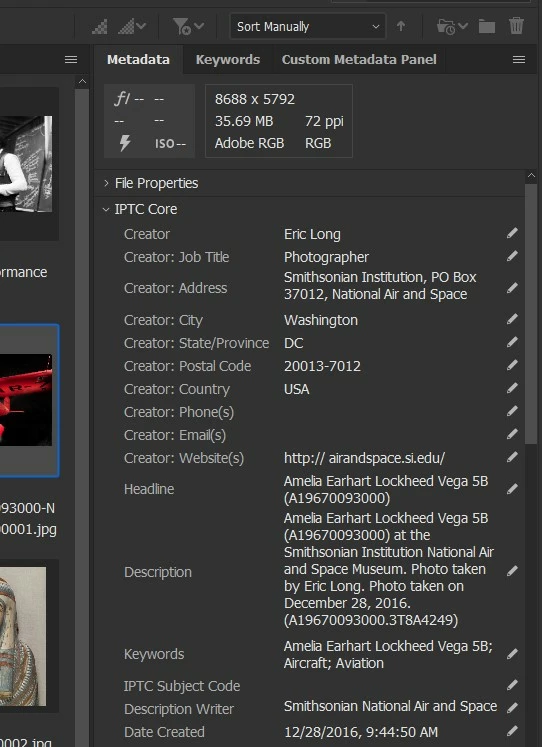
Look in the metadata panel for the IPTC Core sections. If you don't any metdata there, then it's not in the IPTC XMP record.


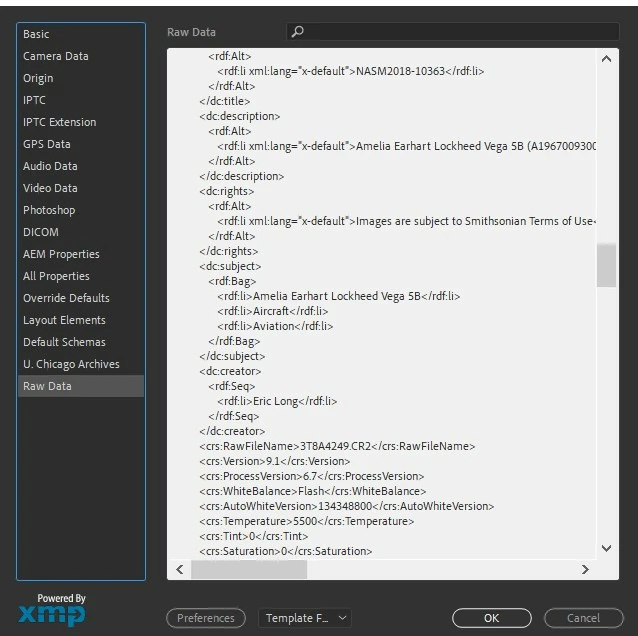
You can also look at the actual XMP metadata record by going to File Info > Raw Data.

Look for <dc:subject>

1 reply

gregreser
gregreserCorrect answer
Legend
May 18, 2021

It's possible Bridge has not indexed the metadata in that folder, but first you should see if the keywords are in IPTC.

Look in the metadata panel for the IPTC Core sections. If you don't any metdata there, then it's not in the IPTC XMP record.


You can also look at the actual XMP metadata record by going to File Info > Raw Data.

Look for <dc:subject>