
koovakk
Participant
April 7, 2018
Answered

recent issue in bridge

  • April 7, 2018
  • 2 replies
  • 527 views

Got a question...  This issue happens in my CS6 and my CC Photoshop / Bridge. On certain times when I download raw files and then  go to bridge, instead of seeing a small version of the photos for that entire date, all the raw photos will only show the raw icon (not sure what to call it). When I click on any of them, it says camera raw cannot open this file. But for most of the other shooting dates, my raw photos can be seen and they open up just fine in ACR. Please see my scan below to understand what I'm seeing when this issue shows up.  This problem just started about a week ago. What is happening to cause this issue and how do I fix it ?  Thanks.
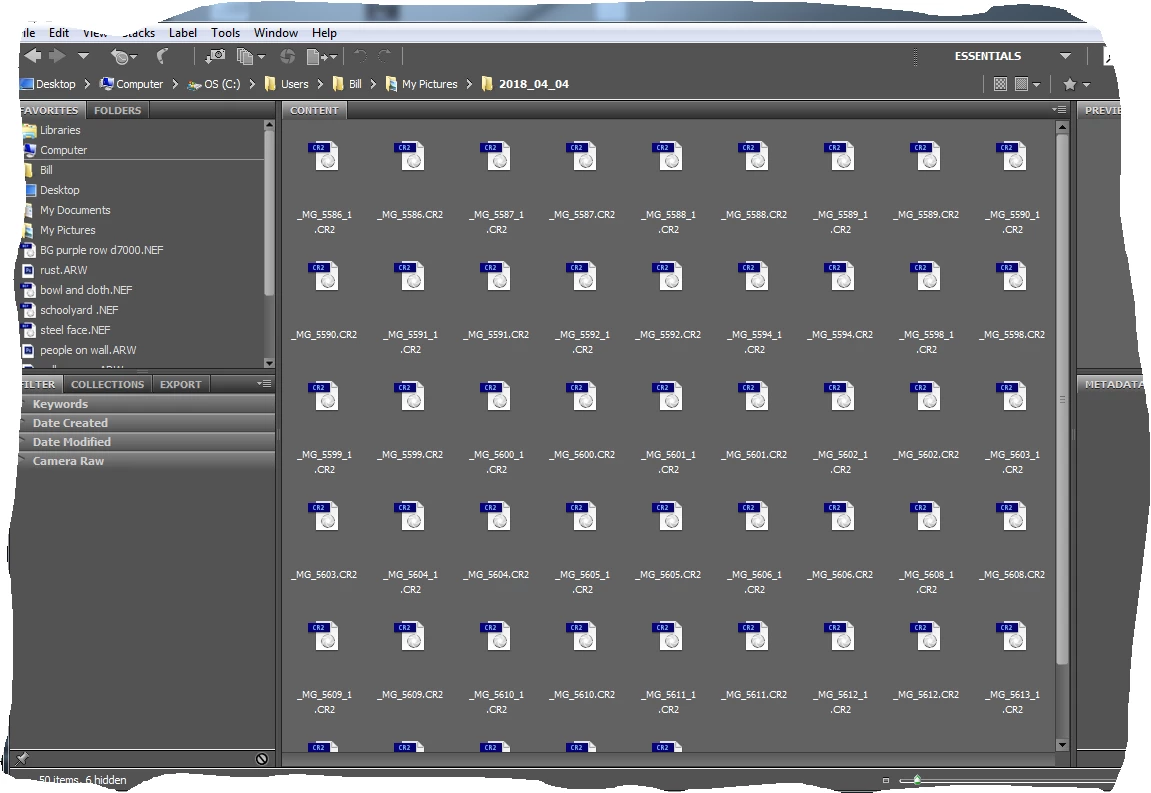
    This topic has been closed for replies.
    Correct answer Abhishek.Seth

    Hi koovakk,

    can you please purge cache for the set of files that are causing issue.

    Also you can upgrade to the latest version of Adobe Bridge CC 2018

    https://creative.adobe.com/products/download/bridge

    Regards,

    Abhishek Seth.

    2 replies

    PECourtejoie
    Community Expert
    Community Expert
    April 17, 2018

    Hello, which camera produced the raw files?

    Did you update its firmware before it happened?

    Is Camera Raw up to date?

    Silkrooster
    Legend
    April 7, 2018

    Moved to the bridge forum.

    Abhishek.SethCorrect answer
    Adobe Employee
    April 10, 2018

    Hi koovakk,

    can you please purge cache for the set of files that are causing issue.

    Also you can upgrade to the latest version of Adobe Bridge CC 2018

    https://creative.adobe.com/products/download/bridge

    Regards,

    Abhishek Seth.

    jbm007
    Community Expert
    Community Expert
    April 11, 2018

    Also select "export cache to folders" when ever possible.