
Participating Frequently
May 13, 2019
Answered

Remove part of filename

  • May 13, 2019
  • 1 reply
  • 675 views

Hi there,

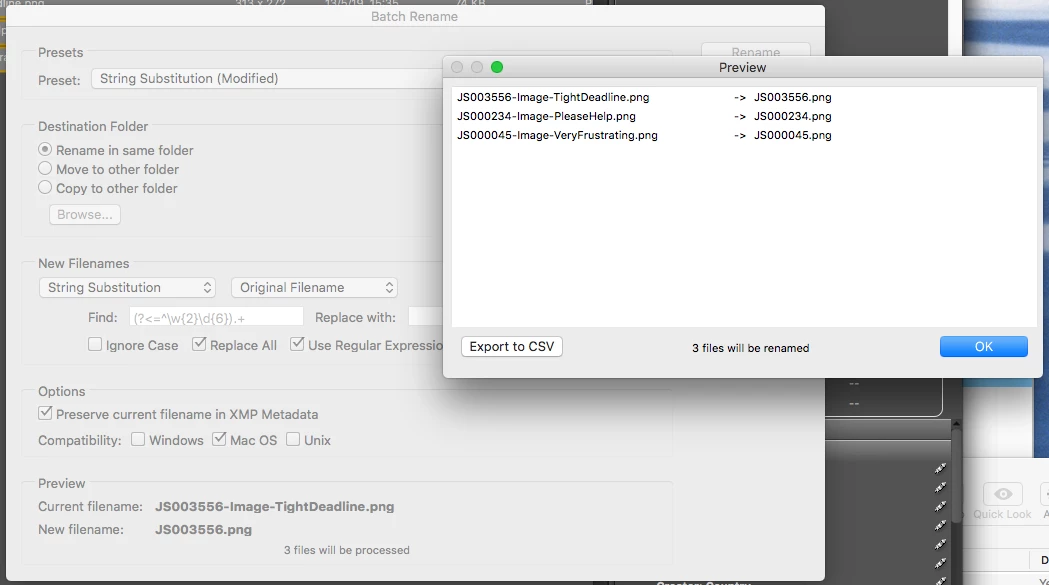
I am hoping that someone can please help me remove part of a filename using string substitutions. I have hundreds of files that all have a unique number and unique description. The numbers are all 6 digits that have 2 consistent letters in front and have a "-" after. I wish to remove everything after the "-" so I am just left with 8 characters (the 2 letters followed by the 6 numbers). For example -

I would like to turn:

JS000045-Image-VeryFrustrating.jpg

JS003556-Image-TightDeadline.jpg

JS000234-Image-PleaseHelp.jpg

Into:

JS000045.jpg

JS003556.jpg

JS000234.jpg

Thanks in advance!
This topic has been closed for replies.
Correct answer Stephen Marsh

For the find, there are many equivalent variations on the theme:

(^.+?)(?:-.+)
(^\w{2}\d{6})(.+)

For the replace:

$1

Or perhaps:

(?<=^\w{2}\d{6}).+

With the replace blank

1 reply

Stephen Marsh
Community Expert
Stephen MarshCommunity ExpertCorrect answer
Community Expert
May 14, 2019

For the find, there are many equivalent variations on the theme:

(^.+?)(?:-.+)
(^\w{2}\d{6})(.+)

For the replace:

$1

Or perhaps:

(?<=^\w{2}\d{6}).+

With the replace blank

GemNAuthor
Participating Frequently
May 14, 2019

This is amazing, thank you SO MUCH. (?:-.+) worked perfectly with "replace with" left blank.

trashcaneron
Inspiring
August 3, 2022

same here awesome thanks