heiron3
Participating Frequently
May 12, 2017
Answered

Rename files with Bridge

  • May 12, 2017
  • 1 reply
  • 1996 views

Hi,

I'd like to rename new photos on the harddisk.

I prefer the serial number (01, 02, 03...) and then the date the picture was taken eg 2017-05-12.

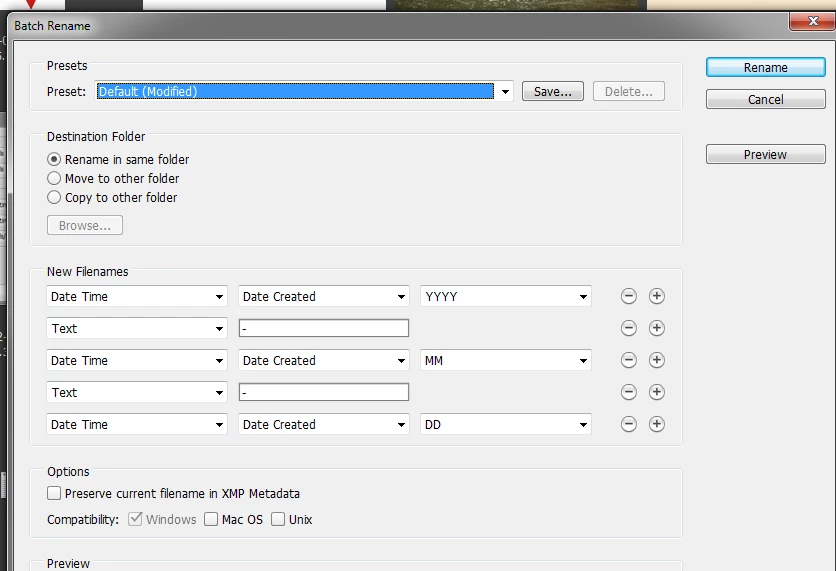
So I need a form like yyyy-mm-dd, but in Bridge I  only can chose yyyymmdd.

I also can't rename the files with Lightroom,

because when importing them I only add them to the catalogue and don't copy them

So what can I do?

Thanks.

Kind Regards

Ronald

    This topic has been closed for replies.
    Correct answer Ronald Keller

    Hi Ronald (nice name)

    Simply split it in several items

    1 reply

    Ronald KellerCorrect answer
    Legend
    May 12, 2017

    Hi Ronald (nice name)

    Simply split it in several items

    Stephen Marsh
    Community Expert
    Community Expert
    May 13, 2017

    Heiron3/Ronald – the key is to use the + plus symbol on the right hand side of the window to add additional filename option fields.

    Note: You may wish to tick the “preserve current filename in XMP metadata” checkbox, just in case you have to revert to the original filenames in the future.

    Agreed Ronald Keller, in their wisdom, Adobe do offer split options for YYYY, MM, DD… however Lightroom also offers split options for HH, MM, SS – while Bridge does not, only HHMMSS, HHMM or milliseconds are offered in Bridge.

    If one does wish to add a delimiter character such as a hyphen, underscore or period to the HH-MM-SS value, one has to use the “regular expression” renaming feature, such as:

    Prepression: Bridge vs. Lightroom Batch Rename Comparison

    heiron3
    heiron3Author
    Participating Frequently
    May 13, 2017

    Hey buddies,

    thank you very much for helping.

    It's as simple as that.

    Best wishes

    Roanld