Participant
July 11, 2019
Answered

Renamer using string

  • July 11, 2019
  • 1 reply
  • 786 views

RS132695_72419-1.jpg

RS12691_372369-1.jpg

RS12693_72379-1.jpg

RS12694_72384-1.jpg

RS12696_724139-2.jpg

RS12697_72472-1.jpg

RS12698_72475-1.jpg

RS122692_72378-1.jpg

As I mentioned above I have different files, need to change as below(need to remove RS and from _/d{5-6}-/d) )

12691

12693

12694

12696

12697

12698

122692

132695

the extension should not be added, I need the file as Unix format. Could anyone help me with this?  Please
This topic has been closed for replies.
Correct answer Stephen Marsh

Hah, I was so focused on the regex that I missed the bit about the filename extension not being desired!

Yes, Adobe have tried to make batch rename foolproof so that one can't mess up files by unintentionally removing the filename extension... However using a 2 step rename workflow, it is possible to achieve the OP's desired result.

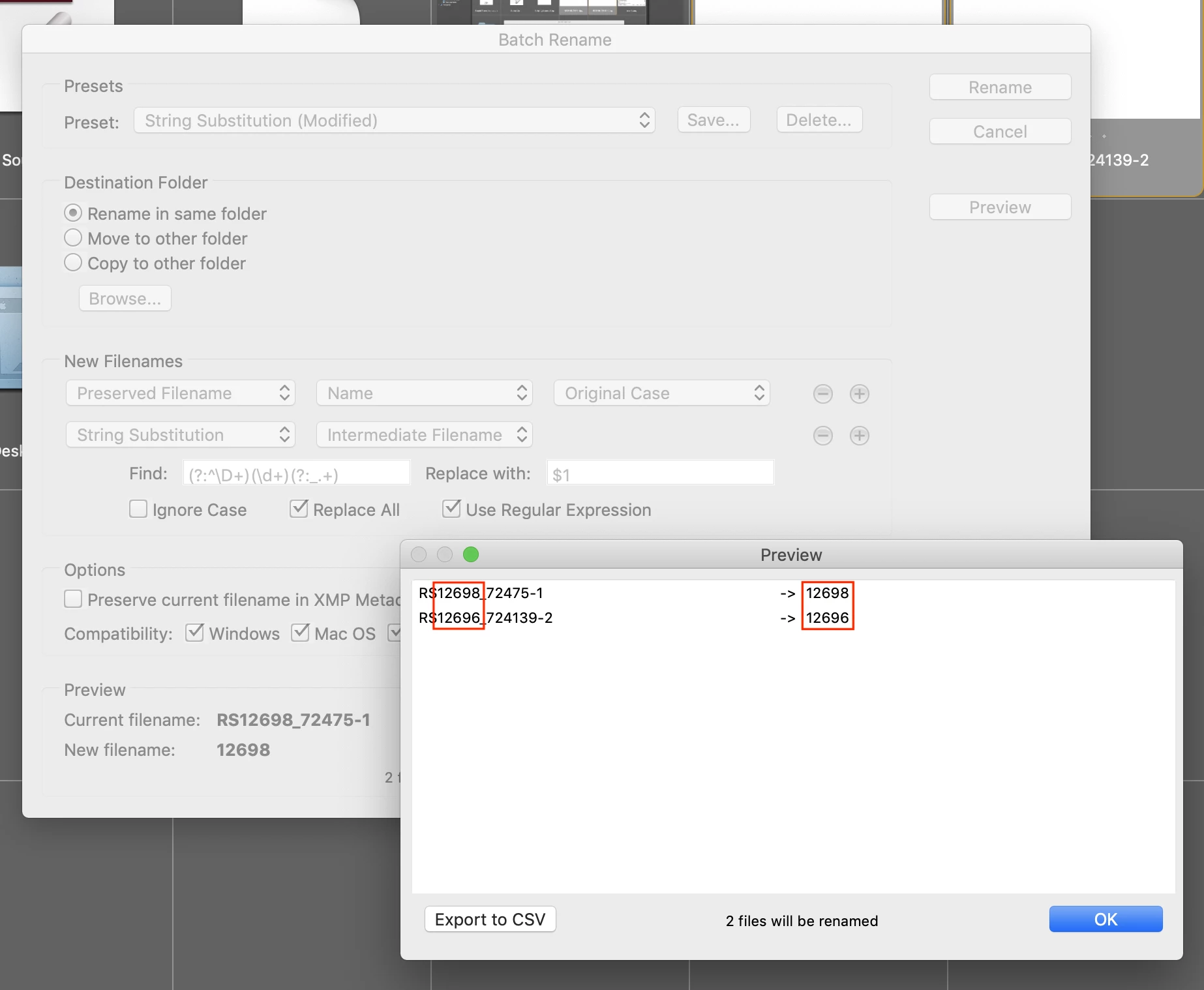
Step 1:

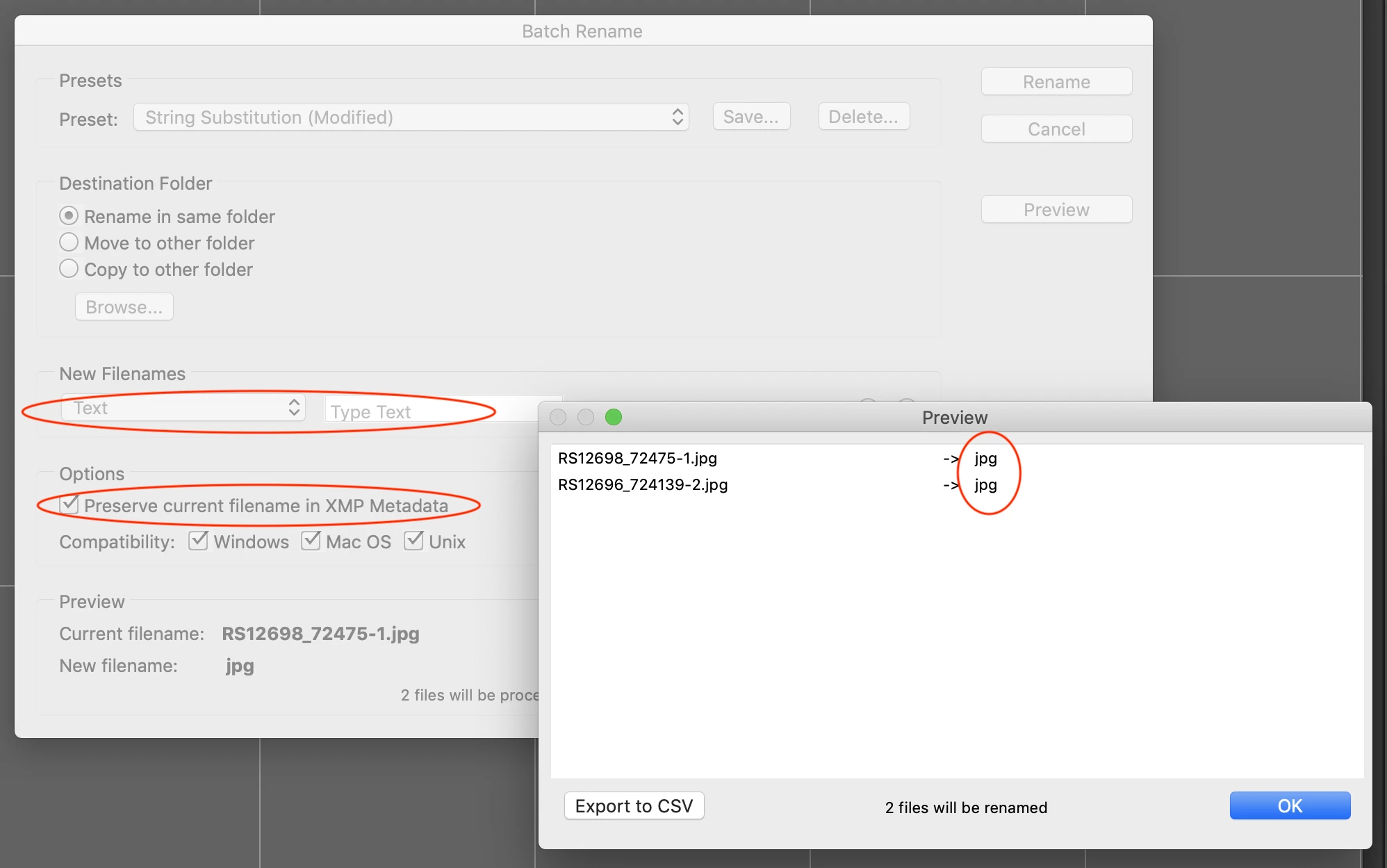
As this results in duplicates, Bridge returns the following rename result:

jpg

jpg (1)

Step 2:

1 reply

Stephen Marsh
Community Expert
Community Expert
July 11, 2019

Here are variations on the same method for the search field (all are equivalent using groups+capture group, some are more flexible than others):

(?:^\D+)(\d+)(?:_.+)(?:\.[^\.]+$)
(?:^\D+)(\d{5,6})(?:_.+)(?:\.[^\.]+$)

(?:^\D+)(\d+)(?:_.+)

(?:^[^0-9]+)(\d+)(_.+)

(?:^[a-zA-Z]+)(\d+)(?:_.+)

(?:^\D{2})(\d+)(?:_.+)

The replacement field would be:

$1


SuperMerlin
Inspiring
July 12, 2019

Batch rename will keep the extension so a script would be required, I.E.

#target bridge  

   if( BridgeTalk.appName == "bridge" ) { 

rnFiles = MenuElement.create("command", "Rename Selected Files", "at the end of Tools");

}

rnFiles.onSelect  = function () {  

var thumbs = app.document.selections;

var count = app.document.selectionsLength;

for(var z =0;z<count;z++){

var Name = decodeURI(thumbs.spec.name).match(/^([a-zA-Z]+)(\d+)/)[2];

if(Name != null) thumbs.spec.rename(Name);

    }

};

Stephen Marsh
Community Expert
Stephen MarshCommunity ExpertCorrect answer
Community Expert
July 12, 2019

Hah, I was so focused on the regex that I missed the bit about the filename extension not being desired!

Yes, Adobe have tried to make batch rename foolproof so that one can't mess up files by unintentionally removing the filename extension... However using a 2 step rename workflow, it is possible to achieve the OP's desired result.

Step 1:

As this results in duplicates, Bridge returns the following rename result:

jpg

jpg (1)

Step 2: