kevinu
Participant
November 8, 2017
Answered

Replace last (4) characters in a filename

  • November 8, 2017
  • 2 replies
  • 7850 views

Using the batch rename feature in Bridge, is there a way to replace a specific amount of characters before an extension (.png). I know there's a way to replace first 4 characters with ^.{4} But, I'm not able to figure out how to do this towards the end of file. Is this possible?

    This topic has been closed for replies.
    Correct answer Stephen Marsh

    A little bit late to the party…

    I know there's a way to replace first 4 characters with ^.{4} But, I'm not able to figure out how to do this towards the end of file. Is this possible?

    What you are looking for is the $ dollar symbol, which will base the regex from the end of the string, rather than the start of the string which is what the ^ caret symbol is for… However, it is of course not that easy!

    Simply using .{4}$ will chop off the . period and three filename extensions, so we can’t use that:

    filename1234.jpg = filename1234

    anothername-abc.tiff = anothername-abc.

    Notice that on a 4 character extension, the dot is left, so we would need a more flexible approach, such as \..{1,} – however that does not solve the fundamental issue with the regex. So a different approach is required. The great thing about regular expressions is that there are many valid alternatives that can achieve the same result. Some are concise or verbose, some are more robust than others and may or may not “fail” with unexpected minor variations to the pattern.

    Another viable regex alternative to the method outlined by SuperMerlin is:

    .{4}(\..{1,})$
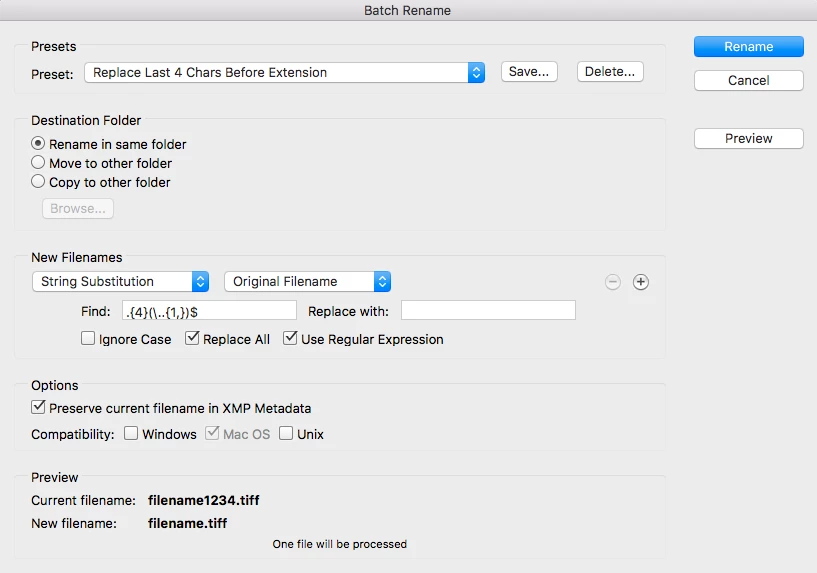
    This valid but “less than ideal” regex works in Adobe Bridge as it has special handling of filename extensions, even though the regex is removing the last 4 characters and the filename extension, Bridge is smart enough to retain the filename extension even though it was explicitly removed by the regex. This would not work the same way in a text editor for example, as the extension would be removed.

    A more robust and technically better approach would gracefully handle the filename extension (even though Bridge has a safety net with extensions)…

    Find: (.+)(.{4})(\..{1,})

    Replace: $1$3

    The $ at the end of the regex is now superfluous in this new improved regex – as the capture groups are specifying explicit positions/patterns:
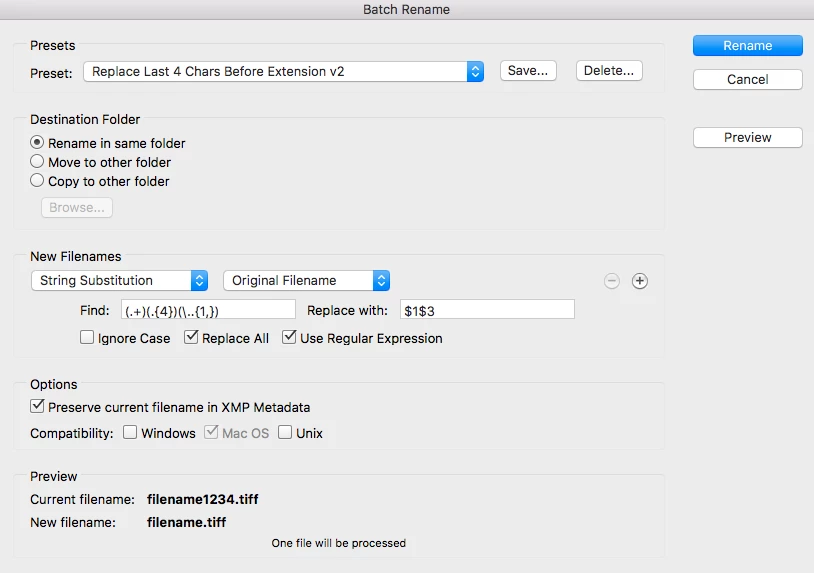
    Which is a slightly different way of expressing the same regex as originally proposed by SuperMerlin, so I have come full circle with this second “refined” regex example! :]

    2 replies

    Stephen Marsh
    Community Expert
    Stephen MarshCommunity ExpertCorrect answer
    Community Expert
    November 9, 2017

    A little bit late to the party…

    I know there's a way to replace first 4 characters with ^.{4} But, I'm not able to figure out how to do this towards the end of file. Is this possible?

    What you are looking for is the $ dollar symbol, which will base the regex from the end of the string, rather than the start of the string which is what the ^ caret symbol is for… However, it is of course not that easy!

    Simply using .{4}$ will chop off the . period and three filename extensions, so we can’t use that:

    filename1234.jpg = filename1234

    anothername-abc.tiff = anothername-abc.

    Notice that on a 4 character extension, the dot is left, so we would need a more flexible approach, such as \..{1,} – however that does not solve the fundamental issue with the regex. So a different approach is required. The great thing about regular expressions is that there are many valid alternatives that can achieve the same result. Some are concise or verbose, some are more robust than others and may or may not “fail” with unexpected minor variations to the pattern.

    Another viable regex alternative to the method outlined by SuperMerlin is:

    .{4}(\..{1,})$

    This valid but “less than ideal” regex works in Adobe Bridge as it has special handling of filename extensions, even though the regex is removing the last 4 characters and the filename extension, Bridge is smart enough to retain the filename extension even though it was explicitly removed by the regex. This would not work the same way in a text editor for example, as the extension would be removed.

    A more robust and technically better approach would gracefully handle the filename extension (even though Bridge has a safety net with extensions)…

    Find: (.+)(.{4})(\..{1,})

    Replace: $1$3

    The $ at the end of the regex is now superfluous in this new improved regex – as the capture groups are specifying explicit positions/patterns:

    Which is a slightly different way of expressing the same regex as originally proposed by SuperMerlin, so I have come full circle with this second “refined” regex example! :]

    kevinu
    kevinuAuthor
    Participant
    November 10, 2017

    Perfect! Thank you so much for this detailed description. These scripts make more sense and are more manageable.

    My favorite is .{4}(\..{1,})$

    Stephen Marsh
    Community Expert
    Community Expert
    November 10, 2017

    Not a problem, other valid variations in Bridge also include:

    .{4}\..+$

    .{4}(\..+)$

    .{4}(?:\..+)$

    You may find the following regex testers helpful in working out what is going on:

    www.regexr.com

    www.regex101.com

    SuperMerlin
    Inspiring
    November 9, 2017