klaw5546
Participant
August 15, 2017
Answered

Resetting my photos to its original settings?

  • August 15, 2017
  • 2 replies
  • 312 views

I did something in Bridge last week I don't know how to fix?

When I load my raw files from my Nikon D610, all the photos I load into bridge start to automatically change all the settings to color grade my photos. YIKES! I can't figure out how I did this and want to have files load in bridge just like the settings were in camera...

need some help ASAP,,,,,thanks

    This topic has been closed for replies.
    Correct answer Jeff Arola

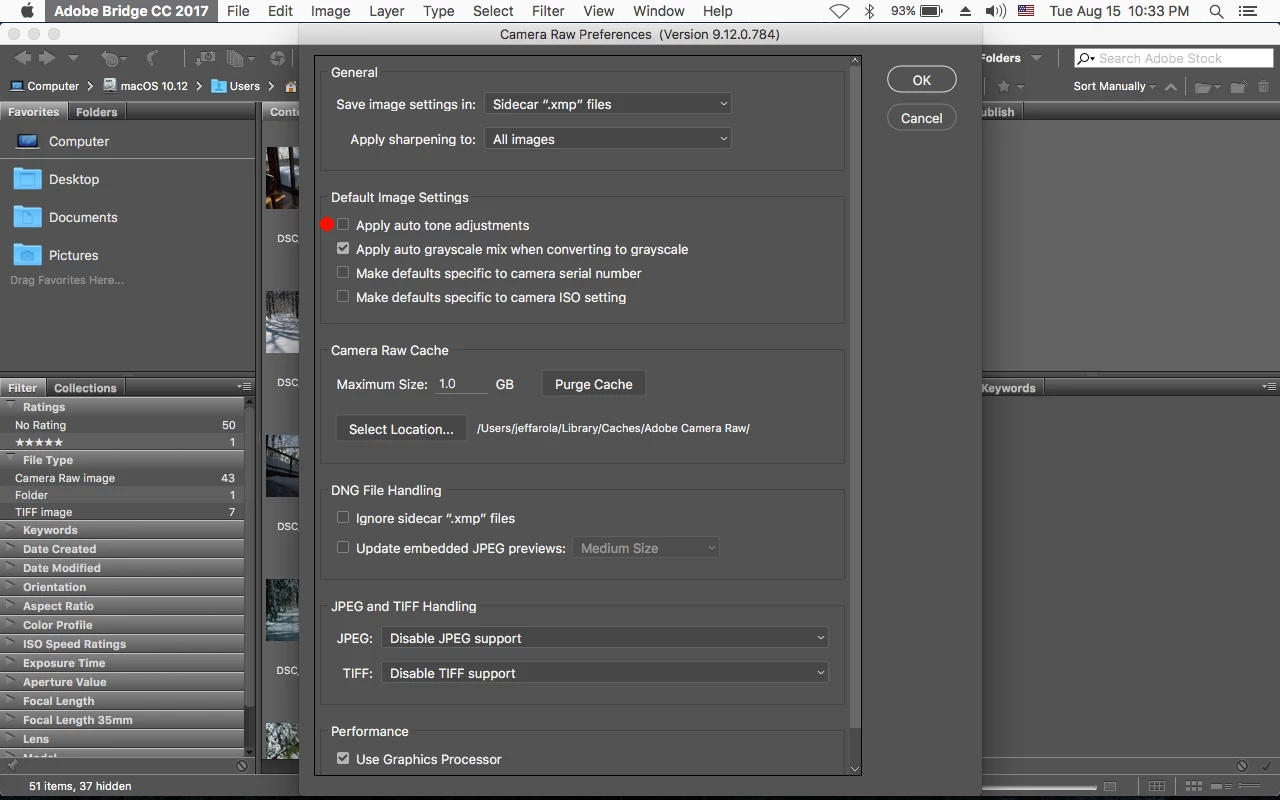
    Check in the Camera Raw preferences that you don't have Apply Auto Tone Adjustments checked.

    Edit>Preferences>Camera Raw (windows) or Adobe Bridge>Preferences>Camera Raw (mac).

    2 replies

    Stephen Marsh
    Community Expert
    Community Expert
    August 16, 2017

    Another possibility is that you may need to clear or change the develop settings previously applied to these images:

    Jeff Arola
    Community Expert
    Jeff ArolaCommunity ExpertCorrect answer
    Community Expert
    August 16, 2017

    Check in the Camera Raw preferences that you don't have Apply Auto Tone Adjustments checked.

    Edit>Preferences>Camera Raw (windows) or Adobe Bridge>Preferences>Camera Raw (mac).