
Hester Dijkstra
Known Participant
November 4, 2018
Question

Scroll bar in Bridge not visible enough

  • November 4, 2018
  • 1 reply
  • 529 views

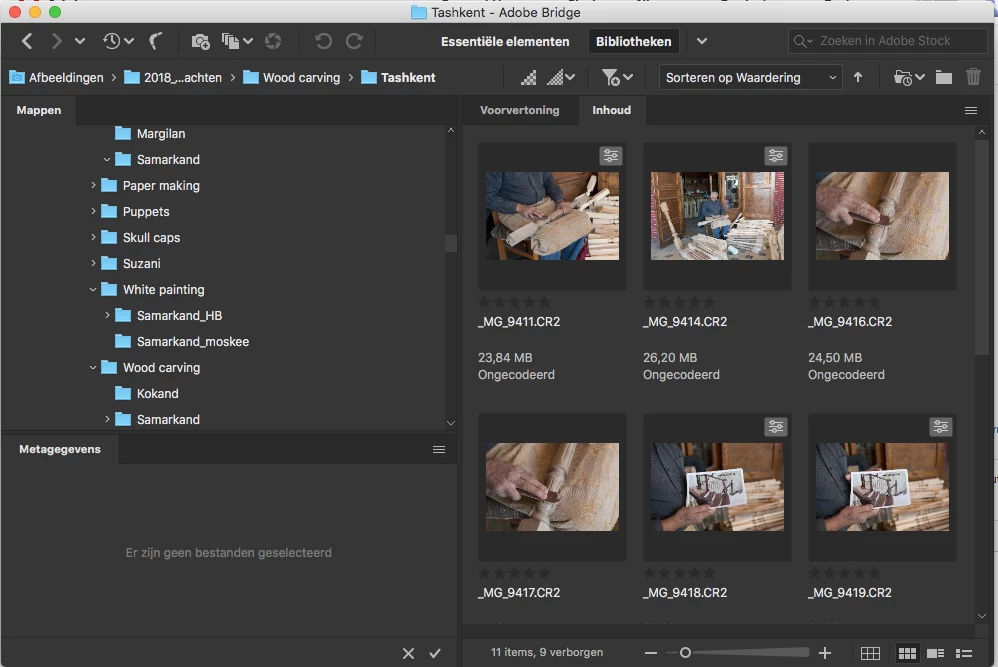
In Bridge CC 2019 the scroll bar is not visible enough. There is no contrast. I cannot find a preference to change it.

Is there a solution?
This topic has been closed for replies.

1 reply

Sahil.Chawla
Adobe Employee
Adobe Employee
November 6, 2018

Hi Hesterd,

Sorry to hear about the scroll bar is not available, could you please try resetting the preferences of Bridge and let us know if it helps?

Troubleshoot Adobe Bridge for freezes and performance issues

Regards,
Sahil

Hester Dijkstra
Known Participant
November 7, 2018

Hi Sahil,

Thanks for answering. The scroll bar is available, but not visible enough. It is almost as dark as the background. The contrast between background and scrollbar is too low.

If I put my computer screen very bright, I can see the scrollbar better, but I prefer to work with less brightness because that is the brightness that correspond with the printed photo's.

For me it would be working when I can change the brightness or colour (lighter grey) of the scrollbar in Bridge (in preferences).

Kind regards,

Hester
